
When it comes to copying and transferring files on Windows, the built-in explorer often feels slow and inefficient, especially when dealing with large data. This is where FastCopy Pro 5.10.0 shines. Known as one of the fastest file copy utilities available, it offers unmatched speed, reliability, and flexibility, making it the ultimate solution for power users, IT administrators, and anyone who regularly moves large amounts of data and buy.
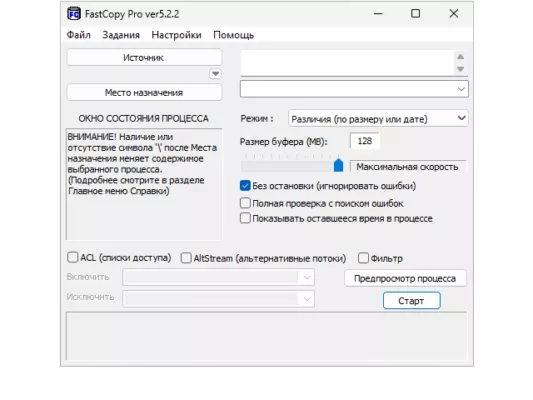
Why Choose FastCopy Pro?
Unlike standard file copy tools, FastCopy Pro is designed for performance and control. It bypasses some of the limitations of Windows file management and ensures that every copy operation is done at maximum possible speed.
Key Advantages:
High-speed transfers: Optimized to achieve the best throughput for HDDs and SSDs.
Support for large files: Easily handle files larger than 4GB without issues.
Multiple copy modes: Choose between different transfer methods such as Diff HDD, Same HDD, Sync, Overwrite.
Advanced filtering: Include or exclude specific files by extension or path.
Accurate verification: After copying, the software checks data integrity to ensure no corruption.
What’s New in FastCopy Pro 5.10.0
The latest version introduces improvements for performance and stability:
Enhanced multi-threaded file copying for modern multi-core CPUs.
Improved interface for easier navigation.
Bug fixes for smoother operations on Windows 10 and 11.
Better support for NVMe SSDs and high-speed storage devices.
How to Use FastCopy Pro 5.10.0
Using FastCopy is straightforward:
Select the Source Folder.
Choose the Destination Folder.
Pick your copy method (Overwrite, Sync, etc.).
Apply filters if needed (file type, path).
Start the copy process and monitor the progress in real-time.
With its detailed logs and reporting, you’ll always know the status of your file transfers.
Who Should Use It?
Home users who want faster copying of movies, games, and backups.
IT professionals who manage servers and large amounts of data.
Developers who frequently move large project files.
Photographers & videographers who work with massive raw files.
System Requirements
Operating System: Windows 7, 8, 10, 11 (32/64-bit).
Storage: Works best with HDDs, SSDs, and NVMe drives.
RAM: 2GB minimum, more recommended for large transfers.
Final Verdict
FastCopy Pro 5.10.0 is not just another file copy tool—it’s the fastest and most reliable solution for Windows users. Whether you’re transferring large backups, syncing project folders, or managing files across drives, FastCopy ensures maximum performance with zero data loss.
If speed, efficiency, and reliability matter to you, FastCopy Pro is the best file copy utility you can get.
✔ Tested: This software was tested on Windows 10 & Windows 11 and works smoothly without issues.
Frequently Asked Questions
- Is this software free?
Yes, it can be downloaded and used for free. - Does it support Windows 11?
Yes, it works perfectly on Windows 10 and 11. - Is it safe to use?
Yes, the software was scanned and tested before publishing.
Last updated: January 2026