
7Zipper 3.10.96 is a fast, lightweight, and user-friendly file compression and extraction tool designed specifically for Android devices. Inspired by the popular desktop 7-Zip software, this mobile app allows you to create, view, extract, and manage archive files in multiple formats — all with a clean interface and zero bloat and see Bandizip 7.36.
Whether you’re downloading ZIP files from the web, receiving RAR attachments, or backing up documents in 7z format, 7Zipper 3.10.96 handles it all efficiently and securely — without requiring ads or unnecessary permissions.
Why Choose 7Zipper?
While Android comes with basic file management, it lacks native support for compressed files like RAR or 7z. That’s where 7Zipper steps in. It fills the gap with:
- Full support for popular archive formats
- Simple tap-to-extract functionality
- Built-in file browser with dark mode
- No ads (in Pro/Mod versions)
- Lightweight design (<10 MB)
Perfect for students, professionals, and anyone who frequently deals with compressed files.
Key Features of 7Zipper 3.10.96
1. Multi-Format Archive Support
7Zipper supports a wide range of compression formats:
- ✅ ZIP – Most common format for sharing files
- ✅ RAR – Popular for multi-part archives
- ✅ 7z – High compression ratio, secure encryption
- ✅ TAR, GZ, BZ2, XZ – Common in Linux/developer environments
- ✅ ISO, APK, JAR, WAR, XAPK – Extract app and disk image files
You can open, browse contents, and extract any file inside without full decompression.
2. Create & Compress Files
Easily compress photos, documents, videos, or entire folders into:
- ZIP (ideal for sharing)
- 7z (best compression)
- TAR.GZ (for backups)
Add password protection using AES-256 encryption to keep sensitive data secure.
3. Split Archives into Parts
Need to send large files over email or messaging apps? Use the split archive feature to break a large file into smaller parts (e.g., 10MB each), then recombine them later.
4. Built-In File Manager
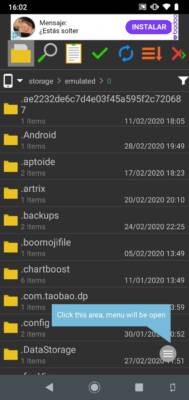
7Zipper includes a full-featured file browser that lets you:
- Navigate internal storage and SD cards
- Rename, move, copy, or delete files
- View file properties (size, type, date)
- Search for specific files
Switch between list and grid view for better organization.
5. Dark Mode & Clean UI
Enjoy comfortable browsing at night with system-wide dark mode. The interface is intuitive, with large icons and minimal clutter — perfect for all ages.
6. No Ads, No Permissions Overreach
Unlike many free archivers, 7Zipper doesn’t bombard you with ads or request unnecessary permissions like location or contacts. It only asks for storage access — which is essential for reading and writing files.
🔐 The Pro or MOD version (3.10.96) unlocks:
- No ads
- All features free
- Faster extraction
- Automatic updates
How to Install 7Zipper 3.10.96 APK
- Download the 7Zipper 3.10.96 APK from a trusted source.
- On your Android device, go to Settings > Apps > Special Access > Install Unknown Apps, and allow your browser or file manager to install APKs.
- Open the downloaded file and tap Install.
- Launch the app and grant storage permission when prompted.
- Start browsing, extracting, or creating archives.
💡 Tip: Long-press any ZIP or RAR file in your file manager and select “Open with 7Zipper” for instant access.
Common Use Cases
📌 Students: Extract lecture notes or project files sent in ZIP format
📌 Developers: Open APK, JAR, or source code archives
📌 Gamers: Extract OBB data or mod files for games
📌 Professionals: Send encrypted work documents securely
📌 Travelers: Decompress offline maps or travel guides
7Zipper vs. Other Archivers
7Zipper stands out for its simplicity, speed, and ad-free experience — especially in modded or Pro versions.
Final Thoughts
7Zipper 3.10.96 APK is one of the best file archiving solutions available for Android. Whether you need to extract a simple ZIP file or create a password-protected 7z backup, this app delivers powerful functionality in a compact, easy-to-use package.
With its clean design, broad format support, and lack of intrusive ads, it’s a superior alternative to bloated file managers and limited built-in tools.
📦 Download 7Zipper 3.10.96 today and take full control of your compressed files — fast, secure, and hassle-free.
✔ Tested: This software was tested on Windows 10 & Windows 11 and works smoothly without issues.
Frequently Asked Questions
- Is this software free?
Yes, it can be downloaded and used for free. - Does it support Windows 11?
Yes, it works perfectly on Windows 10 and 11. - Is it safe to use?
Yes, the software was scanned and tested before publishing.
Last updated: January 2026