ActivePresenter Pro 9.3.0 is a powerful all-in-one screen recording, video editing, and e-learning authoring software developed by Atomi Systems. With its wide range of features, it has become a go-to solution for educators, trainers, marketers, and YouTubers who want to create engaging instructional content, interactive courses, and professional videos and buy.
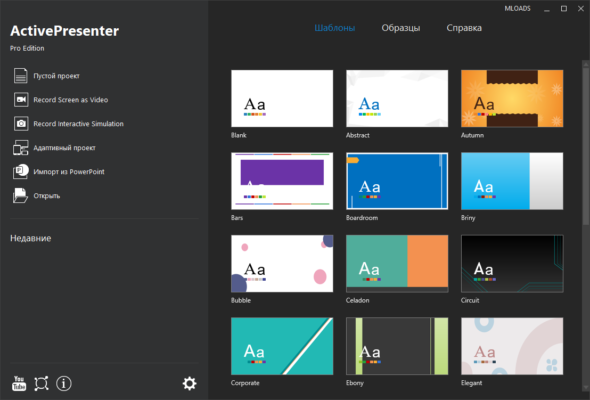
🎯 Key Features of ActivePresenter Pro 9.3.0
🖥️ 1. Screen Recording with High Performance
ActivePresenter allows users to record the entire screen, specific applications, or custom regions. It supports full-motion recording, which means everything that happens on screen is captured with high accuracy and performance.
🎙️ 2. Audio and Webcam Support
Users can add voiceovers using microphones or include webcam footage during the recording. This is especially useful for tutorials and presentations that need a personal touch.
✂️ 3. Powerful Video Editing Capabilities
After capturing your screen, you can utilize the built-in video editor that supports:
Cut, trim, and crop clips
Add text annotations and shapes
Insert images, zoom-and-pan effects
Green screen (chroma key)
Transition effects
Audio normalization and noise reduction
📚 4. E-learning Authoring Tools
What sets ActivePresenter apart from other video editors is its strong e-learning support. It allows the creation of:
Quizzes with multiple question types
SCORM/xAPI-compliant packages
Interactive courses with branching scenarios
Responsive content for different devices
💡 5. Smart Capture Technology
The software can automatically capture every mouse click, keystroke, or screen action and convert them into a slide-based tutorial, saving time for software trainers.
🆕 What’s New in Version 9.3.0?
Improved performance for large projects
Enhanced export options to HTML5 and SCORM
Bug fixes related to timeline editing and audio syncing
Updated user interface with customizable themes
Better compatibility with Windows 11
🛠️ Who Should Use ActivePresenter Pro?
ActivePresenter Pro is ideal for:
Teachers and Educators: To create lessons, quizzes, and interactive modules.
Corporate Trainers: For compliance training and onboarding content.
Marketers and YouTubers: For creating promotional and explainer videos.
Software Developers: To build tutorials and demos for apps and tools.
📤 Export Options
The program supports exporting your project to:
MP4, AVI, MKV, and WebM video formats
HTML5 interactive content
PDF, Word, Excel documents
LMS-compliant SCORM/xAPI packages
✅ System Requirements
OS: Windows 7/8/10/11 (64-bit)
CPU: Dual-core 2.0 GHz or faster
RAM: Minimum 4GB (8GB recommended)
Storage: 1GB of free disk space for installation
GPU: Integrated or dedicated GPU for rendering
📝 Conclusion
ActivePresenter Pro 9.3.0 stands out as a versatile and efficient tool that combines screen recording, video editing, and e-learning content creation in one platform. Whether you’re a professional instructor or a beginner looking to create high-quality educational videos, this software can help you produce polished and interactive content with ease.
✔ Tested: This software was tested on Windows 10 & Windows 11 and works smoothly without issues.
Frequently Asked Questions
- Is this software free?
Yes, it can be downloaded and used for free. - Does it support Windows 11?
Yes, it works perfectly on Windows 10 and 11. - Is it safe to use?
Yes, the software was scanned and tested before publishing.
Last updated: مايو 2026
Frequently Asked Questions
- هل هذا البرنامج مجاني؟ نعم، مجاني للاستخدام الشخصي.
- هل يعمل على Windows و Mac و Android؟ نعم، متوافق مع أغلب الأنظمة.
- هل الملفات آمنة؟ نعم، جميع الملفات يتم فحصها قبل النشر.