
MEmu App Player 9.2.6 is a high-performance Android emulator designed for Windows users who want to enjoy Android apps and games on a bigger screen. With advanced optimization, smooth gameplay, and customizable controls, MEmu is perfect for both casual gamers and developers testing mobile applications.
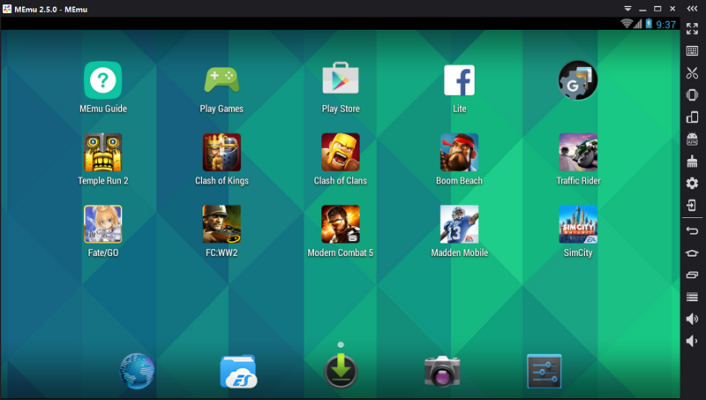
This version delivers improved stability, faster load times, and enhanced compatibility with the latest Android games.
⚡ Key Benefits
Smooth Gameplay – Optimized for high FPS and low latency.
Customizable Controls – Map keyboard, mouse, or gamepad for a better experience.
Multi-Instance Support – Run multiple Android sessions simultaneously.
High Compatibility – Supports thousands of Android apps and games.
Resource Management – Adjust CPU, RAM, and resolution settings for performance balance.
🚀 What’s New in Version 9.2.6
Improved compatibility with newer Android games
Faster startup and reduced loading times
Enhanced multi-instance stability
Minor bug fixes and performance improvements
🔧 Core Features
✅ Multi-Instance Manager
Run several games or apps at once without lag.
✅ Keyboard Mapping
Set up personalized control schemes for any game.
✅ Game Recording
Capture gameplay footage directly within the emulator.
✅ Android Version Options
Switch between Android versions for better compatibility.
✅ Cloud Synchronization
Sync settings and data across devices.
🛠 Technical Details
Software Name: MEmu App Player
Version: 9.2.6
Developer: Microvirt
Category: Android Emulator
Supported OS: Windows 7, 8, 10, 11
Size: ~500MB
License: Free
📥 Installation Guide
Download MEmu App Player 9.2.6 from a trusted source.
Run the installer and follow the on-screen instructions.
Launch MEmu after installation.
Sign in to Google Play or sideload APK files.
Customize settings and start enjoying Android apps on your PC.
🧠 Final Thoughts
MEmu App Player 9.2.6 is one of the best choices for running Android on Windows. With smooth performance, flexible controls, and multi-instance support, it caters to both gaming enthusiasts and productivity users.
If you want to experience Android on a bigger screen with desktop-level performance, MEmu is definitely worth installing.
Developer: info
✔ Tested: This software was tested on Windows 10 & Windows 11 and works smoothly without issues.
Frequently Asked Questions
- Is this software free?
Yes, it can be downloaded and used for free. - Does it support Windows 11?
Yes, it works perfectly on Windows 10 and 11. - Is it safe to use?
Yes, the software was scanned and tested before publishing.
Last updated: January 2026