
In a world where PDF files are used daily for work, study, and personal tasks, having a reliable and fast PDF reader is essential. While many PDF tools are packed with heavy features and slow startup times, NCH PicoPDF Plus 7.03 offers a refreshing alternative: a lightweight, fast, and fully functional PDF solution that opens files instantly and uses minimal system resources and buy.
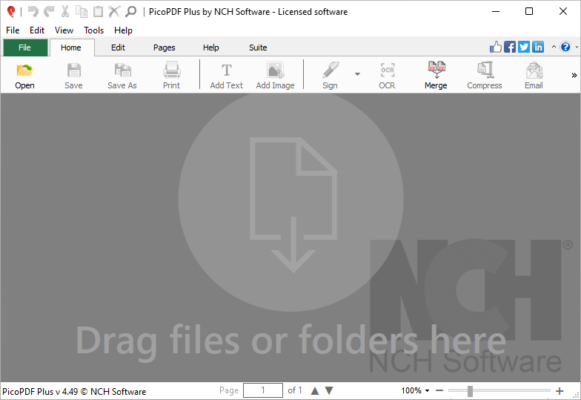
Developed by NCH Software , a trusted name in audio, video, and productivity tools, PicoPDF Plus 7.03 is designed for users who want a no-frills, efficient, and secure way to view, edit, and manage PDFs — without the complexity of large suites like Adobe Acrobat.
Let’s explore what makes PicoPDF Plus 7.03 one of the best lightweight PDF tools for Windows in 2025.
📌 What Is NCH PicoPDF Plus 7.03?
NCH PicoPDF Plus 7.03 is a compact desktop application for Windows that combines a PDF reader, editor, converter, and annotation tool in a single, streamlined package. It installs quickly, launches in seconds, and works smoothly even on older PCs or low-end laptops.
Unlike full-featured PDF editors, PicoPDF focuses on core functionality :
- Viewing PDFs with high clarity
- Adding comments and highlights
- Filling forms
- Signing documents
- Converting PDFs to text
All while maintaining a tiny footprint — the entire app is less than 5 MB in size.
It’s ideal for:
- Reading e-books and manuals
- Annotating reports and articles
- Signing contracts
- Extracting text from simple PDFs
And best of all? It runs offline — your files stay private and secure on your device.
🛠️ Key Features of NCH PicoPDF Plus 7.03
1. 🚀 Ultra-Fast Startup & Performance
One of the fastest PDF readers available — opens large files in seconds with minimal RAM usage.
Perfect for quick viewing without waiting.
2. ✏️ Basic PDF Editing & Annotation
Add:
- Text highlights (yellow, green, etc.)
- Sticky notes and comments
- Underlines, strikeouts, and freehand drawings
- Typewriter text boxes
Great for reviewing documents or leaving feedback.
3. 🖋️ Fill & Sign PDF Forms
Complete interactive forms electronically and add digital signatures using your mouse or touchscreen.
Signatures are embedded as part of the PDF — legally valid and secure.
4. 🔍 Text Selection & Search
Easily select, copy, and search for text within PDFs — useful for research, quotes, or data extraction.
5. 🔄 Convert PDF to Plain Text (.TXT)
Extract readable text from PDF documents and save it as a .txt file — ideal for importing into other apps or summarizing content.
Note: Does not convert to Word or Excel (use NCH PDF Express for that).
6. 🧩 Zoom & Navigation Tools
Smooth zooming, continuous scroll mode, thumbnails pane, and bookmarks support for easy navigation.
7. 🖥️ Standalone Operation – No Dependencies
Runs independently — no need for Adobe Reader, Ghostscript, or .NET framework.
Also doesn’t require an internet connection.
8. 🧼 Clean, Minimal Interface
Simple ribbon-style toolbar with only the tools you need — no clutter or distractions.
9. 💾 Lightweight & Portable
Less than 5 MB in size — can be run from a USB drive for on-the-go use.
Ideal for portable workflows or older machines.
10. 🔐 Secure & Private
No data collection, telemetry, or cloud uploads — your PDFs remain 100% local.
👥 Who Should Use NCH PicoPDF Plus 7.03?
- Students: Read and annotate textbooks or research papers.
- Office Workers: Review reports, sign agreements, and fill forms.
- Home Users: View manuals, bills, and eBooks quickly.
- IT Technicians: Use on client machines without installing heavy software.
- Privacy-Conscious Users: Avoid cloud-based readers that track usage.
🖥️ System Requirements
- Operating System: Windows 10 / 11 / 8.1 / 8 / 7 (32-bit & 64-bit)
- RAM: 512 MB minimum
- Hard Disk Space: 10 MB free space
- No Internet Required
- Administrator Rights: Needed for installation
✅ Fully portable version available.
📈 Why Choose NCH PicoPDF Plus 7.03?
- ✅ Extremely Lightweight & Fast
- ✅ No Ads, No Bloat, No Watermarks
- ✅ Perfect for Quick Viewing & Marking
- ✅ Secure & Offline Operation
- ✅ Ideal for Older PCs and USB Use
- ✅ Affordable Alternative to Heavy PDF Suites
✅ Final Thoughts
NCH PicoPDF Plus 7.03 may not have every advanced feature found in premium PDF editors, but it excels where it matters most: speed, simplicity, and reliability .
If you’re looking for a lean, fast, and trustworthy PDF reader that does the basics exceptionally well — without slowing down your PC — PicoPDF Plus is an excellent choice .
For users who value performance over complexity , NCH PicoPDF Plus 7.03 delivers a clean, efficient, and private PDF experience — one document at a time.
✔ Tested: This software was tested on Windows 10 & Windows 11 and works smoothly without issues.
Frequently Asked Questions
- Is this software free?
Yes, it can be downloaded and used for free. - Does it support Windows 11?
Yes, it works perfectly on Windows 10 and 11. - Is it safe to use?
Yes, the software was scanned and tested before publishing.
Last updated: January 2026