PixPlant 5.0.49 – Create Seamless Textures and 3D Maps from Photos
PixPlant 5.0.49 is a professional texture generation software that allows designers, 3D artists, and game developers to create seamless textures and realistic 3D maps from ordinary photos. It’s one of the most versatile tools for transforming images into high-quality materials ready for use in 3D modeling and rendering applications.
What Is PixPlant?
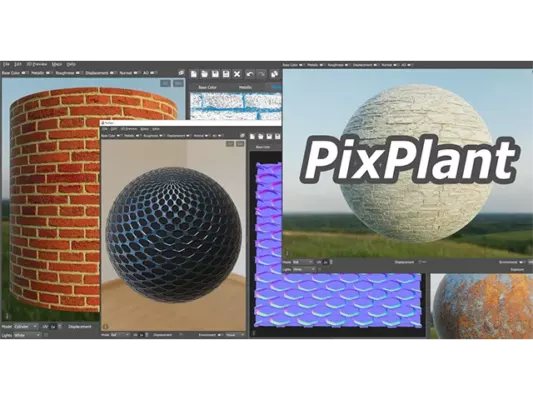
PixPlant is developed to simplify the process of generating seamless textures and 3D material maps. Whether you are working on architectural visualization, game design, or graphic art, PixPlant automatically extracts and produces textures that blend perfectly without visible edges or repetitions.
Key Features
Seamless Texture Creation:
Instantly converts any photo into a seamless, tileable texture with intelligent edge-blending algorithms.3D Map Generation:
Create detailed displacement, normal, ambient occlusion, and specular maps for realistic 3D rendering.Smart Cloning Tools:
Remove unwanted details and improve texture quality with advanced cloning and retouching functions.PBR Material Support:
Fully supports Physically Based Rendering (PBR) workflows used in modern 3D engines like Unreal and Unity.Real-Time Preview:
See how your texture will appear on 3D surfaces before exporting.High-Resolution Output:
Export textures and maps in resolutions up to 8K for professional use.
Why Use PixPlant 5.0.49?
Designers love PixPlant because it drastically reduces the time spent creating seamless materials. Instead of relying on Photoshop and manual edits, PixPlant automates the process, ensuring accuracy and saving hours of work. It’s ideal for architects, 3D artists, game developers, and visual effects creators who need fast, precise, and realistic textures.
System Requirements
OS: Windows 11, 10, 8.1, 8, 7 (64-bit)
CPU: Intel or AMD processor with SSE2 support
RAM: 4 GB minimum (8 GB recommended)
Storage: 200 MB free space
GPU: OpenGL 3.3 compatible graphics card
How to Use PixPlant 5.0.49
Open an image in PixPlant.
Use the Make Seamless tool to generate a perfect texture.
Switch to the 3D Maps tab to create bump, displacement, and normal maps.
Preview results in 3D and export your materials.
Final Verdict
PixPlant 5.0.49 is an essential tool for digital artists and 3D professionals who want to turn simple photos into high-quality seamless textures and material maps. Its smart automation, powerful editing tools, and realistic output make it one of the best texture generators available today.
✔ Tested: This software was tested on Windows 10 & Windows 11 and works smoothly without issues.
Frequently Asked Questions
- Is this software free?
Yes, it can be downloaded and used for free. - Does it support Windows 11?
Yes, it works perfectly on Windows 10 and 11. - Is it safe to use?
Yes, the software was scanned and tested before publishing.
Last updated: January 2026