
Data loss is one of the most frustrating experiences for computer users. Whether caused by hardware failure, malware, or accidental deletion, losing important files can disrupt both personal and professional life. To avoid such risks, reliable backup software is essential. Macrium Reflect 8.1.8631 is a powerful backup and disk imaging tool that provides advanced protection for Windows systems. With its user-friendly interface and professional-grade features, it ensures data safety and fast recovery when needed and buy.
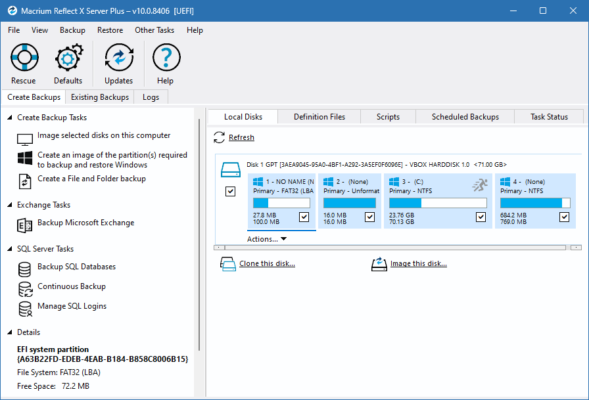
What is Macrium Reflect 8.1.8631?
Macrium Reflect is a comprehensive backup and disk imaging solution for Windows PCs and servers. It allows users to create exact images of entire disks or partitions, making recovery from system crashes or data loss quick and simple.
The latest version, 8.1.8631, comes with improved performance, enhanced security, and updated support for modern hardware. Whether you’re a home user or an IT professional, Macrium Reflect offers flexible backup solutions tailored to your needs.
Key Features of Macrium Reflect 8.1.8631
1. Full Disk Imaging
Create an exact copy of your hard drive or SSD, including the operating system, applications, settings, and files. This ensures a complete recovery option in case of failure.
2. File and Folder Backup
Beyond full disk images, Macrium Reflect lets you back up specific files and folders, providing flexible data protection.
3. Rapid Delta Clone and Restore
This feature speeds up cloning and restoring by only copying changed data blocks, saving both time and storage space.
4. Incremental and Differential Backups
Macrium Reflect supports advanced backup strategies, reducing backup size and time by only recording changes since the last backup.
5. Rescue Media Builder
In case of system failure, you can boot into the Macrium Reflect recovery environment using a USB or DVD and restore your system quickly.
6. Ransomware Protection
The software integrates with Macrium Image Guardian, a technology designed to protect backup files from ransomware and unauthorized modification.
Benefits of Using Macrium Reflect 8.1.8631
Reliable Data Protection
With automated backup schedules and strong encryption, your data remains safe and secure against loss or theft.
Fast Recovery Process
Thanks to Rapid Delta Restore, recovering a system after failure takes just minutes instead of hours.
Business and Home Use
Macrium Reflect is versatile enough to serve both IT professionals managing servers and home users protecting personal files.
Long-Term Storage Efficiency
Differential and incremental backups optimize storage, allowing multiple restore points without consuming excessive disk space.
How to Download and Install Macrium Reflect 8.1.8631
Step 1: Download the Installer
Go to the official Macrium website or a trusted distributor and download the latest version (8.1.8631).
Step 2: Install the Software
Run the installer, follow the on-screen instructions, and select either free or paid license options depending on your needs.
Step 3: Configure Your Backup
Choose between full disk imaging, file backup, or scheduled backups. The intuitive interface makes setup quick and easy.
Step 4: Create Rescue Media
For complete safety, use the Rescue Media Builder to prepare a recovery USB drive.
Conclusion
Macrium Reflect 8.1.8631 is one of the most trusted backup and recovery solutions for Windows. With its powerful disk imaging, incremental backups, ransomware protection, and fast restore capabilities, it provides peace of mind to both personal users and businesses. If you value your data and want to ensure it remains safe, Macrium Reflect is an essential tool to have.
✔ Tested: This software was tested on Windows 10 & Windows 11 and works smoothly without issues.
Frequently Asked Questions
- Is this software free?
Yes, it can be downloaded and used for free. - Does it support Windows 11?
Yes, it works perfectly on Windows 10 and 11. - Is it safe to use?
Yes, the software was scanned and tested before publishing.
Last updated: January 2026