USB Disk Storage Format Tool 6.1: Format Your Removable Drives with Ease 🖥️✨
Need to format a USB flash drive, SD card, external hard drive, or other removable storage media? The built-in Windows formatting tool sometimes falls short, especially when dealing with large drives or specific file systems. USB Disk Storage Format Tool 6.1 is a lightweight, dedicated utility designed to format USB storage devices quickly and reliably, often supporting larger capacities and more options than standard tools.
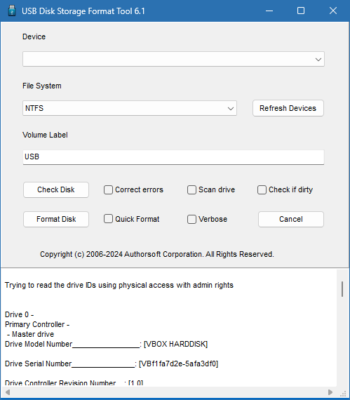
Whether you’re preparing a drive for a specific purpose (like creating a bootable USB), fixing a corrupted drive, or changing its file system, this tool provides a straightforward solution.
🎯 Why Use USB Disk Storage Format Tool?
- ✅ Specifically designed for USB/removable drives – optimized for these devices
- ✅ Supports large drive capacities (beyond standard Windows limits in older systems)
- ✅ Multiple File System Options: FAT32, NTFS, exFAT, and more
- ✅ Fast Formatting Process – often quicker than built-in tools
- ✅ Lightweight & Portable – no complex installation required (usually)
- ✅ Can format drives locked by the system (in some cases)
Perfect for home users, IT professionals, and anyone needing to format USB or memory card devices.
✨ Key Features of Version 6.1
💾 1. Wide File System Support
- FAT32: Universal compatibility (but limited to 4GB file size)
- NTFS: Standard for Windows, supports large files and drives
- exFAT: Good for flash drives, compatible with Windows/Mac/Linux
- Other formats may be supported depending on the version
🚀 2. High-Speed Formatting
- Optimized algorithms for faster formatting on removable devices
- Quick Format option for faster erasure (doesn’t securely wipe data)
- Full Format option for thorough checking (takes longer)
🛠️ 3. Drive Management
- View detailed drive information (size, type, serial number)
- Customize cluster size (allocation unit size) for performance
- Add volume label (name your drive)
- Select target drive carefully (to avoid formatting the wrong device)
🧩 4. Handling Problematic Drives
- May be able to format drives that Windows Explorer cannot
- Attempts to fix common drive errors during the process
- Useful for resetting drive status (e.g., after failed bootable creation)
🛠️ Ideal For:
- Creating Bootable USB Drives: Format drive to prepare for OS installation tools
- Recovering Corrupted Drives: Fix errors that prevent normal access
- Changing File Systems: Switch from FAT32 to NTFS/exFAT for larger file support
- Cleaning USB Drives: Remove stubborn files or viruses
- Anyone: Needing a dedicated tool for formatting removable storage
💡 Tip: Always backup important data before formatting, as the process erases all content on the selected drive.
🆚 USB Disk Storage Format Tool vs. Windows Format Tool
USB Disk Storage Format Tool can offer more flexibility for specific removable storage tasks.
⚠️ Important Notes
- Use with Caution: Formatting permanently deletes all data on the drive.
- Select Correct Drive: Double-check the drive letter to avoid formatting the wrong disk.
- Source: Download only from trusted sources to avoid modified (potentially harmful) versions.
- Limitations: May not work on all problematic drives or very new hardware.
💡 Final Thoughts: Format Your Drives Simply
USB Disk Storage Format Tool 6.1 provides a specialized, efficient way to format USB drives and memory cards. While Windows has built-in tools, this utility can be more effective for specific tasks or drives that standard tools struggle with.
💾 Select. Format. Done.
🔗 (Note: This tool is often distributed through various tech sites. Ensure downloading from a reputable source. The exact official developer may vary, but the tool itself is widely known.)
💻 Compatible with Windows (specifically for formatting connected removable storage).
✔ Tested: This software was tested on Windows 10 & Windows 11 and works smoothly without issues.
Frequently Asked Questions
- Is this software free?
Yes, it can be downloaded and used for free. - Does it support Windows 11?
Yes, it works perfectly on Windows 10 and 11. - Is it safe to use?
Yes, the software was scanned and tested before publishing.
Last updated: January 2026