
When it comes to managing PDF files, most users end up juggling multiple tools: one for converting, another for merging, a third for securing. But what if you could do everything in a single application — without uploading your files to the cloud? and buy
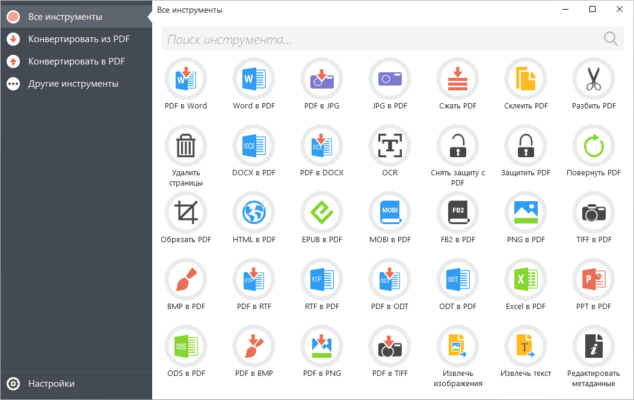
Enter Icecream PDF Candy Desktop Pro 3.13 , a comprehensive and user-friendly PDF suite developed by Icecream Apps. Unlike the online version, this desktop Pro edition works 100% offline , giving you full control over your documents while ensuring privacy and security.
With over 20 essential PDF tools built into one sleek interface, PDF Candy Desktop Pro 3.13 is ideal for professionals, students, and home users who want a fast, reliable, and all-in-one solution for their PDF needs.
Let’s explore what makes this software a top choice in 2025.
📌 What Is Icecream PDF Candy Desktop Pro 3.13?
Icecream PDF Candy Desktop Pro 3.13 is a Windows-based application that combines the best features of online PDF tools into a secure, offline desktop environment . It eliminates the need to upload sensitive files to websites — a major advantage for handling contracts, financial reports, or personal records.
The Pro version unlocks advanced features like:
- Batch processing
- OCR (Optical Character Recognition)
- No watermarks or ads
- Higher conversion quality
- Priority support
Whether you’re converting, editing, protecting, or organizing PDFs, this tool delivers professional results with minimal effort.
🛠️ Key Features of Icecream PDF Candy Desktop Pro 3.13
1. 🔁 Convert PDF to & From 10+ Formats
Convert PDFs to:
- Word (.docx) – Editable text with layout preserved
- Excel (.xlsx) – Extract tables and data
- PowerPoint (.pptx) – Turn presentations into slides
- EPUB, HTML, JPG, PNG, TIFF, TXT
And create PDFs from any of these formats.
2. 🔍 OCR for Scanned Documents
Use built-in OCR technology to convert image-based or scanned PDFs into fully searchable and editable files . Supports multiple languages including English, Spanish, French, German, and Russian.
Perfect for digitizing paper archives, receipts, or faxes.
3. 🧩 Merge PDF Files
Combine multiple PDFs into one organized document. Drag and drop to reorder pages before merging.
Ideal for creating reports, portfolios, or eBooks.
4. ✂️ Split & Extract Pages
Break large PDFs into smaller parts by page range, or extract specific pages to share only what’s needed.
5. 🧳 Compress PDF Size
Reduce file size for easier emailing or uploading — ideal when dealing with scanned documents or high-resolution images.
Choose between low, medium, and high compression modes.
6. ✏️ Edit & Annotate PDFs
Modify text, rotate pages, add highlights, insert sticky notes, draw freehand, and underline important sections.
Great for reviewing contracts or marking up reports.
7. 🔐 Secure PDFs with Passwords
Protect your files with:
- User passwords (to restrict opening)
- Owner permissions (to block copying, printing, or editing)
- AES encryption for strong security
8. 🖋️ Fill & Sign PDF Forms
Complete interactive forms electronically and add digital signatures using your mouse or touchscreen — legally valid and secure.
9. 📦 Batch Processing
Apply conversions, compression, or security settings to multiple files at once — saves time when handling large volumes of documents.
10. 🖥️ Works Completely Offline
All processing happens locally on your PC — no internet connection required. Your data stays private and secure.
✅ No file uploads, no tracking, no privacy risks.
👥 Who Should Use Icecream PDF Candy Desktop Pro 3.13?
- Business Professionals: Edit, sign, and send contracts securely.
- Students & Educators: Convert lecture slides and annotate research papers.
- Freelancers: Deliver clean, professional PDF deliverables.
- IT & Admin Staff: Automate document workflows.
- Home Users: Manage bills, manuals, and personal records easily.
🖥️ System Requirements
- Operating System: Windows 10 / 11 (64-bit recommended)
- RAM: 2 GB minimum (4 GB suggested)
- Hard Disk Space: 200 MB free space
- No .NET or Java Dependencies
- Administrator Rights: Required for installation
✅ Portable mode available — run directly from a USB drive.
📈 Why Choose Icecream PDF Candy Desktop Pro 3.13?
- ✅ All-in-One PDF Toolset – No More Switching Apps
- ✅ Offline Operation = Maximum Privacy
- ✅ OCR Support for Scanned Documents
- ✅ Batch Processing for Efficiency
- ✅ No Ads, No Watermarks, No Uploads
- ✅ Simple Interface – Great for Beginners
- ✅ Affordable Alternative to Adobe Acrobat
✅ Final Thoughts
Icecream PDF Candy Desktop Pro 3.13 isn’t just another PDF converter — it’s a complete document productivity suite that puts all the tools you need in one place. With its rich feature set, offline operation, and focus on user privacy, it’s an excellent choice for anyone who works regularly with PDFs.
If you’re tired of using online converters that compromise your data or juggling multiple apps for simple tasks, PDF Candy Desktop Pro delivers a smarter, safer, and more efficient solution .
For powerful functionality, ease of use, and peace of mind, Icecream PDF Candy Desktop Pro 3.13 is definitely worth installing .
✔ Tested: This software was tested on Windows 10 & Windows 11 and works smoothly without issues.
Frequently Asked Questions
- Is this software free?
Yes, it can be downloaded and used for free. - Does it support Windows 11?
Yes, it works perfectly on Windows 10 and 11. - Is it safe to use?
Yes, the software was scanned and tested before publishing.
Last updated: January 2026