
DiskDigger 2.0.11.4091 is a feature-rich data recovery application that specializes in recovering lost or deleted files from a wide range of storage media. It supports quick and deep scans, allowing users to retrieve files from hard disks, USB drives, memory cards, CDs, DVDs, floppy disks, and even virtual disk images. The tool is designed for both Windows and Linux platforms and is favored for its intuitive interface and effective scanning technology and see Defraggler and buy.
🔑 Key Features
Dual Scan Modes:
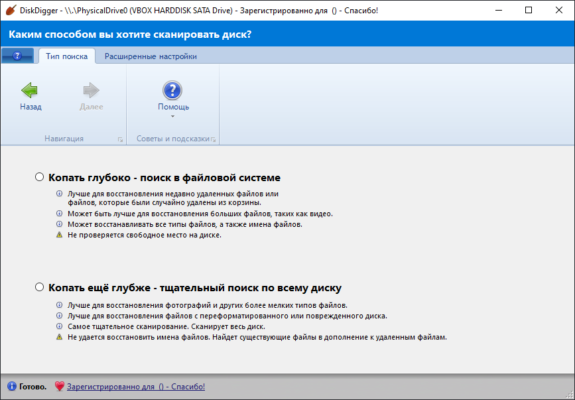
“Dig Deep” for recovering recently deleted files from FAT, NTFS, exFAT, ReFS, ext2, and more.
“Dig Deeper” for detailed file-type–based carving, useful when file system data is damaged.
Wide File-Type Support:
Recover images (JPG, PNG, BMP, TIFF, RAW formats), documents (DOC, PDF, XLSX, PPTX, etc.), audio/video files (MP3, WAV, AVI, MP4, MKV), archives (ZIP, RAR, 7Z), and over 200 formats.Preview & Metadata View:
Preview images with pan/zoom, view text-only document previews, and inspect metadata such as EXIF data and ID3 tags before recovery.Virtual Disk Support:
Scan disk image files in formats like E01, VMDK, VHD/X, VDI, QCOW2, and raw dd images.Filtering & Sorting:
Filter results by file name, extension, size, date, and location. Sort the recovered list for easy browsing.Export & Resume Capability:
Recover selected files and save them to a different location. Optionally resume scanning sessions later.Lightweight, Portable Utility:
Easy to run—no installation required on Windows; Linux users can run the executable directly.
🆕 What’s New in Version 2.0.11.4091
Enhanced preview and metadata extraction for raw photo formats.
Improved file-system awareness, with stronger support for ReFS, ZFS, UFS, and various Unix-like systems.
Faster and more robust “Dig Deeper” scanning algorithms.
Better recovery accuracy for images, documents, and compressed archives.
Stability and interface improvements, along with increased performance under high-DPI displays.
💡 Common Use Cases
Recover Accidentally Deleted Files: Quickly retrieve accidentally deleted photos, documents, or videos.
Restore After Formatting: Successfully recover content from formatted memory cards or drives.
Repair Corrupted Partitions: Recover files when partitions become inaccessible or damaged.
Extract Data from Disk Images: Pull files from snapshots or forensic disk images.
Archival Projects: Recover files from old media like CDs, DVDs, or legacy floppy disks.
🖥️ System Requirements
Operating System: Windows XP through Windows 11 (32/64-bit) or compatible Linux distributions
Architecture: x86 or x64 CPU
Memory: Minimum 512 MB RAM (1 GB+ recommended)
Disk: 1–2 MB for the executable, plus space to store recovered files
Optional: Additional libraries on Linux for virtual disk image support
✅ Why Choose DiskDigger?
DiskDigger stands out for its combination of a lightweight, portable design and powerful recovery capabilities. Its two-pronged scanning approach covers both recent file loss and deep data recovery, while its virtual disk support makes it ideal for forensic or archival use. The ability to preview files before the recovery ensures users retrieve exactly what they need—without clutter.
🎯 Who Is It For?
Home users recovering accidentally deleted media
IT technicians restoring client files after formatting or crashes
Digital archivists salvaging old media content
Forensic analysts extracting data from disk images
Linux or Windows users needing a portable recovery solution
✔ Tested: This software was tested on Windows 10 & Windows 11 and works smoothly without issues.
Frequently Asked Questions
- Is this software free?
Yes, it can be downloaded and used for free. - Does it support Windows 11?
Yes, it works perfectly on Windows 10 and 11. - Is it safe to use?
Yes, the software was scanned and tested before publishing.
Last updated: January 2026