
In today’s fast-paced digital environment, managing PDF documents efficiently across devices has become essential for professionals, students, and remote workers. Whether you’re editing contracts on your PC, signing forms on your tablet, or scanning receipts on your phone, having a unified and powerful tool makes all the difference and buy.
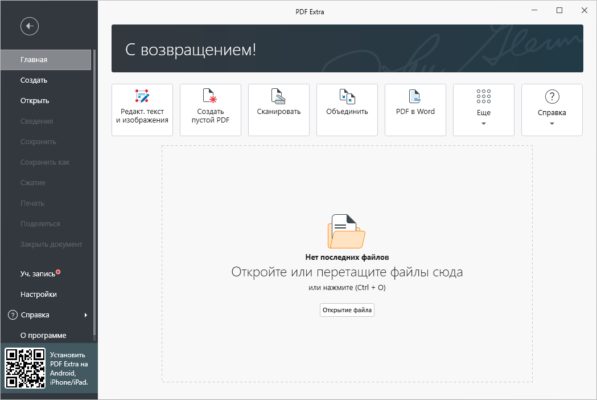
Enter PDF Extra Ultimate 9.70.57653 — a comprehensive, feature-rich PDF suite developed by MobiSystems , the creators of the popular OfficeSuite app. This “Ultimate” edition combines desktop power with mobile flexibility , offering everything from text editing and form filling to optical character recognition (OCR), e-signatures, and cloud synchronization.
Let’s explore what makes PDF Extra Ultimate 9.70.57653 one of the most versatile PDF solutions for Windows and mobile users in 2025.
📌 What Is PDF Extra Ultimate 9.70.57653?
PDF Extra Ultimate 9.70.57653 is the premium version of MobiSystems’ PDF editor, designed for users who need full control over their PDF workflows across platforms. It includes all features available in the standard version plus advanced tools like OCR, batch processing, document comparison, redaction, and priority support .
Available for:
- Windows 10/11 (desktop)
- Android
- iOS/iPadOS
With seamless integration between devices via Google Drive, OneDrive, Dropbox, and MobiDrive, you can start a task on your laptop and finish it on your smartphone — without missing a beat.
It’s ideal for business users, legal teams, educators, and anyone who works heavily with PDFs daily.
🛠️ Key Features of PDF Extra Ultimate 9.70.57653
1. ✏️ Full PDF Editing
Edit existing text and images directly within PDFs — change fonts, adjust spacing, move objects, and reflow content as easily as in a Word processor.
No need to recreate documents from scratch.
2. 🔍 Built-in OCR (Optical Character Recognition)
Convert scanned documents and image-based PDFs into fully editable and searchable text . Supports multiple languages and maintains layout accuracy.
Essential for digitizing paper files, invoices, or old reports.
3. 🔁 Convert PDFs to & From Multiple Formats
Export PDFs to:
- Microsoft Word (.docx)
- Excel (.xlsx)
- PowerPoint (.pptx)
- TXT, HTML, JPG
And create high-quality PDFs from any of these formats — perfect for collaboration and archiving.
4. 💬 Annotate & Comment
Add highlights, sticky notes, stamps, shapes, arrows, and freehand drawings to clarify meaning, review contracts, or provide feedback.
5. 🖋️ Fill & Sign Forms Digitally
Complete interactive forms electronically and add legally binding digital signatures using your mouse, touchscreen, or stylus.
You can also send documents for signature via email.
6. 🧩 Merge, Split & Organize Pages
Combine multiple PDFs into one file or split large documents into sections. Rearrange, rotate, and delete pages with drag-and-drop ease.
7. 🔐 Secure & Redact Sensitive Data
Protect files with passwords and permissions. Use the redaction tool to permanently remove confidential information (e.g., SSNs, bank details) before sharing.
8. ☁️ Cloud & Mobile Sync
Sync your recent files, templates, and settings across Windows, Android, and iPhone using integrated cloud services.
Work anywhere, anytime — even offline.
9. 📱 Scan Documents with Your Phone
Use the mobile app to turn your smartphone camera into a high-quality PDF scanner . Automatically detect edges, enhance text, and save as searchable PDFs (with OCR).
10. 📦 Batch Processing
Apply edits, conversions, or security settings to multiple files at once — ideal for handling large volumes of documents.
👥 Who Should Use PDF Extra Ultimate 9.70.57653?
- Business Professionals: Edit contracts, proposals, and presentations.
- Legal & Compliance Teams: Sign, redact, and secure sensitive documents.
- Students & Educators: Annotate research papers and submit assignments.
- Remote Workers: Stay productive across devices with synced workflows.
- Home Users: Manage bills, manuals, receipts, and personal records securely.
🖥️ System Requirements (Windows)
- Operating System: Windows 10 or 11 (64-bit)
- RAM: 2 GB minimum (4 GB recommended)
- Hard Disk Space: 300 MB free space
- Internet Connection: Required for activation and cloud sync (optional after setup)
✅ Companion apps available on Google Play and Apple App Store.
📈 Why Choose PDF Extra Ultimate 9.70.57653?
- ✅ True Cross-Platform Experience
- ✅ Advanced OCR Included
- ✅ One-Time Purchase Option Available
- ✅ No Ads or Watermarks
- ✅ Regular Updates & Excellent Support
- ✅ Trusted Alternative to Adobe Acrobat Pro
✅ Final Thoughts
PDF Extra Ultimate 9.70.57653 is more than just a PDF editor — it’s a complete document productivity ecosystem that bridges the gap between desktop precision and mobile convenience.
With its rich feature set, intuitive interface, and seamless device synchronization, it stands out as one of the best value-packed PDF solutions on the market.
If you need a reliable, intelligent, and flexible tool to manage your PDFs across all your devices, PDF Extra Ultimate 9.70.57653 is definitely worth trying .
✔ Tested: This software was tested on Windows 10 & Windows 11 and works smoothly without issues.
Frequently Asked Questions
- Is this software free?
Yes, it can be downloaded and used for free. - Does it support Windows 11?
Yes, it works perfectly on Windows 10 and 11. - Is it safe to use?
Yes, the software was scanned and tested before publishing.
Last updated: January 2026