
What is Benvista PhotoZoom Pro 9.0.2?
**Benvista PhotoZoom Pro 9.0.2** is one of the most advanced image enlargement tools designed for professional photographers, designers, and editors. It allows you to **enlarge photos without losing quality**, maintaining details, clarity, and natural sharpness even at extreme zoom levels.
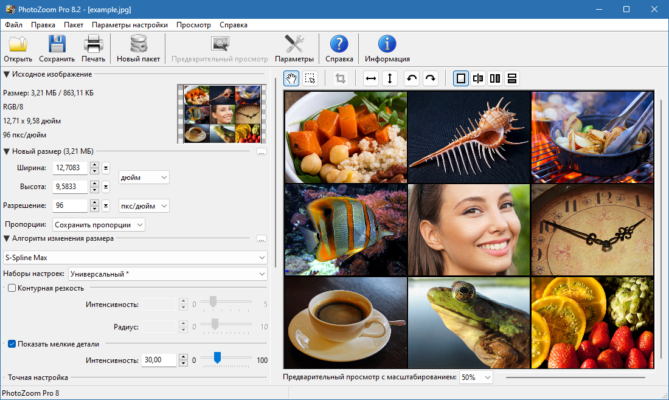
This version integrates the latest S-Spline Max technology, which intelligently analyzes image pixels to create smooth, realistic results that far surpass standard resizing methods found in most editing software.
Main Features of Benvista PhotoZoom Pro 9.0.2
1. S-Spline Max Algorithm
The heart of PhotoZoom Pro lies in its **S-Spline Max algorithm**, which offers superior results when enlarging images. It eliminates noise, jagged edges, and blurry textures, producing crisp, high-definition photos suitable for printing or digital projects.
2. Batch Processing
PhotoZoom Pro 9.0.2 supports **batch image resizing**, allowing users to process hundreds of images simultaneously. This feature saves time for photographers working with large galleries or studios handling product photos.
3. Support for All Image Formats
The software is compatible with nearly every image format, including **JPEG, TIFF, PNG, BMP, GIF, and RAW files** from popular cameras, ensuring flexibility for any workflow.
4. Enhanced Presets and Custom Profiles
You can choose from a variety of built-in presets or create **custom resizing profiles** for specific image types, such as portraits, landscapes, or graphic designs. This ensures the best enlargement results for every use case.
5. Advanced Preview and Comparison
The program includes a **real-time preview panel**, allowing you to compare before-and-after results side by side. This helps fine-tune sharpness, noise reduction, and artifact removal settings before saving the final version.
6. Plugin for Photoshop and Lightroom
PhotoZoom Pro 9.0.2 integrates smoothly with **Adobe Photoshop and Lightroom**, letting professionals access the resizing engine directly within their favorite editing environment.
What’s New in Version 9.0.2?
The new update improves overall performance, offering faster processing times and better color management. It also introduces enhanced GPU acceleration support, which makes large-scale photo enlargement significantly quicker on modern systems.
Additionally, stability improvements ensure smooth operation even when working with ultra-high-resolution images exceeding 20,000 x 20,000 pixels.
Why Choose PhotoZoom Pro?
Benvista PhotoZoom Pro stands out as the **industry leader in photo enlargement**. While other programs blur or distort details when zooming, PhotoZoom maintains texture and clarity, making it ideal for **printing posters, advertising materials, and professional photography**.
Its intuitive interface and customizable options make it accessible to both professionals and beginners who demand the best possible image scaling results.
Conclusion
In summary, **Benvista PhotoZoom Pro 9.0.2** is an essential tool for anyone who needs to enlarge images while preserving perfect quality. Its unique algorithms, batch processing, and professional compatibility make it a must-have for designers, photographers, and digital artists in 2025.
It’s a reliable, efficient, and high-quality solution for achieving crystal-clear enlarged photos without compromise.
✔ Tested: This software was tested on Windows 10 & Windows 11 and works smoothly without issues.
Frequently Asked Questions
- Is this software free?
Yes, it can be downloaded and used for free. - Does it support Windows 11?
Yes, it works perfectly on Windows 10 and 11. - Is it safe to use?
Yes, the software was scanned and tested before publishing.
Last updated: January 2026