
Overview of Efficient Elements for Presentations 4.4.3800.1
Efficient Elements for Presentations 4.4.3800.1 is a professional PowerPoint add-in designed to help users create high-quality and visually consistent presentations in less time. It integrates seamlessly into Microsoft PowerPoint, offering a wide range of automation features, reusable templates, and design tools that simplify the slide creation process for professionals and teams.
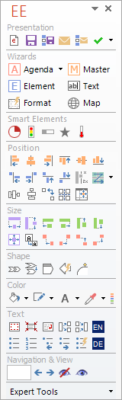
This version improves performance and brings new customization options, helping business users and corporate teams maintain brand consistency while saving hours of manual formatting work.
Key Features
Smart Templates and Layouts
The add-in provides a library of professional templates and layout elements that adapt to company branding. You can easily insert standard shapes, tables, diagrams, and icons with a single click. This ensures uniform design across all slides while maintaining corporate identity.
Automated Formatting and Alignment
Efficient Elements automates repetitive PowerPoint tasks like aligning objects, adjusting spacing, and resizing text boxes. With intelligent snapping and grid alignment tools, you can achieve pixel-perfect designs without manual effort.
Corporate Design Integration
Version 4.4.3800.1 supports company-specific branding guidelines. Administrators can define templates, color palettes, and fonts, ensuring that all team members create slides consistent with the brand’s visual identity.
Element Library and Reusability
Users can store and reuse frequently used elements such as logos, headers, and tables. The library feature saves time by letting you quickly access your most common design components.
Slide and Object Management
This tool simplifies working with complex slide decks. You can easily rearrange, group, or replace elements across multiple slides. The batch editing functions are ideal for updating logos, headers, or design patterns in large presentations.
Productivity Enhancements
The software adds handy shortcuts and smart insertion features that reduce the number of clicks needed to complete tasks. These time-saving features make it especially valuable for consultants, marketers, and corporate trainers who work on presentations daily.
What’s New in Version 4.4.3800.1
The latest version brings several enhancements to improve workflow efficiency and stability:
Faster startup and improved PowerPoint integration
Enhanced design libraries with new templates and icons
Extended compatibility with Office 365 and PowerPoint 2021
Improved slide element alignment and auto-layout features
Better error handling and smoother UI performance
Benefits for Professionals
Save Time and Effort
Efficient Elements helps users create slides up to 70% faster by automating repetitive tasks and offering quick access to ready-made templates.
Consistent and Polished Presentations
It ensures every slide adheres to the same visual standard, which is essential for corporate communication and client presentations.
Increased Productivity in Teams
By sharing standardized templates and assets, teams can collaborate more effectively and maintain unified design quality across all projects.
Conclusion
Efficient Elements for Presentations 4.4.3800.1 is a must-have add-in for anyone who works extensively with PowerPoint. It streamlines slide creation, enhances visual consistency, and reduces manual formatting tasks. Whether you’re a business professional, marketing specialist, or educator, this tool can transform the way you create and deliver presentations — saving you time while ensuring your work always looks professional and on-brand.
✔ Tested: This software was tested on Windows 10 & Windows 11 and works smoothly without issues.
Frequently Asked Questions
- Is this software free?
Yes, it can be downloaded and used for free. - Does it support Windows 11?
Yes, it works perfectly on Windows 10 and 11. - Is it safe to use?
Yes, the software was scanned and tested before publishing.
Last updated: January 2026