What Is Avast Rescue Disk 24.7.9311
Avast Rescue Disk 24.7.9311 is a standalone, bootable antivirus environment built by Avast to scan and remove malware from machines that cannot run or are too compromised to be cleaned from within Windows. Instead of relying on an installed antivirus, you burn or deploy this disk (ISO) to a USB drive or DVD, boot from it, and perform deep scans outside the normal operating system.
Because the OS isn’t running during the scan, many types of stealth malware, rootkits, or locked files can be detected and removed with higher success rates.
Key Features
Bootable ISO/USB Support
You can create the Rescue Disk as an ISO file and burn it to DVD, or write it to a USB flash drive. It supports UEFI boot (for modern systems) or legacy BIOS depending on configuration.
Deep Offline Scanning
Once booted, Avast Rescue Disk uses the AvastPE environment to scan all drives, archives, and system files. It leverages up-to-date virus definitions to detect and remove threats that evade in-OS antivirus scans.
Repair & Removal Options
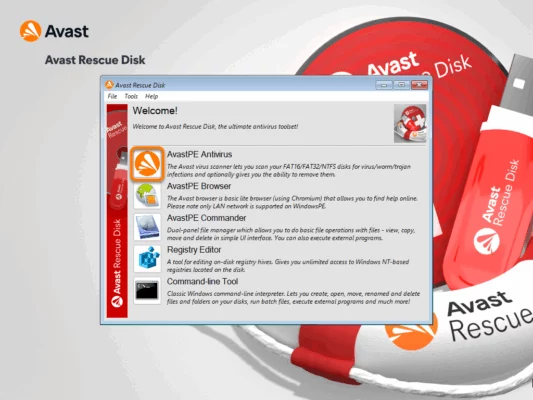
After scanning, the tool offers automatic repair functions, or you can manually choose which threats to fix or delete. It also includes file manager, command-line tools, registry editor, and a browser to aid in recovery tasks.
Frequent Database Updates
If the infected machine has internet connection during the booted session, the Rescue Disk can update its virus definition database to catch newer threats before scanning.
How to Use Avast Rescue Disk
Step 1: Download and Prepare
Obtain the ISO for version 24.7.9311. Use a tool like Rufus or built-in burning software to create a USB boot disk or DVD.
Step 2: Boot From Disk
Restart the computer and enter boot menu (via keys like F12, ESC, F11). Select the USB/DVD containing the Rescue Disk.
Step 3: Scan Your System
Once booted, launch the AvastPE Antivirus app. Choose to scan all disks or specific folders. Enable “scan all archives” if desired.
Step 4: Repair or Remove
After scan completion, choose “Fix automatically” or proceed manually. After actions, reboot and remove the rescue media.
Why It Matters
Systems that are heavily infected may not boot, or malware may block antivirus functionality. Avast Rescue Disk is designed for those extreme cases — when Windows is unusable or standard scans fail. By scanning outside the OS, it bypasses interference from active malware and provides a fresh, clean environment for detection.
It is especially effective against rootkits, boot-sector malware, file-locking threats, and infections that load early during system startup.
Best Practices & Recommendations
Always back up important files before using the tool — some repair or deletion actions may cause data loss.
Use the latest version (24.7.9311) and update definitions if the environment allows.
Test the boot media on another machine first to ensure proper creation.
Use it as a last-resort tool, not a regular repair method — it’s for emergencies and deep cleaning.
✔ Tested: This software was tested on Windows 10 & Windows 11 and works smoothly without issues.
Frequently Asked Questions
- Is this software free?
Yes, it can be downloaded and used for free. - Does it support Windows 11?
Yes, it works perfectly on Windows 10 and 11. - Is it safe to use?
Yes, the software was scanned and tested before publishing.
Last updated: January 2026