Overview of ProfiCAD 13.2.4
ProfiCAD 13.2.4 is one of the most user-friendly and efficient CAD tools designed specifically for electrical engineers and technicians. It allows users to create professional electrical schematics, wiring diagrams, and control circuit layouts quickly and accurately. With its clean interface and optimized workflow, ProfiCAD is suitable for both beginners and professionals who need a reliable design solution for electrical documentation.
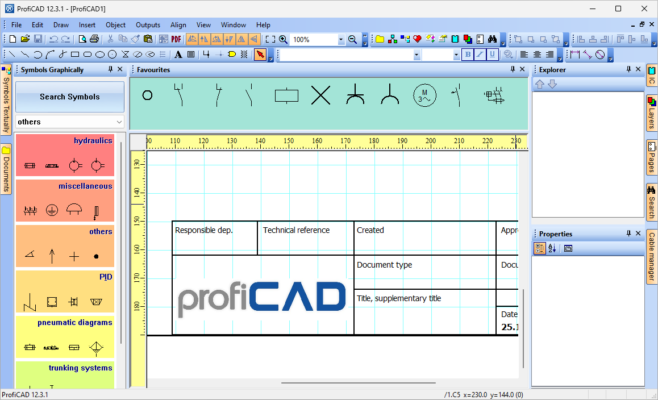
This version, 13.2.4, brings enhanced stability, faster drawing performance, and improved compatibility with Windows 11, continuing the software’s reputation as a go-to choice for light yet powerful electrical CAD design.
Key Features of ProfiCAD
Efficient Electrical Schematic Design
ProfiCAD provides a wide range of ready-to-use electrical symbols for switches, relays, resistors, connectors, and control components. You can easily drag and drop elements into your workspace and connect them with intelligent wiring lines that automatically adjust to your layout.
Automatic Numbering and Symbol Management
The software automatically handles component numbering, wire labeling, and cross-references between symbols. This saves time and prevents manual errors in large and complex schematics.
Compatible with Industrial Standards
ProfiCAD supports international electrical standards and allows you to customize symbols or create your own libraries, ensuring compliance with specific project or regional requirements.
Lightweight and Easy to Use
Unlike many complex CAD platforms, ProfiCAD is lightweight and fast. It can run smoothly even on older computers without consuming high resources, making it ideal for small offices, schools, and field technicians.
Export and Printing Options
Your schematics can be exported as PDF, DXF, BMP, PNG, or SVG files. ProfiCAD also includes an advanced print preview and scaling system, ensuring your electrical diagrams are ready for documentation or presentation.
What’s New in Version 13.2.4
The 13.2.4 release includes a variety of small but impactful improvements:
Improved symbol editor with better snapping and alignment tools.
Enhanced cross-reference generator for multi-page projects.
Optimized wire routing for cleaner schematic design.
Bug fixes and performance updates that make drawing smoother and more responsive.
These refinements ensure better productivity and precision in professional environments.
Why Choose ProfiCAD 13.2.4?
ProfiCAD stands out because it focuses exclusively on what electrical designers truly need — speed, clarity, and simplicity. Unlike bulky 3D CAD applications, it delivers a clean workspace optimized for 2D electrical documentation. The built-in symbol libraries and automatic numbering reduce repetitive work, while the export features make collaboration and printing effortless.
It’s particularly useful for electricians, control engineers, PLC technicians, and technical educators who want to produce accurate schematics without investing time in learning overly complex systems.
How to Use ProfiCAD
Open a new project and select your drawing template or custom sheet size.
Use the symbol library to drag electrical elements into your schematic.
Connect symbols using the wiring tool, which automatically maintains neat line paths.
Add labels, text fields, and terminal blocks where needed.
Use automatic numbering to ensure all wires and components are clearly identified.
Save, export, or print your schematic once the design is complete.
Conclusion
ProfiCAD 13.2.4 offers a perfect balance between simplicity and functionality for anyone involved in electrical or control system design. Its intuitive interface, powerful automation tools, and wide export options make it one of the best choices for producing clean and accurate electrical schematics. Whether for education, maintenance, or engineering projects, ProfiCAD remains a dependable solution that combines ease of use with professional-grade precision.
✔ Tested: This software was tested on Windows 10 & Windows 11 and works smoothly without issues.
Frequently Asked Questions
- Is this software free?
Yes, it can be downloaded and used for free. - Does it support Windows 11?
Yes, it works perfectly on Windows 10 and 11. - Is it safe to use?
Yes, the software was scanned and tested before publishing.
Last updated: January 2026