
Task Explorer 1.6.5 is a lightweight yet powerful task management tool designed for users who want more control and visibility over their system processes. Unlike the default Windows Task Manager, Task Explorer offers deeper insights into system activity, active processes, services, and resource usage, all within a sleek, user-friendly interface.
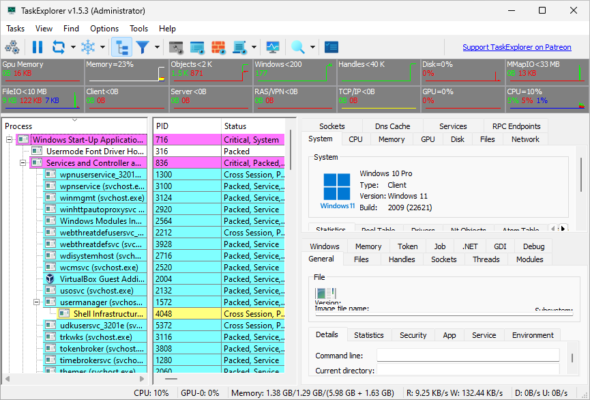
Whether you’re a tech enthusiast, system administrator, or just a curious user, Task Explorer helps you detect and troubleshoot performance issues quickly. Let’s dive into its key features and why it stands out.
🔍 What Is Task Explorer?
Task Explorer is an open-source utility developed by David Xanatos, best known for his work on advanced system monitoring tools. It acts as an enhanced version of Task Manager, offering detailed information about processes, threads, memory consumption, handles, file access, and more.
With version 1.6.5, the tool brings even more stability, improved UI responsiveness, and compatibility with the latest versions of Windows 10 and Windows 11.
🧩 Key Features of Task Explorer 1.6.5
🛠️ Detailed Process Tree
Task Explorer shows a live process tree that gives you full visibility into how parent and child processes interact. You can inspect any process for:
CPU and memory usage
Open network connections
File paths and loaded modules
Thread activity
🔐 Security Checks
The tool also provides VirusTotal integration, allowing you to scan any suspicious process with a single click. This feature is incredibly useful for identifying malware and unknown executables running silently in the background.
📁 File & Registry Access
Task Explorer gives detailed information about file and registry access per process. You can see which files a process has locked and which registry keys it is accessing, making it a handy forensic tool.
💻 Real-Time Monitoring
All information is updated in real time, giving you a live overview of:
System CPU and RAM usage
I/O performance
Disk and network activity
🔄 What’s New in Version 1.6.5?
Improved stability on Windows 11
Reduced resource consumption for better performance
Updated process filters for easier navigation
Bug fixes related to thread display and network metrics
✅ Pros and Cons
Pros:
Open-source and free
No installation required (portable)
Very lightweight on system resources
Detailed process information
Excellent security and malware detection features
Cons:
May be overwhelming for beginners
Some advanced features require technical knowledge
📥 Download and Installation
You can download Task Explorer 1.6.3 from its official GitHub page or trusted software directories. The tool comes in a ZIP package with no installer—just extract and run.
System Requirements:
Windows 10 or 11
64-bit processor
Administrator privileges for full access
👨💻 Who Should Use Task Explorer?
Task Explorer is ideal for:
Power users who want full transparency
Developers needing insight into process behavior
IT professionals performing diagnostics
Anyone concerned about malware or system slowdowns
If you’re using tools like Process Hacker or Sysinternals Process Explorer, you’ll find Task Explorer to be a worthy addition or even a replacement.
Conclusion
Task Explorer 1.6.5 offers a robust alternative to Windows Task Manager, delivering real-time analytics and security insights in a clean, user-friendly interface. Its depth of detail makes it a favorite among tech-savvy users looking to optimize and protect their systems.
If you want more control over your Windows environment, Task Explorer is definitely worth trying.
✔ Tested: This software was tested on Windows 10 & Windows 11 and works smoothly without issues.
Frequently Asked Questions
- Is this software free?
Yes, it can be downloaded and used for free. - Does it support Windows 11?
Yes, it works perfectly on Windows 10 and 11. - Is it safe to use?
Yes, the software was scanned and tested before publishing.
Last updated: January 2026