tinyMediaManager 5.2.0 – Smart Media Library Manager for Movies & TV Shows
tinyMediaManager 5.2.0 is a lightweight yet powerful media management tool that helps users organize, rename, and catalog their movie and TV show libraries efficiently. Designed for collectors and media enthusiasts, this open-source application automatically retrieves rich metadata, posters, fanart, cast information, and ratings from popular databases like TheMovieDB (TMDb), IMDb, and TVmaze.
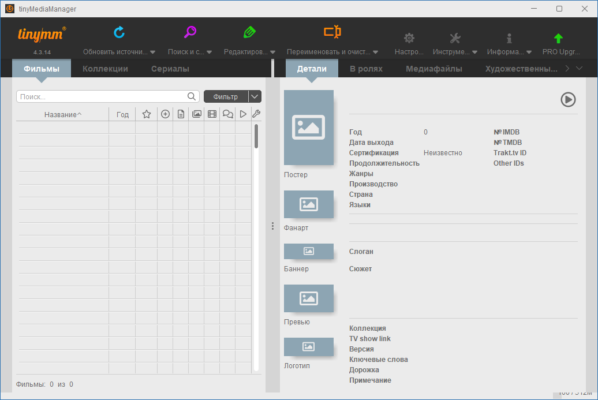
Whether your media is stored locally or on a network drive, tinyMediaManager ensures everything is neat, searchable, and visually appealing across your devices.
Key Features of tinyMediaManager 5.2.0
Automatic Metadata Retrieval:
tinyMediaManager scans your media library and fetches detailed metadata, including plot summaries, genres, cast, crew, release dates, and ratings from reliable online sources.Movie & TV Show Management:
Manage separate libraries for movies and TV series. The app can automatically detect new media files and add them to the appropriate collection.File Renaming & Organization:
Easily rename files and folders according to custom naming conventions. This ensures full compatibility with popular media servers such as Kodi, Plex, and Emby.Artwork Download:
Download posters, fanart, and thumbnails in high resolution automatically. You can even select your preferred artwork manually if desired.NFO File Creation:
Generate .nfo metadata files to ensure your media library integrates perfectly with home theater systems and media centers.Trakt.tv Integration:
Sync your media library with Trakt.tv for online tracking and sharing of watched episodes and movies.Multi-Platform Support:
Available for Windows, macOS, and Linux, making it accessible to all types of users.Batch Processing:
Rename, re-scan, and update multiple entries simultaneously to save time when managing large libraries.
What’s New in Version 5.2.0
The 5.2.0 release introduces several enhancements and fixes for smoother performance:
Improved scraping accuracy for TMDb and IMDb data
Enhanced speed when scanning large media folders
Better handling of multi-episode TV show files
Updated UI for a more modern and responsive experience
Added support for new artwork sources and higher-resolution images
These updates make tinyMediaManager faster, smarter, and more compatible with the latest media platforms.
System Requirements
Operating System: Windows 10 / 11, macOS 10.14+, Linux
Processor: 1 GHz or faster
RAM: 1 GB minimum (2 GB recommended)
Disk Space: 200 MB of free space
Java Runtime: Java 17 or higher
How to Use tinyMediaManager 5.2.0
Download and install tinyMediaManager from the official website.
Launch the program and set your movie and TV show source folders.
Let the software scan and scrape metadata automatically.
Rename and organize files using your preferred naming pattern.
Export NFOs and artwork for seamless use with media players.
With a few clicks, your entire media collection becomes perfectly organized and visually enhanced — ready to enjoy on any device or platform.
Why Choose tinyMediaManager
Completely free and open-source
Integrates seamlessly with Plex, Kodi, and Emby
Regularly updated for better compatibility
Offers custom file naming and metadata editing
Lightweight, fast, and highly configurable
Whether you’re managing hundreds of movies or an entire TV archive, tinyMediaManager gives you full control over how your media is stored and displayed.
Conclusion
tinyMediaManager 5.2.0 is the perfect companion for anyone who wants a clean, organized, and visually appealing media library. Its automation tools and flexible metadata system make it one of the best open-source media management apps available. With continuous updates and multi-platform support, it ensures your media collection stays tidy and up-to-date.
Official Website:
https://www.tinymediamanager.org/
✔ Tested: This software was tested on Windows 10 & Windows 11 and works smoothly without issues.
Frequently Asked Questions
- Is this software free?
Yes, it can be downloaded and used for free. - Does it support Windows 11?
Yes, it works perfectly on Windows 10 and 11. - Is it safe to use?
Yes, the software was scanned and tested before publishing.
Last updated: January 2026