
For gamers, every frame per second (FPS) counts. Whether you’re playing fast-paced shooters like Counter-Strike 2, competitive titles like VALORANT, or open-world adventures like Cyberpunk 2077, lag, stuttering, or low FPS can ruin the experience — even on powerful rigs.
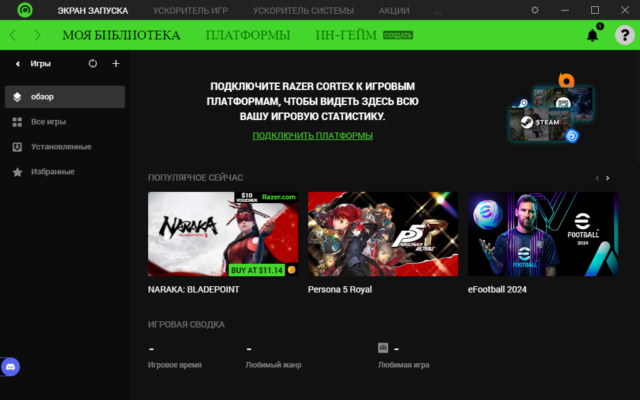
That’s where Razer Cortex 11.2.10.0 comes in — a free, lightweight system optimization tool designed to boost gaming performance by freeing up system resources, managing background apps, and prioritizing your game.
Developed by Razer as part of its ecosystem of gaming software, Cortex 11.2.10.0 combines game boosting, system cleanup, and performance monitoring into one sleek interface. It’s not magic — but it’s the next best thing: smart resource management that gives your games the CPU, RAM, and GPU power they need to run smoothly and see Internet Download Manager .
Let’s explore how Razer Cortex 11.2.10.0 helps you get the most out of your PC while gaming.
📌 What Is Razer Cortex 11.2.10.0?
Razer Cortex 11.2.10.0 is a Windows-based application that acts as a game booster and system optimizer. It analyzes your system in real time and temporarily shuts down non-essential background processes, services, and startup apps to free up RAM and CPU power for your game.
Think of it as a “turbo mode” for your PC — it doesn’t overclock your hardware, but it removes performance bottlenecks caused by background tasks like updates, sync tools, and web browsers.
It works with:
- Steam, Epic Games, Battle.net, Ubisoft Connect, and more
- Both Razer and non-Razer PCs
- Laptops and desktops
And best of all? It’s 100% free — no ads, no trials, no premium paywalls.
🛠️ Key Features of Razer Cortex 11.2.10.0
1. ⚡ Game Booster Mode
With one click, pause background apps (e.g., Chrome, Discord, OneDrive, Spotify) and free up hundreds of MB or even GB of RAM — giving your game more memory to breathe.
Automatically re-enables apps when you exit the game.
2. 🧹 System Cleanup Tools
Remove temporary files, cache, and junk data that slow down your system over time — similar to a lightweight disk cleaner.
3. 📈 Performance Dashboard
Monitor real-time stats:
- CPU usage
- RAM usage
- GPU temperature
- Network speed
All from an overlay (press Ctrl + Alt + R) — no need to alt-tab.
4. 🎮 Game Launcher Integration
Syncs with your game libraries (Steam, Epic, etc.) and lets you launch titles directly from the app.
5. 🔍 FPS Counter
Display real-time FPS in any game — useful for benchmarking performance or detecting drops.
6. 🛠️ Startup Manager
See and disable unnecessary startup programs that slow down boot time and consume resources.
7. 💾 Disk Defrag & Optimization (Basic)
Optimize game drive performance with smart defragmentation (for HDDs) and SSD health monitoring.
8. 🔄 Automatic Optimization Scheduling
Set Cortex to run optimizations automatically when you start a game — no manual clicks needed.
9. 🌐 Cloud Sync (with Razer ID)
Save your settings, game profiles, and preferences across devices using your Razer account.
10. 🧼 Clean, Razer-Style Interface
Dark theme, intuitive layout, and smooth animations — fits perfectly with Razer Synapse and Chroma lighting.
👥 Who Should Use Razer Cortex 11.2.10.0?
- Gamers: Boost FPS and reduce stuttering in demanding titles.
- Streamers: Free up resources for OBS and gameplay simultaneously.
- Laptop Users: Maximize performance on limited hardware.
- Casual Gamers: Improve game performance without upgrading your PC.
- Esports Players: Gain a competitive edge with smoother gameplay.
🖥️ System Requirements
- Operating System: Windows 10 or 11 (64-bit)
- RAM: 4 GB minimum (8 GB recommended)
- Hard Disk Space: 100 MB free space
- Internet Connection: Required for login and updates
- Razer Account: Optional (for cloud sync)
✅ Works on non-Razer PCs — no hardware required.
📈 Why Choose Razer Cortex 11.2.10.0?
- ✅ Free & No Ads
- ✅ Easy One-Click Optimization
- ✅ Real FPS & System Monitoring
- ✅ Supports All Major Game Launchers
- ✅ Lightweight & Safe
- ✅ Trusted by Millions of Gamers
⚠️ Important Notes
- Not a Game Changer on Weak PCs: If your hardware is below minimum requirements, boosting won’t fix everything.
- Doesn’t Overclock: Focuses on software optimization, not hardware tuning.
- Background Services: Some apps may restart after being paused — normal behavior.
✅ Final Thoughts
Razer Cortex 11.2.10.0 may not replace a hardware upgrade, but it maximizes what you already have. By intelligently managing system resources, it helps eliminate background clutter that can hurt gaming performance.
If you’ve ever experienced lag, low FPS, or memory issues while gaming, Razer Cortex delivers a simple, effective solution — and it’s completely free.
For gamers who want smoother gameplay, faster load times, and better system control, Razer Cortex 11.2.10.0 is definitely worth installing.
✔ Tested: This software was tested on Windows 10 & Windows 11 and works smoothly without issues.
Frequently Asked Questions
- Is this software free?
Yes, it can be downloaded and used for free. - Does it support Windows 11?
Yes, it works perfectly on Windows 10 and 11. - Is it safe to use?
Yes, the software was scanned and tested before publishing.
Last updated: January 2026