Blackmagic Design DaVinci Resolve Studio 20.1 is the latest release of the world-renowned professional post-production suite used in films, TV shows, commercials, and YouTube content creation. It combines video editing, color correction, visual effects, motion graphics, and audio post in a single application and buy.
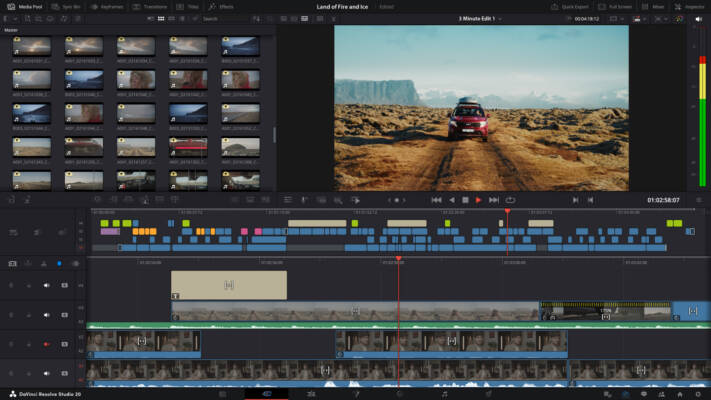
Favored by industry professionals, Resolve Studio offers a blend of creative flexibility and technical power, allowing editors, colorists, VFX artists, and sound designers to work in a unified environment.
⚡ Key Benefits
All-in-One Solution – Edit, grade, add effects, and mix audio without switching programs.
Hollywood-Quality Tools – Used in blockbuster movies and high-end productions.
AI-Powered Features – Smart reframe, scene cut detection, and object removal.
Multi-User Collaboration – Edit projects with multiple people in real time.
8K and HDR Support – Work with ultra-high resolution formats with ease.
🚀 What’s New in Version 20.1
Enhanced AI-based color grading tools for faster look creation.
Improved Magic Mask with better tracking and object isolation.
New Fairlight Audio Engine updates for low-latency, high-track-count sessions.
Faster rendering with optimized GPU acceleration.
Updated UI improvements for more efficient workflow.
🔧 Core Features
✅ Advanced Color Grading
DaVinci Resolve Studio is famous for its powerful color grading panel, giving you industry-leading precision for adjusting tones, hues, and dynamic range.
✅ AI & Machine Learning Tools
Resolve’s Neural Engine delivers automatic scene detection, facial recognition, and intelligent reframing for social media formats.
✅ Fairlight Audio Post
Mix audio with a full digital audio workstation (DAW) built directly into the software.
✅ Fusion Visual Effects
Create cinematic effects, titles, and motion graphics without leaving the app.
✅ Multi-Format Export
Render in formats optimized for YouTube, Netflix, TV, or cinema projection.
🛠 Technical Details
Software Name: DaVinci Resolve Studio
Version: 20.1
Developer: Blackmagic Design
Category: Video Editing / Post-Production
Supported OS: Windows, macOS, Linux
RAM: 16GB minimum (32GB recommended for 8K)
GPU: Discrete GPU with at least 4GB VRAM
📥 Installation & Setup
Download DaVinci Resolve Studio 20.1 from the official Blackmagic Design website.
Install according to your OS guidelines.
Activate your Studio license key or dongle.
Configure GPU and media storage settings for optimal performance.
Start editing, grading, or mixing audio in the workspace that suits your needs.
🧠 Final Thoughts
Blackmagic Design DaVinci Resolve Studio 20.1 is more than just a video editor — it’s a complete professional post-production powerhouse. Whether you’re an indie filmmaker, YouTube creator, or studio colorist, this update brings speed, intelligence, and creative freedom to your workflow. With its unmatched color science and AI enhancements, Resolve Studio remains the top choice for creators aiming for cinematic results.
✔ Tested: This software was tested on Windows 10 & Windows 11 and works smoothly without issues.
Frequently Asked Questions
- Is this software free?
Yes, it can be downloaded and used for free. - Does it support Windows 11?
Yes, it works perfectly on Windows 10 and 11. - Is it safe to use?
Yes, the software was scanned and tested before publishing.
Last updated: January 2026