
For active Steam users who collect, trade, or sell in-game items — especially in games like Counter-Strike 2 (CS2), Team Fortress 2 (TF2), Dota 2, and Rust — managing a cluttered inventory can be frustrating. The default Steam interface lacks advanced filtering, real-time pricing, and scam protection, making it easy to miss valuable items or fall victim to fraud.
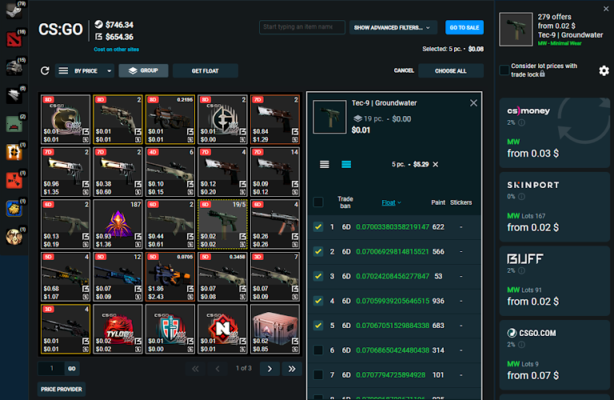
That’s where Steam Inventory Helper 2.4.15 comes in — a modern, feature-rich desktop application designed to transform your Steam inventory into a clean, organized, and intelligent trading dashboard.
This updated version brings enhanced performance, improved scam detection, deeper market integration, and better support for new CS2 skins and stickers, making it the go-to tool for serious traders and collectors in 2025.
Let’s explore what’s new in Steam Inventory Helper 2.4.15 and why it’s essential for anyone who values their virtual assets.
📌 What Is Steam Inventory Helper 2.4.15?
Steam Inventory Helper 2.4.15 is a lightweight, secure Windows application that connects to your public Steam profile to provide an enhanced view of your inventory. It pulls data directly from the Steam Community API and enriches it with tools for valuation, filtering, and safety.
Unlike browser extensions that can slow down your system or pose privacy risks, this desktop app offers:
- Faster loading
- Offline caching
- Better customization
- No ads or tracking
It supports all Steam games with tradable items, including CS2 weapon skins, TF2 hats, Dota 2 emoticons, and seasonal badges.
🔐 Note: The app does not require login credentials — it only reads public inventory data.
🛠️ Key Features of Steam Inventory Helper 2.4.15
1. 🧹 Enhanced Inventory Organization
View your items in a clean, sortable table with high-res icons, names, types, and categories. Much clearer than the default Steam layout.
2. 💰 Real-Time Market Prices & Trends
Displays up-to-date Steam Community Market prices in USD, EUR, GBP, and other currencies. Shows price history and trend indicators (rising/falling).
3. 🔍 Advanced Filtering & Search
Filter by:
- Game
- Item type (skin, sticker, badge, background)
- Rarity (Consumer Grade, Classified, Covert)
- Collection
- Tradable/Marketable status
- Duplicate count
Perfect for finding high-value CS2 knives or rare TF2 items.
4. 📊 Duplicate Item & Badge Crafting Assistant
Highlights duplicate items and shows which badge sets you can complete. Calculates potential booster pack rewards to maximize Steam XP.
5. 🛡️ Scam Protection Alerts (Improved in 2.4.15)
New in this version: enhanced scam database that warns you about:
- Recently acquired items (common in “burner account” scams)
- Items with misleading names (e.g., fake StatTrak™)
- Fake untradable items
- Suspicious trade patterns
Helps prevent costly mistakes.
6. 🔄 Trade Offer Preview & Value Comparison
Preview incoming and outgoing trade offers with total value calculation for both sides. Spot imbalances before accepting.
7. 📦 Bulk Selection & Export Options
Select multiple items for selling or trading. Export your inventory to CSV or JSON for analysis, record-keeping, or portfolio tracking.
8. 🕒 Auto-Refresh & Scheduled Updates
Set the app to refresh your inventory every few minutes — ideal for active traders monitoring market changes.
9. 🌙 Dark Mode & Custom Themes
New UI improvements in 2.4.15 include full dark mode support, customizable fonts, and resizable windows for better readability.
10. 🖥️ Portable & Offline Mode
Run from a USB drive. Once loaded, inventory data is cached — works even when Steam servers are slow or offline.
👥 Who Should Use Steam Inventory Helper 2.4.15?
- CS2 Skin Traders: Buy, sell, and trade knives, gloves, and StatTrak™ skins.
- TF2 Collectors: Manage rare hats, unusual effects, and name tags.
- Dota 2 Enthusiasts: Organize couriers, sprays, and profile sets.
- Steam Badge Farmers: Maximize XP and level up your profile.
- New & Experienced Traders: Avoid scams and make informed decisions.
🖥️ System Requirements
- Operating System: Windows 10 / 11 (64-bit)
- RAM: 1 GB minimum (2 GB recommended)
- Hard Disk Space: 100 MB free space
- Internet Connection: Required to load inventory and market data
- Steam Account: Must have a public or friends-only inventory
✅ Fully portable — no installation required.
📈 Why Choose Steam Inventory Helper 2.4.15?
- ✅ Real-Time Market Data & Price Tracking
- ✅ Advanced Scam Detection & Trade Safety
- ✅ Supports All Tradable Steam Games
- ✅ Lightweight, Fast, and Secure
- ✅ No Ads, No Bloat, No Privacy Risks
- ✅ Regular Updates & Active Development
⚠️ Important Notes
- Third-Party Tool: Not affiliated with Valve or Steam.
- Never Share Your Password: The app only reads public data.
- Always Confirm Trades on Steam: This tool does not auto-accept trades.
✅ Final Thoughts
Steam Inventory Helper 2.4.15 is more than just a visual upgrade — it’s a complete trading intelligence platform for Steam users. With its powerful filtering, real-time pricing, and enhanced scam protection, it gives you the edge you need in the fast-paced world of virtual item trading.
Whether you’re flipping CS2 skins, collecting TF2 rarities, or leveling up your Steam profile, this tool brings clarity, security, and efficiency to your workflow.
If you’re serious about your Steam inventory, Steam Inventory Helper 2.4.15 is definitely worth downloading.
✔ Tested: This software was tested on Windows 10 & Windows 11 and works smoothly without issues.
Frequently Asked Questions
- Is this software free?
Yes, it can be downloaded and used for free. - Does it support Windows 11?
Yes, it works perfectly on Windows 10 and 11. - Is it safe to use?
Yes, the software was scanned and tested before publishing.
Last updated: January 2026