
⭐ XRecode III 1.174 – Powerful Multi-Format Audio Converter
XRecode III 1.174 is one of the most reliable and lightweight tools for converting audio files into multiple formats without losing quality. Whether you work with music, podcasts, voice recordings, or large audio libraries, this program offers an efficient solution with strong performance and an easy-to-use interface. It is designed for users who want fast conversion speeds, multi-threaded processing, and accurate audio output.
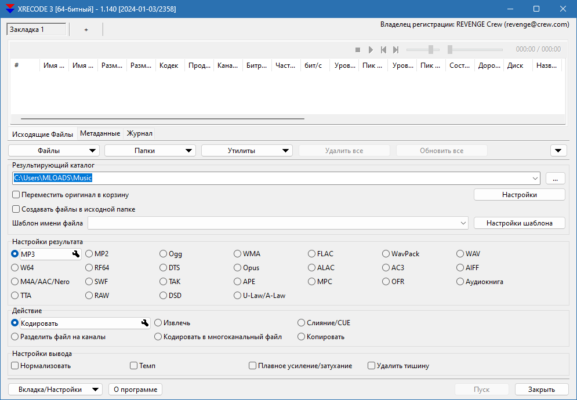
Below, you will find everything you need to know about the key features, system performance, advantages, and reasons why XRecode III remains one of the best choices for audio handling.
🎧 Key Features of XRecode III 1.174
XRecode III includes a wide set of features that help both beginners and professionals complete audio conversion tasks with minimal effort.
Fast Multi-Format Conversion
The software supports nearly every common audio format, including MP3, FLAC, WAV, AAC, AIFF, OGG, APE, WMA, and more. This makes it ideal for users who need compatibility across devices, editing software, or streaming platforms.
Batch Processing for Large Libraries
One of the most impressive features is its ability to convert hundreds of files at once. The batch converter is built to handle large volumes of audio, making it perfect for users with extensive media collections.
High-Quality Audio Output
The program preserves sound quality even when converting to compressed formats. Built-in encoders ensure accurate bitrate control and clear audio reproduction.
⚙️ Advanced Tools for Power Users
🛠 Audio Extraction from Video
XRecode III can extract audio tracks directly from video files. This is especially useful for video editors or users who want to save background music or voice clips separately.
🎵 Tag Editing + Metadata Support
Users can edit metadata such as artist, album, track number, genre, and artwork. This ensures your audio library remains organized across devices.
🌐 Multi-Core CPU Optimization
The software is optimized to use multiple CPU cores during conversion. This results in faster processing compared to traditional converters.
🔊 Normalization & Audio Processing
It includes options like volume normalization, silence removal, splitting, merging, and more — making it a compact audio toolbox.
💡 Why Choose XRecode III 1.174?
XRecode III stands out thanks to its combination of speed, simplicity, and advanced functionality. Unlike heavy audio editing programs, it focuses on delivering fast conversion without unnecessary complexity. Its clean interface ensures a smooth workflow, while its powerful tools provide everything needed for professional-level audio preparation.
📌 System Requirements
The program is lightweight and works well on older systems.
Windows 7, 8, 10, 11
2 GB RAM or higher
Dual-core processor recommended
100 MB free disk space
✔ Tested: This software was tested on Windows 10 & Windows 11 and works smoothly without issues.
Frequently Asked Questions
- Is this software free?
Yes, it can be downloaded and used for free. - Does it support Windows 11?
Yes, it works perfectly on Windows 10 and 11. - Is it safe to use?
Yes, the software was scanned and tested before publishing.
Last updated: January 2026