
🧠 Overview of System Informer 3.0.7578
System Informer 3.0.7578 is a powerful and lightweight system monitoring utility designed to give users full control over their Windows environment. It provides in-depth insights into running processes, services, handles, and network activity, offering far more detail and flexibility than the standard Windows Task Manager. Whether you’re a tech enthusiast, developer, or IT professional, this tool helps you analyze and optimize your system performance efficiently. ⚙️
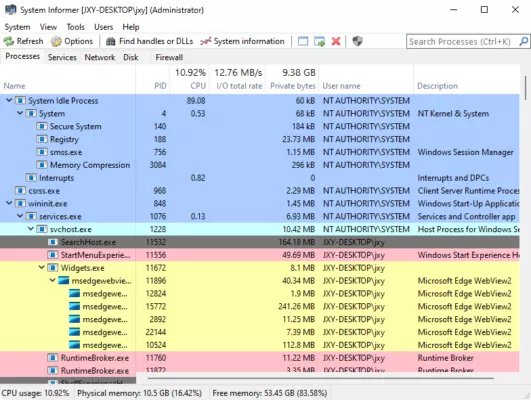
With its advanced process management features, System Informer allows users to suspend, terminate, or restart processes, monitor CPU and memory usage in real time, and identify hidden system activities. The intuitive interface displays detailed data for every running process, including open file handles, DLLs, and threads, making troubleshooting faster and more precise. 💡
🚀 Key Features
Detailed Process Monitoring:
View comprehensive details about every active process, including command lines, dependencies, and memory usage.Advanced Task Management:
Replace the standard Task Manager with a professional-grade process manager that offers deeper control and visibility.Performance Graphs:
Monitor CPU, GPU, memory, and disk activity in real time using visual performance charts.Startup Program Control:
Easily identify and disable unwanted startup items to speed up Windows boot time.System Tray Integration:
Keep performance data visible at all times with convenient system tray icons and alerts.Security & Integrity Checks:
Detect and analyze suspicious processes to maintain system stability and security. 🔒Portable Version Available:
Use it directly without installation—perfect for technicians and portable diagnostics.
🖥️ Why Choose System Informer?
Unlike the default Task Manager, System Informer provides deeper technical analysis tools ideal for developers and administrators. Its ability to visualize low-level system behavior, coupled with advanced filtering options, makes it an essential tool for performance optimization and troubleshooting. The software also integrates with Windows Explorer for quick access to process-related files and registry entries.
If you frequently experience system slowdowns or want to uncover resource-heavy background services, System Informer is your go-to utility. It’s open-source, continuously updated, and fully compatible with Windows 10 and Windows 11. 🔧
⚙️ System Requirements
Operating System: Windows 7, 8, 10, 11 (32-bit & 64-bit)
RAM: Minimum 2 GB (4 GB recommended)
Processor: Intel or AMD dual-core CPU
Disk Space: 50 MB free space
🏁 Conclusion
System Informer 3.0.7578 stands out as one of the most complete and efficient Windows performance monitoring tools available. It provides comprehensive visibility into system activity, powerful management capabilities, and real-time performance tracking. Whether you’re managing enterprise systems or optimizing your personal PC, this software ensures top-level stability and transparency.
🔗 Official website:https://systeminformer.com
✔ Tested: This software was tested on Windows 10 & Windows 11 and works smoothly without issues.
Frequently Asked Questions
- Is this software free?
Yes, it can be downloaded and used for free. - Does it support Windows 11?
Yes, it works perfectly on Windows 10 and 11. - Is it safe to use?
Yes, the software was scanned and tested before publishing.
Last updated: January 2026