Overview of Ontrack EasyRecovery Toolkit 16.0.0.8
Ontrack EasyRecovery Toolkit 16.0.0.8 is a professional data recovery solution trusted by individuals and IT experts worldwide. It helps users restore accidentally deleted files, formatted drives, or damaged storage devices efficiently. Designed with powerful algorithms, this toolkit supports a wide range of file systems and storage types, ensuring reliable recovery under any situation.
Key Features of Ontrack EasyRecovery Toolkit 16.0.0.8
Comprehensive Data Recovery
The software can recover files lost due to accidental deletion, system crashes, virus attacks, or drive corruption. It works seamlessly with internal and external hard drives, SSDs, USB drives, SD cards, and even RAID arrays.
Support for All File Types
Ontrack EasyRecovery Toolkit recovers documents, photos, videos, emails, and archive files across multiple file systems such as NTFS, FAT, exFAT, APFS, and HFS+. It’s ideal for both Windows and macOS users who require flexible recovery options.
Advanced RAID Recovery
For professionals, the toolkit provides robust RAID reconstruction tools. It supports RAID 0, RAID 5, and RAID 6 configurations, allowing users to rebuild and recover data even if parts of the array are damaged or missing.
How to Use Ontrack EasyRecovery Toolkit
Simple and Guided Interface
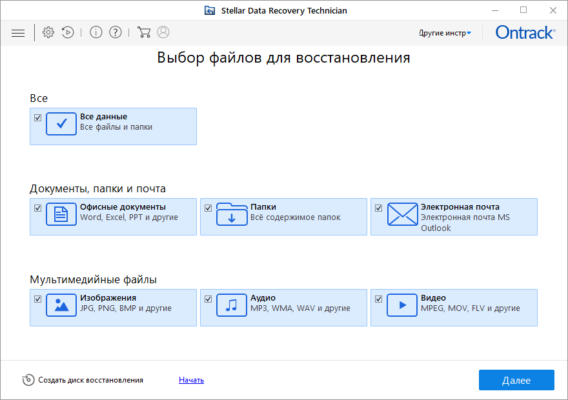
The interface of Ontrack EasyRecovery Toolkit 16.0.0.8 is clean and intuitive. After launching the software, users simply select the drive or device they wish to recover from, scan for lost data, and preview the results before restoring them.
Quick and Deep Scan Modes
The program offers two scanning modes. Quick Scan is ideal for recently deleted files, while Deep Scan digs deeper into the drive’s sectors to locate lost or corrupted data that standard recovery tools may miss.
Advantages of Using Ontrack EasyRecovery Toolkit
Safe and Secure Recovery Process
The software ensures your original data remains untouched during the recovery process. It creates a read-only copy of the damaged or corrupted drive, preventing further data loss or damage.
High Success Rate
Ontrack’s advanced recovery algorithms deliver one of the highest success rates in the industry. Even if your system has suffered severe corruption, this toolkit can often recover most of your files.
Multi-Platform Compatibility
This version fully supports both Windows 11/10/8/7 and macOS Ventura and Monterey, providing flexibility for mixed-environment users or IT departments managing multiple systems.
What’s New in Version 16.0.0.8
The latest release introduces several improvements for speed, accuracy, and device support:
Faster scan performance for large drives.
Enhanced SSD recovery algorithm.
Improved preview function for photos and videos.
Expanded compatibility with new file systems and RAID controllers.
Best Use Cases
For Individuals
Recover deleted photos, documents, and videos from PCs, cameras, or flash drives with just a few clicks.
For Businesses
Ideal for IT professionals handling drive failures, accidental formatting, or RAID reconstruction in enterprise environments.
Conclusion
Reliable and Complete Data Recovery Solution
Ontrack EasyRecovery Toolkit 16.0.0.8 stands out as one of the most dependable recovery tools available today. With its easy interface, advanced features, and strong compatibility, it gives users complete control over their data restoration process.
Whether you’re rescuing lost family photos or recovering mission-critical business files, this version ensures a fast, safe, and effective recovery every time.
✔ Tested: This software was tested on Windows 10 & Windows 11 and works smoothly without issues.
Frequently Asked Questions
- Is this software free?
Yes, it can be downloaded and used for free. - Does it support Windows 11?
Yes, it works perfectly on Windows 10 and 11. - Is it safe to use?
Yes, the software was scanned and tested before publishing.
Last updated: January 2026