🎥 Aiseesoft Video Converter Ultimate 10.9.18 – Convert, Edit, and Enhance Videos Like a Pro
Aiseesoft Video Converter Ultimate 10.9.18 is one of the most comprehensive video processing tools available today. Designed for both professionals and everyday users, it allows you to convert, edit, enhance, and compress videos quickly and efficiently. Whether you’re dealing with 4K, 5K, or even 8K resolution, this program handles it all with excellent performance and quality.
⚙️ Advanced Video Conversion Capabilities
Aiseesoft Video Converter Ultimate supports over 1000 video and audio formats, including MP4, AVI, MOV, MKV, FLV, WMV, MP3, and more. Its built-in high-speed encoding engine ensures 30x faster conversion compared to traditional converters.
With full support for NVIDIA, AMD, and Intel GPU acceleration, you can convert large video files in seconds without losing quality. The tool also preserves audio synchronization and supports batch conversions for multiple files at once.
🎬 Powerful Video Editing Tools
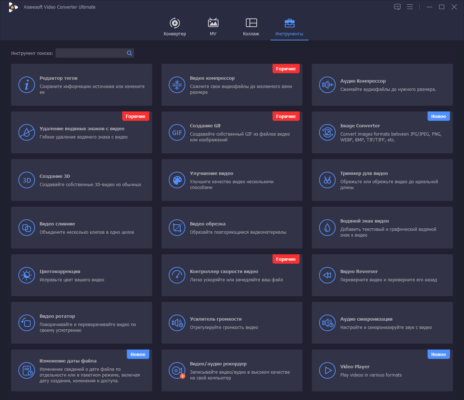
Besides conversion, Aiseesoft Video Converter Ultimate 10.9.18 doubles as a video editor. You can trim, crop, rotate, and merge clips easily. The built-in filters and effects help you enhance brightness, contrast, and saturation, while the watermark tool lets you add logos or subtitles professionally.
You can even stabilize shaky videos, remove noise, or adjust playback speed — all in a simple, intuitive interface that’s easy to master.
🔊 Audio Extraction and Enhancement
The software includes a robust audio extraction feature that allows you to rip audio tracks from any video. Extract your favorite music or podcast from MP4, YouTube, or DVD and convert it into MP3, FLAC, or WAV.
With built-in noise reduction and volume normalization, you can ensure studio-quality sound for your projects.
📦 Compress, Merge, and Convert DVDs
Aiseesoft Video Converter Ultimate goes beyond simple file conversion — it also includes tools to compress videos, combine clips, and rip DVDs to digital formats. You can reduce file size without compromising quality, making it perfect for uploading to YouTube, Instagram, or TikTok.
The DVD ripper feature lets you back up your entire disc library in digital form, preserving quality and subtitles.
💡 AI Video Enhancer
One of the standout features of this version is the AI-powered enhancement engine. It can automatically upscale resolution, remove noise, and optimize colors using deep learning algorithms. This ensures your videos look sharp and professional, even if they were recorded with older devices.
🖥️ Easy-to-Use Interface
Aiseesoft designed the interface with simplicity in mind. You can drag and drop files, select output formats, and start conversion with one click. The real-time preview window allows you to see every change before saving your video.
Even beginners can perform complex tasks like adding effects, editing metadata, or converting entire folders with ease.
🚀 Why Choose Aiseesoft Video Converter Ultimate 10.9.18
Supports over 1000 video/audio formats
GPU acceleration for ultra-fast processing
Built-in video editor and compressor
AI enhancement for better video quality
DVD ripping and 8K/4K conversion support
User-friendly interface with batch operations
🧭 System Requirements
Compatible with Windows 7, 8, 10, 11 and macOS 10.12 or later. Requires at least 4GB RAM, dual-core processor, and 200MB of free disk space.
✅ Conclusion
Aiseesoft Video Converter Ultimate 10.9.18 is more than a video converter — it’s a complete multimedia toolkit for anyone who wants professional results without complexity. Whether you’re editing a short clip or converting an entire film library, this software delivers unmatched quality and speed.
Official Website:
https://www.aiseesoft.com/video-converter-ultimate/
✔ Tested: This software was tested on Windows 10 & Windows 11 and works smoothly without issues.
Frequently Asked Questions
- Is this software free?
Yes, it can be downloaded and used for free. - Does it support Windows 11?
Yes, it works perfectly on Windows 10 and 11. - Is it safe to use?
Yes, the software was scanned and tested before publishing.
Last updated: January 2026