
FX Draw Tools MultiDocs 25.10.19: The Ultimate Drawing Tool for Educators & Students 🧑🏫✨
Creating precise mathematical diagrams, geometric shapes, graphs, and scientific illustrations for worksheets, tests, presentations, or lessons can be time-consuming and technically challenging. FX Draw Tools MultiDocs 25.10.19 is a professional-grade drawing application specifically designed for mathematics and science teachers, educators, and students who need to produce high-quality, accurate diagrams quickly and easily.
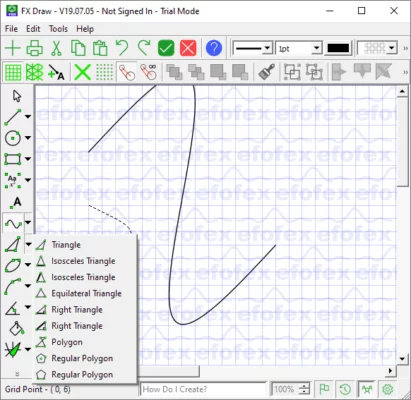
Built on the robust FX Draw engine, MultiDocs enhances the experience by allowing management of multiple drawing documents simultaneously, streamlining workflows for extensive content creation.
🎯 Why Use FX Draw Tools MultiDocs?
- ✅ Mathematical & Scientific Focus: Tailored for creating precise diagrams
- ✅ Intuitive & Fast: Powerful tools designed for speed and accuracy
- ✅ Multiple Document Support: Work on several drawings at once (MultiDocs)
- ✅ Extensive Shape & Symbol Library: Thousands of math symbols and shapes
- ✅ Easy Integration: Insert drawings into Word, PowerPoint, PDFs, etc.
- ✅ Educator-Designed: Built with the needs of teachers and students in mind
Perfect for math teachers, science educators, tutors, students, and anyone needing accurate technical drawings.
✨ Key Features of MultiDocs 25.10.19
📐 1. Precision Drawing Tools
- Automatic labeling for points, angles, sides, and measurements
- Intelligent construction of geometric shapes (perpendicular lines, parallel lines, bisectors)
- Angle marking and labeling with customizable notation
- Grid and axis drawing for graphs and coordinate geometry
📈 2. Graphing Capabilities
- Function graphing (linear, quadratic, trigonometric, etc.)
- Coordinate plane with customizable scales
- Point plotting and curve sketching
- Calculus tools (tangent lines, area under curve)
🧮 3. Extensive Symbol & Shape Library
- Thousands of mathematical symbols (Greek letters, operators, sets)
- Pre-made geometric shapes (polygons, solids, nets)
- Chemical structure templates (optional add-on)
- Customizable text and labels with math fonts
🔄 4. MultiDocs Workflow Enhancement
- Open and manage multiple drawing documents simultaneously
- Effortlessly switch between different diagrams or projects
- Copy and paste elements between documents
- Streamlined workflow for creating multiple related diagrams
📤 5. Flexible Output & Integration
- Export to various formats (WMF, EMF, PNG, JPG, SVG)
- Seamless insertion into Microsoft Office applications
- High-resolution output suitable for printing
- Easy sharing of diagrams with students or colleagues
🛠️ Ideal For:
- Mathematics Teachers: Creating worksheets, tests, and lesson diagrams
- Science Educators: Drawing molecular structures, physics diagrams
- Students: Creating precise homework or project illustrations
- Tutors: Generating custom practice problems with diagrams
- Anyone: Requiring accurate, professional-looking technical drawings
💡 Tip: Use the automatic labeling feature to quickly add point names, angle measures, or side lengths to geometric figures.
🆚 FX Draw MultiDocs vs. General Drawing Tools
FX Draw MultiDocs provides specialized tools that general software cannot match for mathematical and scientific illustration.
💡 Final Thoughts: Draw Math with Precision & Ease
FX Draw Tools MultiDocs 25.10.19 empowers educators and students to create accurate, professional diagrams effortlessly. By combining the power of FX Draw with multi-document management, it significantly enhances productivity for anyone involved in mathematical or scientific content creation.
✏️ Draw. Calculate. Illustrate. Teach.
🌐 Official website: https://www.efofex.com (Note: Verify exact product page for FX Draw Tools MultiDocs)
💻 Compatible with Windows. Requires license purchase.
✔ Tested: This software was tested on Windows 10 & Windows 11 and works smoothly without issues.
Frequently Asked Questions
- Is this software free?
Yes, it can be downloaded and used for free. - Does it support Windows 11?
Yes, it works perfectly on Windows 10 and 11. - Is it safe to use?
Yes, the software was scanned and tested before publishing.
Last updated: January 2026