
Forgetting your Windows password can be frustrating, especially when it prevents you from accessing important files, applications, and documents. Traditional solutions like reinstalling Windows often lead to data loss and wasted time. This is where imyPass Windows Password Reset 1.0.12 comes in. It is a powerful and user-friendly tool that allows you to reset or remove forgotten passwords on Windows accounts quickly, without losing your data and buy.
What is imyPass Windows Password Reset?
imyPass Windows Password Reset is a professional password recovery and reset software designed for Windows users. It provides multiple solutions to unlock a locked Windows account, including local accounts and administrator accounts.
The version 1.0.12 enhances stability, adds support for the latest Windows updates, and makes the reset process smoother and more secure.
🔑 Key Features of imyPass Windows Password Reset 1.0.12
1. Reset or Remove Passwords
Quickly reset forgotten Windows login passwords or completely remove them, allowing instant access to your account.
2. Support for All User Types
Works with local users, administrators, and even Microsoft account logins.
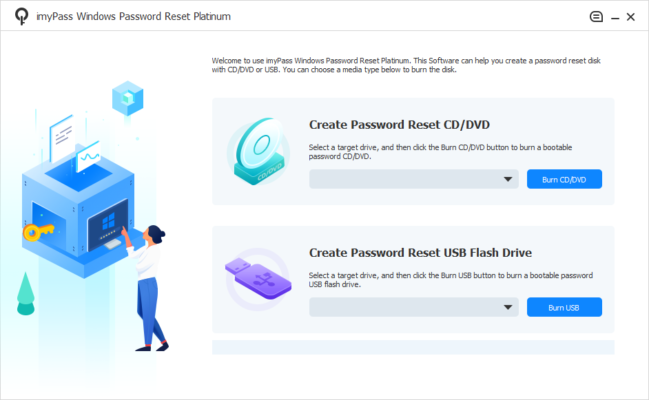
3. Create Bootable Reset Disk
Allows you to create a bootable USB flash drive or CD/DVD to reset passwords even when you cannot log in to Windows.
4. Wide Windows Compatibility
Supports Windows 11, 10, 8.1, 8, 7, Vista, and XP.
5. Multiple Editions Available
imyPass offers Standard, Professional, Ultimate, and Technician editions, suitable for personal or business use.
6. Data Protection
Ensures your files, applications, and settings remain untouched during the password reset process.
7. User-Friendly Interface
A simple, step-by-step wizard makes it accessible even to non-technical users.
⚡ Benefits of Using imyPass Windows Password Reset
No Data Loss: Unlike reinstalling Windows, this tool resets the password without affecting your files.
Fast and Reliable: Quickly unlock your system within minutes.
Flexible Options: Choose between resetting or removing the password entirely.
Supports Multiple Accounts: Manage and reset several user accounts on the same device.
Ideal for IT Professionals: Technician edition helps IT teams manage multiple machines efficiently.
🛠️ What’s New in Version 1.0.12?
Improved compatibility with Windows 11 updates.
Faster bootable disk creation.
Enhanced security algorithms for safer password resets.
Minor bug fixes and UI improvements.
📥 How to Use imyPass Windows Password Reset 1.0.12
Download & Install the software on an accessible computer.
Create a Bootable Disk – Insert a USB drive or CD/DVD and let the software prepare it.
Boot from Disk – Insert the bootable media into the locked PC and restart.
Select Account – Choose the locked Windows account.
Reset or Remove Password – Confirm the process and reboot into Windows without restrictions.
Conclusion
imyPass Windows Password Reset 1.0.12 is a must-have tool for anyone who struggles with forgotten Windows login credentials. Its ability to reset or remove passwords quickly, without risking data loss, makes it a superior alternative to traditional recovery methods.
Whether you’re an individual locked out of your personal computer or an IT technician handling multiple systems, imyPass offers a reliable, secure, and efficient solution to password recovery.
If you need a simple yet powerful way to unlock your Windows account, this version of imyPass Windows Password Reset is an excellent choice.
✔ Tested: This software was tested on Windows 10 & Windows 11 and works smoothly without issues.
Frequently Asked Questions
- Is this software free?
Yes, it can be downloaded and used for free. - Does it support Windows 11?
Yes, it works perfectly on Windows 10 and 11. - Is it safe to use?
Yes, the software was scanned and tested before publishing.
Last updated: January 2026