
For users who need a fast and reliable video editing tool, VirtualDub 1.10.4 continues to be one of the most trusted programs. Known for its open-source nature and lightweight performance, this version provides everything from video capture to quick editing and file compression. It is especially popular among users who want a simple yet powerful tool for processing AVI files on Windows.
What Is VirtualDub?
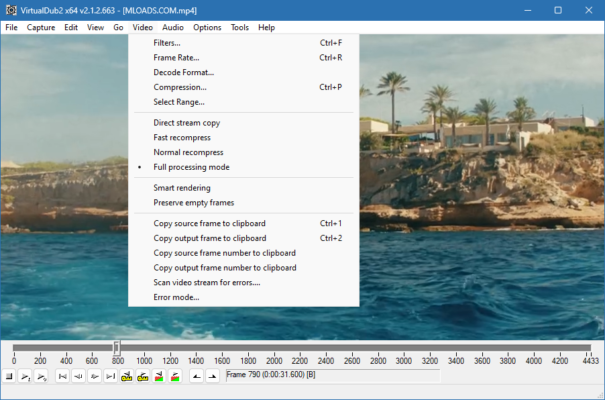
VirtualDub is a free, open-source video capture and editing program designed for Windows. Unlike professional non-linear editors, VirtualDub is focused on speed and simplicity. It allows users to cut, trim, filter, and compress videos quickly without unnecessary features. This makes it an excellent choice for anyone looking for lightweight editing software.
Key Features of VirtualDub 1.10.4
The 1.10.4 release includes performance updates and bug fixes, making the software stable and reliable. Some of its main features include:
- Video Capture Support – Record directly from webcams, TV tuner cards, or capture devices.
- Batch Processing – Process multiple files at once to save time.
- Real-Time Compression – Apply video and audio compression during capture or editing.
- Video Filters – Use filters for resizing, cropping, sharpening, and noise reduction.
- AVI File Editing – Designed for precise frame-by-frame editing of AVI files.
- Lightweight Performance – Runs efficiently on older and newer Windows systems.
Benefits of Using VirtualDub
VirtualDub 1.10.4 is ideal for users who need basic editing tools without the complexity of advanced video editors. It is free, resource-friendly, and capable of handling essential tasks such as trimming, compression, and applying filters.
Because it is open-source, users also benefit from a wide range of third-party plugins that expand its functionality. This flexibility allows the program to remain relevant even years after its original release.
Why Choose VirtualDub in 2025?
While modern editors like Adobe Premiere and DaVinci Resolve dominate the professional market, VirtualDub remains highly valuable for simple tasks. It is perfect for quick edits, AVI file handling, and efficient compression without consuming system resources.
Users who prefer speed and reliability often find VirtualDub to be a perfect solution. It may not have advanced visual effects, but its straightforward workflow ensures efficiency and stability.
Final Thoughts
VirtualDub 1.10.4 is a classic video editing tool that has stood the test of time. Its combination of simplicity, speed, and open-source flexibility makes it an excellent option for quick video capture and editing. Whether you are trimming clips, applying filters, or compressing files, VirtualDub provides the essential tools you need without unnecessary complexity.
✔ Tested: This software was tested on Windows 10 & Windows 11 and works smoothly without issues.
Frequently Asked Questions
- Is this software free?
Yes, it can be downloaded and used for free. - Does it support Windows 11?
Yes, it works perfectly on Windows 10 and 11. - Is it safe to use?
Yes, the software was scanned and tested before publishing.
Last updated: January 2026