When it comes to data security, simply deleting files or formatting a drive is not enough. Deleted files can often be recovered using advanced recovery tools, which may pose a serious privacy risk. Lowvel 3053 is a lightweight, free, and effective low-level disk wiping tool that permanently erases all data from your storage devices, ensuring it cannot be restored by any recovery software.
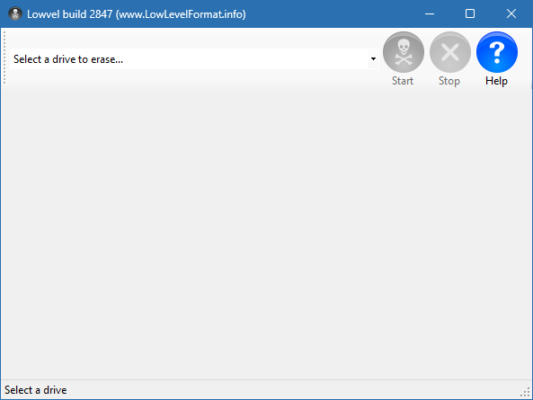
What is Lowvel?
Lowvel is a specialized utility designed to perform secure data wiping on hard drives, SSDs, and other storage media. Unlike standard formatting, Lowvel overwrites every sector of the disk with zeroes, making it impossible to retrieve any previously stored information.
This makes it especially valuable for individuals and businesses who want to securely dispose of old hardware or protect sensitive data from falling into the wrong hands.
Key Features of Lowvel 3053
1. Secure Data Erasure
Performs a low-level format by overwriting every sector.
Prevents recovery of deleted or formatted files.
2. Wide Device Support
Works with HDDs, SSDs, external drives, and USB storage.
Supports both old and modern storage technologies.
3. Lightweight & Free
No installation required – portable tool.
Simple interface that even beginners can use.
4. Fast and Efficient
Optimized algorithms for quick erasure.
Supports wiping of large-capacity drives.
5. Privacy Protection
Ensures sensitive information like financial data, personal files, or business documents cannot be restored.
What’s New in Version 3053?
Enhanced compatibility with Windows 10 and Windows 11.
Improved SSD wiping algorithms to comply with TRIM technology.
Performance optimization for faster wiping of large drives.
Minor bug fixes and interface improvements.
Benefits of Using Lowvel 3053
For Individuals
Permanently remove personal files before selling or donating your PC.
Eliminate traces of browsing history, documents, and media files.
For Businesses
Protect confidential data before decommissioning old servers or laptops.
Meet compliance requirements for data destruction in regulated industries.
For IT Professionals
A reliable tool for bulk erasure of multiple drives.
Portable and easy to integrate into IT security workflows.
How to Use Lowvel 3053
Step 1: Download and Launch
Download Lowvel 3053 and run it directly – no installation needed.
Step 2: Select the Drive
Choose the hard drive, SSD, or external device you want to wipe.
Step 3: Confirm Operation
Since wiping is irreversible, confirm your selection carefully.
Step 4: Start Wiping
Lowvel will overwrite every sector with zeroes, ensuring complete erasure.
Why Choose Lowvel Over Other Tools?
While many commercial data wiping solutions exist, Lowvel 3053 stands out because:
It is completely free.
It is lightweight and portable.
It performs true low-level formatting rather than just deleting partitions.
It is reliable and widely trusted by IT professionals.
Conclusion
In today’s digital world, protecting your data is more important than ever. Lowvel 3053 offers a simple yet highly effective way to ensure that sensitive information cannot be recovered after deletion. Whether you are an individual, a business, or an IT professional, this tool provides peace of mind when disposing of or repurposing storage devices.
For anyone looking for a free, portable, and powerful low-level disk wiping solution, Lowvel 3053 is an excellent choice.
✔ Tested: This software was tested on Windows 10 & Windows 11 and works smoothly without issues.
Frequently Asked Questions
- Is this software free?
Yes, it can be downloaded and used for free. - Does it support Windows 11?
Yes, it works perfectly on Windows 10 and 11. - Is it safe to use?
Yes, the software was scanned and tested before publishing.
Last updated: January 2026