
Windows 10 and Windows 11 are packed with features that improve usability — but many of them also collect user data and share it with Microsoft. For users who value privacy and control, O&O ShutUp10 1.9.1444 offers a simple yet powerful way to protect your information. This lightweight utility allows you to disable unwanted tracking and telemetry features with just a few clicks, giving you complete command over your system’s privacy.
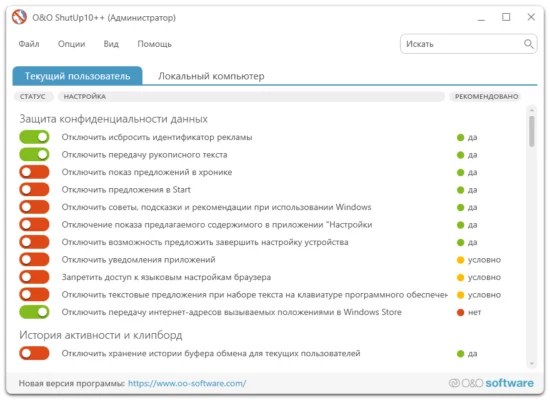
What Is O&O ShutUp10 1.9.1444?
O&O ShutUp10 is a free Windows utility developed by O&O Software. It provides a comprehensive dashboard where users can fine-tune privacy, security, and system settings that are otherwise buried deep in the Windows configuration menus.
Unlike other tools that modify the registry manually, O&O ShutUp10 applies changes safely and reversibly. You can easily switch between recommended and advanced settings, ensuring you find the perfect balance between functionality and privacy.
Key Features of O&O ShutUp10 1.9.1444
Full Privacy Control
Disable Windows telemetry, data collection, location tracking, and background synchronization services that may compromise user privacy.Safe Configuration Options
Every setting includes a clear explanation of its function and potential side effects, so users can make informed decisions before applying changes.Recommended Settings Presets
For convenience, O&O ShutUp10 offers ready-made profiles such as “Recommended” and “Recommended + Limited Functionality.” These presets allow beginners to quickly enhance privacy without confusion.Disable Cortana and Activity Tracking
If you don’t use Cortana or Timeline, you can easily turn them off to stop background data collection and improve performance.Windows Update and App Control
Control how Windows updates are downloaded and installed, and restrict unnecessary background app permissions that consume resources.Portable and Lightweight
The program doesn’t require installation — just run the executable file. It’s perfect for IT professionals who need a quick privacy fix on multiple PCs.Create and Restore System States
O&O ShutUp10 allows you to create a restore point before applying changes, ensuring that you can safely revert any setting at any time.
Why Use O&O ShutUp10 1.9.1444?
Privacy concerns are growing as modern systems continuously send telemetry data to servers. O&O ShutUp10 puts control back in your hands by letting you decide what Windows can and cannot access.
For example, it can block advertising IDs, stop location tracking, disable cloud clipboard syncing, and even prevent apps from accessing your camera or microphone.
In addition, by turning off unnecessary background services, you can experience better system performance and reduced resource usage, making your computer faster and more efficient.
How to Use O&O ShutUp10
Download and launch O&O ShutUp10 (no installation required).
Create a restore point for safety.
Choose a preset — Recommended or Advanced.
Apply changes and restart your computer.
After restarting, your Windows system will be optimized for privacy and efficiency without compromising essential functions.
System Requirements
Operating System: Windows 10, Windows 11
Processor: 1GHz or faster
RAM: 1GB minimum
Storage: 50MB free disk space
Final Thoughts
O&O ShutUp10 1.9.1444 is one of the best free privacy tools available for Windows users. It combines simplicity, transparency, and safety, allowing anyone — from beginners to IT professionals — to secure their system in minutes.
With this tool, you’re not just disabling tracking; you’re reclaiming control over your personal data and improving your system’s performance.
If you value digital privacy and want to keep Windows running cleanly and securely, O&O ShutUp10 1.9.1444 is an essential utility to add to your toolkit.
✔ Tested: This software was tested on Windows 10 & Windows 11 and works smoothly without issues.
Frequently Asked Questions
- Is this software free?
Yes, it can be downloaded and used for free. - Does it support Windows 11?
Yes, it works perfectly on Windows 10 and 11. - Is it safe to use?
Yes, the software was scanned and tested before publishing.
Last updated: January 2026