
Optimize Game Booster 1.0.6.0 is a compact, user-friendly system optimization tool designed to improve gaming performance on Windows PCs. Whether you’re playing on a budget laptop or a mid-range desktop, this lightweight utility helps maximize FPS (frames per second), reduce lag, and minimize stuttering by automatically optimizing system resources before you launch your game.
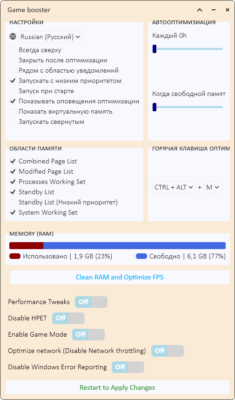
Unlike heavy-duty optimization suites, Optimize Game Booster 1.0.6.0 focuses on simplicity and speed — it doesn’t require installation, runs in the background with minimal footprint, and instantly frees up RAM and CPU power by closing non-essential processes.
Perfect for gamers who want a quick performance boost without tweaking settings manually.
What Is Optimize Game Booster?
Optimize Game Booster 1.0.6.0 is a standalone Windows application that acts as a pre-game optimizer. When activated, it:
- Closes unnecessary background applications
- Frees up RAM
- Sets CPU priority to “High” or “Realtime”
- Disables startup services that consume resources
- Improves system responsiveness during gameplay
It’s especially useful for low-end PCs or older systems struggling to run modern games smoothly.
✅ No installation required
✅ Runs silently in the system tray
✅ Compatible with all games (Steam, Epic, standalone, etc.)
Key Features of Optimize Game Booster 1.0.6.0
1. One-Click Optimization
With a single click, the tool analyzes your system and shuts down non-critical background tasks such as:
- Web browsers (Chrome, Firefox)
- Messaging apps (Discord, Skype)
- Update services (OneDrive, Adobe Updater)
- Auto-start programs
This frees up valuable RAM and CPU cycles for your game.
2. Real-Time Resource Monitoring
A built-in dashboard shows:
- Current RAM usage
- CPU load
- Active processes
- System temperature (if supported)
Helps you decide when to optimize before launching a game.
3. Customizable Optimization Profiles
Create profiles for different games:
- Light optimization (keeps essential apps like Discord)
- Full boost (maximum performance, closes almost everything)
- Custom rules (choose which apps to keep running)
Ideal for streamers who need to keep OBS or chat apps open.
4. Auto-Start with Windows
Enable the tool to run at startup so it’s always ready. It sits quietly in the system tray until you need it.
5. Safe & Reversible Changes
The booster does not modify system files or registry settings permanently. All changes are temporary — your apps and services return to normal after you exit the game.
6. Lightweight & Portable
- File size: Less than 5 MB
- No admin rights required (basic mode)
- Can be run from a USB drive
Great for use on shared or temporary machines.
How to Use Optimize Game Booster 1.0.6.0
- Download the tool from a trusted source (ZIP or EXE).
- Extract and run GameBooster.exe.
- The app appears in the system tray (near the clock).
- Click the icon and select “Optimize System”.
- Wait a few seconds while background apps are paused.
- Launch your game — enjoy smoother performance!
- After gaming, click “Restore System” to bring back closed apps.
💡 Tip: Add exclusions for apps you want to keep running (e.g., voice chat, streaming software).
Who Should Use This Tool?
✅ Gamers with low-spec PCs – Get extra FPS from older hardware
✅ Laptop users – Improve performance on integrated graphics
✅ Casual players – Easy way to boost game speed without technical knowledge
✅ Streamers – Balance gaming and broadcasting performance
✅ Repair technicians – Quick fix for sluggish systems
Game Booster vs. Manual Optimization
This tool saves time and ensures consistent optimization every time you play.
Final Thoughts
Optimize Game Booster 1.0.6.0 may not replace hardware upgrades, but it’s an excellent way to squeeze extra performance out of your current system. By streamlining background activity and prioritizing your game, it delivers noticeable improvements in frame rate, loading times, and overall smoothness — especially on entry-level machines.
Best of all, it’s simple, safe, and fast, making it a must-have tool for any Windows gamer looking to get the most out of their setup.
🎮 Download Optimize Game Booster 1.0.6.0 today and turn your underpowered PC into a better gaming machine — with just one click Steam Origin or Epic Games.
✔ Tested: This software was tested on Windows 10 & Windows 11 and works smoothly without issues.
Frequently Asked Questions
- Is this software free?
Yes, it can be downloaded and used for free. - Does it support Windows 11?
Yes, it works perfectly on Windows 10 and 11. - Is it safe to use?
Yes, the software was scanned and tested before publishing.
Last updated: January 2026