
Epic Games Store 18.5.0 is the latest stable release of one of the most dynamic digital distribution platforms for PC gamers and developers. Developed by Epic Games, the creators of Fortnite and the Unreal Engine, this version delivers enhanced performance, smoother UI navigation, better game library management, and improved download stability — making it a must-have for every PC gamer.
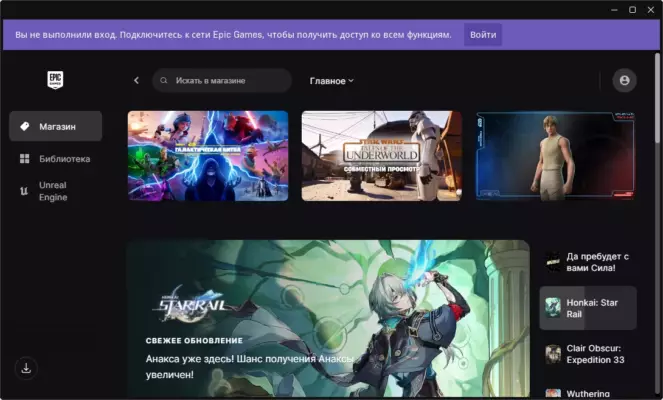
While the Epic Games Store started as a challenger to Steam, it has evolved into a full-featured platform offering exclusive titles, free weekly games, developer-friendly revenue splits (88/12), and deep integration with Unreal Engine projects.
Why Choose Epic Games Store 18.5.0?
The 18.5.0 update focuses on:
- ✅ Faster startup and reduced memory usage
- ✅ Improved game installation and update speeds
- ✅ Better cloud sync and account management
- ✅ Enhanced parental controls and privacy settings
- ✅ Support for DirectX 12 Ultimate and ray tracing titles
Whether you’re playing Fortnite, downloading free games, or developing your own game with Unreal Engine, the Epic Games Store is now a central hub for the modern gaming ecosystem.
Key Features of Epic Games Store 18.5.0
1. Free Weekly Games
One of the most popular features:
- Get 1–2 free games every week
- Past titles include GTA V, Borderlands 3, Subnautica, and Doom 64
- Once claimed, games are yours forever — no subscription needed
Just log in weekly and add them to your library.
2. Exclusive & Indie Titles
Epic partners with studios to bring exclusive PC releases, such as:
- Senua’s Saga: Hellblade II
- The Outer Worlds
- Control
- Psychonauts 2
- Palworld (early access)
Also supports indie developers with visibility and fair revenue sharing.
3. Fortnite & Live Events
The Epic Games Store is the official launcher for Fortnite (Battle Royale, Creative, Save the World). It also hosts:
- In-game events (e.g., Travis Scott Concert, Marvel Crossover)
- Early access to new seasons
- Cross-platform progression
4. Unreal Engine Integration
For developers:
- Download Unreal Engine 5 (free for most uses)
- Access templates, assets, and Marketplace content
- Publish your game directly to the Epic Store
- Use Nanite, Lumen, and MetaHuman tools
Ideal for students, indie devs, and AAA studios.
5. Game Library & Cloud Saves
- Organize your games with custom tags
- Enable cloud saves for supported titles
- Sync settings and progress across devices
- View playtime, achievements, and updates
6. Performance & Settings Optimization
- Set per-game launch options
- Limit bandwidth for downloads
- Choose install locations (SSD/HDD)
- Run games in windowed, borderless, or fullscreen mode
7. Security & Account Protection
- Two-factor authentication (2FA) via email or authenticator apps
- Session management (view active logins)
- Easy password recovery
- Family Link (parental controls)
How to Download & Install Epic Games Store 18.5.0
- Visit the Official Website
Go to: https://store.epicgames.com - Download the Installer
Click “Download” – the file isEpicInstaller.msi(Windows only). - Run the Installer
- Follow the setup wizard.
- Sign in with your Epic account (or create one).
- Update to 18.5.0
The launcher will auto-update to the latest version (18.5.0). - Start Playing
- Claim free games
- Buy new releases
- Launch Fortnite or Unreal Engine
✅ Works on Windows 10 & 11 (64-bit)
🚫 No native macOS/Linux version (except limited Mac support for select games)
Supported Games on Epic Games Store
And thousands more — including early access indie titles.
Epic vs. Steam vs. GOG
Epic wins on developer fairness and free content, though Steam still leads in community features.
Final Thoughts
Epic Games Store 18.5.0 has matured into a powerful, user-friendly platform that offers more than just free games. With its tight integration with Fortnite, Unreal Engine, and exclusive titles, it’s become essential for gamers, creators, and developers alike.
While it started with controversy, it now stands as a legitimate alternative to Steam — especially for those who value cutting-edge tech, free content, and supporting indie developers.
🎮 Download Epic Games Store 18.5.0 today at epicgames.com and unlock a world of PC gaming — for free and for the future.
✔ Tested: This software was tested on Windows 10 & Windows 11 and works smoothly without issues.
Frequently Asked Questions
- Is this software free?
Yes, it can be downloaded and used for free. - Does it support Windows 11?
Yes, it works perfectly on Windows 10 and 11. - Is it safe to use?
Yes, the software was scanned and tested before publishing.
Last updated: January 2026