
Customizing your keyboard can significantly improve productivity, especially if you frequently use specific shortcuts or prefer a different layout. Many advanced software solutions exist, but most are heavy and complicated for casual users. MapKeyboard 2.1 provides a free, simple, and lightweight way to remap keys on Windows computers. Whether you want to disable a troublesome key, swap key functions, or create a custom layout, this tool gets the job done quickly.
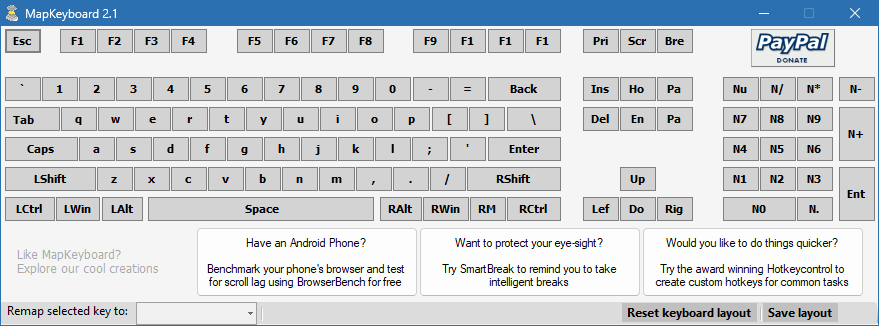
What is MapKeyboard 2.1?
MapKeyboard 2.1 is a Windows utility that allows users to remap keyboard keys without requiring additional drivers or complex setup. Instead of installing large customization suites, you can use this small program to assign different functions to existing keys or disable them entirely. It is particularly useful for laptop users with compact keyboards, gamers who want customized controls, or professionals who rely on efficiency.
Key Features of MapKeyboard 2.1
Key Remapping: Change any key on your keyboard to another key.
Disable Keys: Turn off unused or problematic keys to avoid accidental presses.
Lightweight and Free: Small file size and fast performance with no cost.
Simple Interface: Easy to use, even for beginners.
Windows Compatibility: Works on various versions of Windows, including modern systems.
No Extra Drivers Needed: Functions without requiring additional software layers.
Custom Layouts: Create personalized keyboard setups for work, gaming, or accessibility.
System Requirements
MapKeyboard 2.1 is extremely lightweight and works on most Windows PCs.
Operating System: Windows XP, Vista, 7, 8, 10, or 11
Processor: Intel/AMD CPU, 1 GHz or faster
RAM: 512 MB minimum
Storage: Less than 5 MB of free space
Input Device: Standard keyboard
How to Download and Install MapKeyboard 2.1
Visit the official MapKeyboard website or a trusted software repository.
Download the MapKeyboard 2.1 installer.
Run the setup file and follow the simple installation process.
Launch the program and select the key you want to remap.
Assign the new key function or choose to disable it.
Apply changes and restart your computer to activate the new layout.
Why Use MapKeyboard 2.1?
This program is ideal for anyone looking for a straightforward way to modify their keyboard behavior. For example, if your laptop keyboard has a broken key, you can remap its function to another unused key. Gamers can also create custom control schemes for better performance, while office workers can remap keys to increase efficiency in daily tasks. Compared to heavier tools, MapKeyboard 2.1 offers simplicity, speed, and reliability.
Conclusion
MapKeyboard 2.1 is a practical and free solution for remapping and customizing keyboard keys on Windows. With its easy-to-use interface, small size, and powerful functionality, it provides everything you need to personalize your typing experience. Whether you want to disable unwanted keys, replace broken ones, or optimize your layout for gaming and productivity, MapKeyboard 2.1 delivers a simple and effective solution. Download it today and take full control of your keyboard.
✔ Tested: This software was tested on Windows 10 & Windows 11 and works smoothly without issues.
Frequently Asked Questions
- Is this software free?
Yes, it can be downloaded and used for free. - Does it support Windows 11?
Yes, it works perfectly on Windows 10 and 11. - Is it safe to use?
Yes, the software was scanned and tested before publishing.
Last updated: January 2026