
DVDFab 13.0.4.9: The Ultimate Suite for DVD, Blu-ray & Video Processing 🖥️✨
Dealing with protected DVDs, backing up Blu-rays, or converting discs to digital formats? DVDFab 13.0.4.9 is a comprehensive, professional-grade software suite designed to copy, convert, burn, and manage optical media like DVDs and Blu-rays, as well as rip them to popular video formats for playback on various devices.
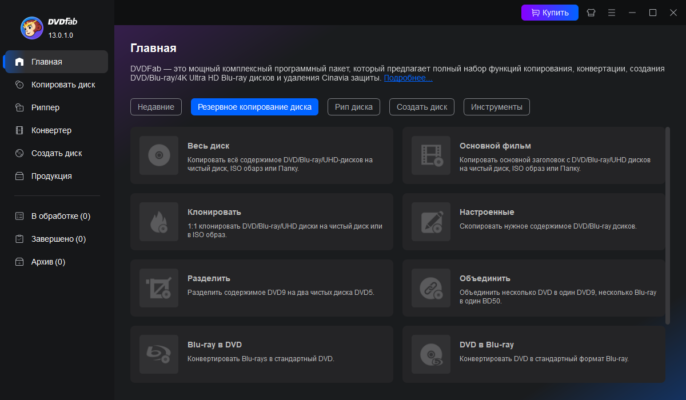
Whether you’re preserving your movie collection, creating backups, or converting for mobile viewing, DVDFab provides the tools and power needed for complex optical media tasks.
🎯 Why Use DVDFab 13.0.4.9?
- ✅ Comprehensive Media Suite: Copy, convert, burn, and more in one application
- ✅ Bypasses Strong DRM Protection: Handles CSS, RCE, RPC, MKB, and more
- ✅ High-Speed Processing: Optimized for multi-core CPUs and GPUs
- ✅ Flexible Output Options: Save as ISO, burn to blank disc, or convert to video files
- ✅ Wide Format Support: Handles DVD, Blu-ray, UHD Blu-ray, and various video formats
- ✅ Customizable Conversion: Adjust parameters like resolution, bitrate, and audio tracks
Perfect for home users, collectors, and anyone needing robust optical media tools.
✨ Key Features of Version 13.0.4.9
📀 1. DVD & Blu-ray Copying
- Full Disc Copy: Create exact 1:1 copies of protected discs
- Main Movie Mode: Copy only the primary feature, saving space
- Split Mode: Compress long movies onto single-layer DVDs
- Clone Mode: Burn directly to blank discs without intermediate files
🔥 2. Video Conversion & Ripping
- Convert to Popular Formats: MP4, AVI, MKV, WMV, MOV, and more
- Device Profiles: Optimize output for iPhone, iPad, Android, PSP, etc.
- Hardware Acceleration: Utilizes NVIDIA CUDA, AMD APP, Intel QSV for faster conversion
- Preserves Quality: Maintains original video and audio fidelity
💿 3. DVD & Blu-ray Burning
- Burn Video to Disc: Create playable DVDs/Blu-rays from video files
- Supports Various Media: DVD-R/RW, DVD+R/RW, BD-R/RE, BD-R/RE DL
- ISO Creation & Burning: Create or burn ISO image files
🛠️ 4. Additional Utilities
- File Transfer: Move converted files to devices or cloud storage
- Remote Access: Access and control DVDFab remotely (optional)
- Batch Processing: Convert multiple files in one go
- Advanced Settings: Fine-tune conversion parameters for specific needs
🛠️ Ideal For:
- Movie Collectors: Backing up physical media collections
- Home Users: Converting discs for playback on smart TVs or mobile devices
- Anyone: Needing to bypass DVD/Blu-ray copy protection
- Users: Creating digital copies for archival or convenience
💡 Tip: Use the “Main Movie” mode to quickly copy just the main feature of a disc, skipping menus and extras.
🆚 DVDFab vs. Other DVD Tools
DVDFab provides a complete solution for copying and converting optical media, including protected content.
⚠️ Important Notes
- Legality: Ensure you comply with local copyright laws regarding copying protected media.
- System Requirements: Requires a PC capable of reading DVDs/Blu-rays.
- Updates: Newer versions may be available; check the official site.
- Usage: Primarily for personal backup or archival of legally owned media.
💡 Final Thoughts: Master Your Optical Media
DVDFab 13.0.4.9 stands as a powerful and versatile suite for anyone needing to manipulate, back up, or convert DVD and Blu-ray content. Its ability to handle protected discs and convert to various formats makes it a valuable tool for media enthusiasts.
📀 Copy. Convert. Burn. Enjoy.
🌐 Official website: https://www.dvdfab.cn (Note: Verify exact product page for DVDFab 13)
💻 Compatible with Windows and macOS.
✔ Tested: This software was tested on Windows 10 & Windows 11 and works smoothly without issues.
Frequently Asked Questions
- Is this software free?
Yes, it can be downloaded and used for free. - Does it support Windows 11?
Yes, it works perfectly on Windows 10 and 11. - Is it safe to use?
Yes, the software was scanned and tested before publishing.
Last updated: January 2026