
FSNotes 6.10: The Minimalist, Privacy-First Notes App Power Users Love ✍️💻
Tired of bloated note apps that track your data or lock you into proprietary formats? FSNotes 6.10 is a sleek, open-source note-taking app built for speed, simplicity, and privacy—exclusively for Apple users (macOS & iOS).
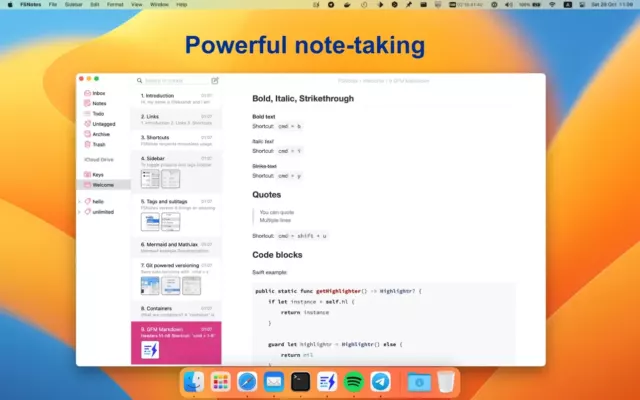
With native Markdown support, instant search, iCloud sync, and zero telemetry, FSNotes lets you focus on writing—not distractions.
🌟 Why Choose FSNotes?
- ✅ 100% offline-first – your notes live on your device
- ✅ Open-source (GitHub) – transparent and community-audited
- ✅ No accounts, no ads, no tracking
- ✅ Uses plain text files (Markdown, RTF, or plain) – future-proof & portable
- ✅ Syncs via iCloud – no third-party servers
Perfect for writers, developers, students, and privacy-conscious users who value control over convenience.
✨ Key Features of FSNotes 6.10
📝 1. Native Markdown Editing
- Live preview or edit in raw Markdown
- Syntax highlighting for code blocks
- Auto-formatting for lists, headers, and links
- Supports CommonMark standard
🗂️ 2. Smart Organization
- Nested folders & tags
- Pin important notes to the top
- Quick filter by folder, tag, or search term
- Keyboard-driven navigation (Vim-like shortcuts optional)
🔍 3. Blazing-Fast Search
- Instant full-text search across all notes
- Search by filename, content, or tags
- Fuzzy matching for typos
☁️ 4. Secure iCloud Sync
- Notes sync seamlessly between Mac and iPhone/iPad
- All data encrypted in transit and at rest (via Apple’s iCloud)
- No data sent to FSNotes servers—because there are none
🎨 5. Clean, Customizable UI
- Dark/light mode
- Adjustable font size & editor width
- Minimalist design with zero clutter
🛠️ Ideal For:
- Developers: Store code snippets, docs, and todos in Markdown
- Writers: Draft essays, journals, or stories with focus
- Students: Organize lecture notes with tags and folders
- Researchers: Keep plain-text references that never expire
💡 Since notes are stored as real files in your iCloud folder, you can also edit them in VS Code, Typora, or any text editor—no vendor lock-in!
🆚 FSNotes vs. Popular Note Apps
FSNotes stands out as the lightest, most private, and most portable option for Apple users who write in Markdown.
💡 Final Thoughts: Notes That Respect You
FSNotes 6.10 proves that great software doesn’t need cloud accounts, AI gimmicks, or subscriptions. It’s a thoughtful, ethical tool that puts your words—and your privacy—first.
✍️ Write freely. Stay private. Own your notes.
🌐 Available free on the Mac App Store and iOS App Store .
🔓 Open-source on GitHub: https://github.com/glushchenko/fsnotes
✔ Tested: This software was tested on Windows 10 & Windows 11 and works smoothly without issues.
Frequently Asked Questions
- Is this software free?
Yes, it can be downloaded and used for free. - Does it support Windows 11?
Yes, it works perfectly on Windows 10 and 11. - Is it safe to use?
Yes, the software was scanned and tested before publishing.
Last updated: January 2026