
🧹 Files Inspector Pro 4.41 – Deep Disk Analysis and Cleanup for Windows
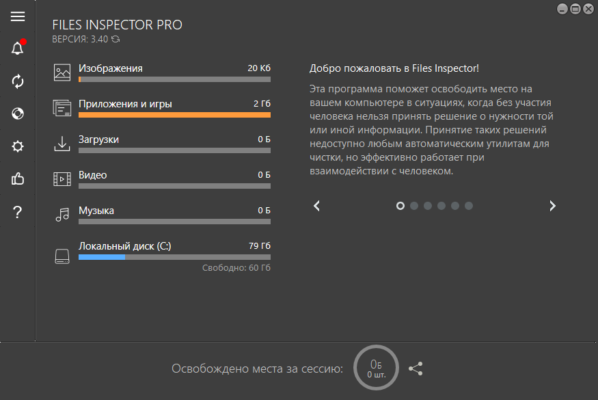
Keeping your computer clean and optimized is crucial for smooth performance and extended drive lifespan. Files Inspector Pro 4.41 by ChemTable Software is a powerful disk analysis and cleanup tool designed to help you easily identify, visualize, and remove unnecessary files that consume valuable storage space.
Whether your drive is running out of room or you simply want to organize your data more efficiently, this utility provides a clear overview of your disk usage, allowing you to take control of every gigabyte.
⚡ Key Features
📊 Disk Space Analyzer
Scan your hard drive or SSD to identify which folders and files take up the most space. Files Inspector displays results in an intuitive tree view and graphical charts for quick understanding.🗑️ Junk File Cleaner
Detect and safely delete temporary files, cache data, and leftover installation files that no longer serve a purpose.🔍 Large File Finder
Locate oversized files (videos, archives, backups) that you might have forgotten about. This feature helps reclaim significant storage space in just minutes.📁 File Preview and Filtering
Preview images, documents, and videos before deleting them. The built-in filter options help narrow down results based on file size, type, or location.🧠 Smart Recommendations
The program provides intelligent suggestions about what files are safe to delete and which should be kept, minimizing the risk of removing important data.💾 Backup Before Deletion
Files Inspector Pro allows you to create automatic backups before cleaning, giving you the ability to restore deleted files if needed.
🆕 What’s New in Version 4.41
Improved scan performance for faster analysis of large disks.
Enhanced detection algorithms for junk and duplicate files.
Updated user interface with better dark mode support.
Minor bug fixes and stability improvements.
💡 Why Choose Files Inspector Pro
Unlike generic disk cleaners, Files Inspector Pro provides visual and detailed insights into your disk usage. Instead of deleting blindly, you can analyze exactly what’s consuming your storage and decide what to remove.
Its tree-based structure makes navigation simple — just expand folders to see which ones occupy the most space. Combined with smart filtering, it’s easy to clean specific directories without affecting system files.
Additionally, it integrates seamlessly with other ChemTable utilities like Reg Organizer for a complete system maintenance suite, giving users professional-grade optimization tools in one ecosystem.
🌈 Ideal Use Cases
Home Users: Free up storage on laptops or PCs running out of space.
Professionals: Keep workstations fast and efficient for productivity.
Photographers & Designers: Locate and remove outdated project files or unused media.
System Administrators: Monitor and maintain disk health across multiple machines.
⚙️ System Requirements
OS: Windows 7, 8, 10, 11 (32-bit & 64-bit)
Processor: Intel/AMD 1GHz or higher
RAM: 1 GB (2 GB recommended)
Disk Space: 100 MB for installation
🔒 Privacy & Safety
All cleaning and analysis processes are performed locally on your system—no files are uploaded or shared externally. Files Inspector Pro ensures complete control over your personal data, with backup options available for extra security.
💡 Final Thoughts
Files Inspector Pro 4.41 is a must-have tool for anyone who values efficiency and organization. Its detailed visual analysis, smart cleaning recommendations, and safety-first approach make it one of the most reliable disk space managers available for Windows.
Whether you’re cleaning up after years of downloads or optimizing your PC for peak performance, this software helps you achieve it quickly and confidently.
🔗 Official Website
👉 https://www.chemtable.com/files-inspector.htm
✔ Tested: This software was tested on Windows 10 & Windows 11 and works smoothly without issues.
Frequently Asked Questions
- Is this software free?
Yes, it can be downloaded and used for free. - Does it support Windows 11?
Yes, it works perfectly on Windows 10 and 11. - Is it safe to use?
Yes, the software was scanned and tested before publishing.
Last updated: January 2026