
Cloud storage has become the default solution for backing up and sharing files, but it often comes with security concerns. Providers like Google Drive, Dropbox, and OneDrive have access to your unencrypted data, leaving you vulnerable to leaks and breaches. Cryptomator 1.17.1 solves this problem by offering open-source, client-side encryption that protects your files before they leave your device.
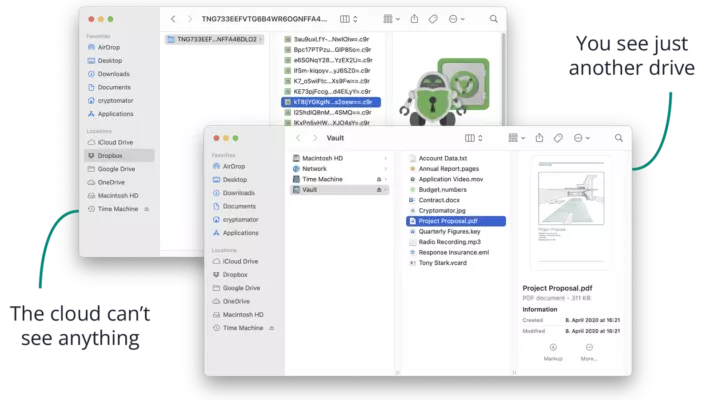
This article explains the key features, benefits, and use cases of Cryptomator 1.17.1, and why it’s one of the most trusted tools for securing cloud storage.
Key Features of Cryptomator 1.17.1
1. Transparent Encryption
Cryptomator encrypts files and folder structures seamlessly, so you can continue using your cloud storage provider without changing your workflow.
2. Cross-Platform Availability
Available on Windows, macOS, Linux, iOS, and Android, Cryptomator ensures you can access your encrypted vaults across all devices.
3. Zero-Knowledge Architecture
Only you have access to your encryption keys. Cryptomator is designed with zero-knowledge principles, meaning no third party, including cloud providers, can read your files.
4. Open-Source Security
The software is fully open-source, enabling transparency, community audits, and trust. Users can verify that no backdoors or hidden vulnerabilities exist.
5. Easy Integration
Cryptomator integrates seamlessly with Dropbox, Google Drive, OneDrive, and other cloud services by creating encrypted vaults inside your synced folders.
6. Performance Improvements in 1.17.1
The new version enhances performance, improves memory handling, and fixes compatibility issues for smoother encryption and decryption processes.
Benefits of Using Cryptomator 1.17.1
- Protects Privacy: Encrypts files locally before they sync to the cloud.
- Cross-Device Security: Access vaults securely from desktops, laptops, and mobile devices.
- User-Friendly Interface: Simple setup process with no technical expertise required.
- Compliance & Trust: Open-source design helps organizations meet privacy regulations like GDPR.
- Peace of Mind: Eliminates the risk of cloud providers or attackers spying on sensitive data.
Use Cases
- Personal File Protection: Secure family photos, financial documents, and personal notes before storing them in the cloud.
- Business Security: Protect client data, contracts, and sensitive business documents.
- Developers & Researchers: Safeguard intellectual property, source code, and research material.
- Cross-Border Privacy: Prevent data snooping when files are stored on servers outside your country.
How It Works
- Download & Install: Get Cryptomator 1.17.1 on your preferred device.
- Create a Vault: Define a password-protected encrypted vault in your cloud folder.
- Add Files: Drag and drop files into the vault; they are encrypted automatically.
- Sync Securely: Files remain protected as they sync to cloud servers.
- Access Anywhere: Unlock your vault on any supported device to view and edit files securely.
Conclusion
With cloud storage becoming more essential, protecting your data has never been more critical. Cryptomator 1.17.1 offers an elegant, secure, and open-source way to encrypt files before uploading them to cloud providers. Its zero-knowledge architecture, cross-platform support, and seamless integration make it an essential tool for anyone concerned about digital privacy.
If you rely on Dropbox, Google Drive, OneDrive, or similar services, Cryptomator 1.17.1 ensures your files stay private — only you control the keys.
✔ Tested: This software was tested on Windows 10 & Windows 11 and works smoothly without issues.
Frequently Asked Questions
- Is this software free?
Yes, it can be downloaded and used for free. - Does it support Windows 11?
Yes, it works perfectly on Windows 10 and 11. - Is it safe to use?
Yes, the software was scanned and tested before publishing.
Last updated: January 2026