
In today’s digital world, data loss can have devastating consequences for both individuals and businesses. From accidental deletions to ransomware attacks, the risks are everywhere. Having a reliable backup solution is no longer optional—it is essential. Iperius Backup 8.6.5 is a powerful and versatile backup software designed to protect your files, applications, and entire systems with advanced features and flexible storage options and buy.
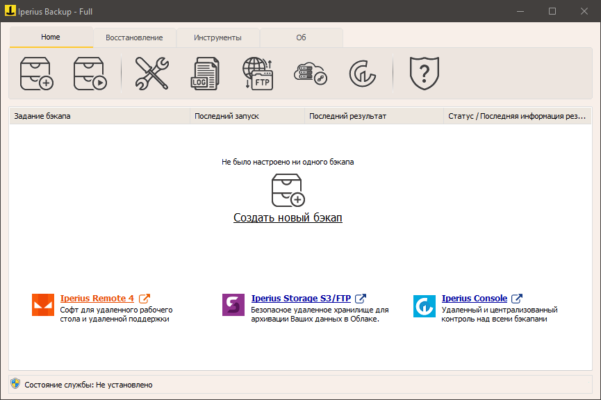
What is Iperius Backup?
Iperius Backup is a comprehensive backup and recovery software for Windows that offers solutions for personal users, IT professionals, and businesses. With support for file-level backups, disk imaging, cloud storage, and database protection, it provides all-in-one functionality for securing critical data.
Unlike many backup tools that focus on a single function, Iperius combines multiple methods into one lightweight and efficient application.
Key Features of Iperius Backup 8.6.5
1. Flexible Backup Options
Users can back up files, folders, entire drives, or system images. It also supports incremental and differential backups, allowing for efficient storage management and faster operations.
2. Cloud Backup Support
Iperius Backup 8.6.5 integrates with popular cloud platforms, including Google Drive, OneDrive, Amazon S3, Dropbox, and Azure Storage. This ensures that data is not only stored locally but also securely preserved offsite.
3. Disk Imaging and Disaster Recovery
The software includes disk-cloning features and the ability to create full system images. In case of hardware failure or a ransomware attack, users can quickly restore their systems to a previous state.
4. Database and Virtual Machine Protection
Iperius supports backup for SQL Server, MySQL, MariaDB, and PostgreSQL databases. It also offers VMware ESXi and Hyper-V backup options, making it a solid choice for IT environments.
5. Advanced Scheduling and Automation
With customizable scheduling, backups can run automatically at specific times, ensuring data protection without manual intervention.
6. Security and Encryption
Iperius Backup includes strong encryption options to secure sensitive files and prevent unauthorized access.
What’s New in Version 8.6.5?
The 8.6.5 release introduces performance optimizations, improved compatibility with the latest Windows updates, and enhanced cloud integration. It also fixes minor bugs and strengthens reliability when handling large-scale backups.
Benefits for Different Users
Home Users: Protect personal files, photos, and system images with simple scheduling and cloud storage.
Small Businesses: Secure business documents, client records, and databases with affordable backup solutions.
IT Administrators: Manage backups for servers, virtual machines, and complex systems with automation and monitoring.
Real-World Applications
Ransomware Protection: Quickly restore clean system images after malware attacks.
Business Continuity: Maintain operations with reliable disaster recovery solutions.
Remote Work Security: Protect employee files with automated cloud backups.
Database Safety: Prevent data loss in mission-critical applications.
Conclusion
Iperius Backup 8.6.5 is a complete backup and recovery solution for Windows environments. Its combination of file-level backup, disk imaging, cloud storage integration, and database protection makes it one of the most versatile tools available.
Whether you are an individual seeking peace of mind or an enterprise managing complex IT infrastructure, Iperius Backup 8.6.5 delivers the reliability and flexibility needed to safeguard your data.
Downloading this version ensures you stay protected against data loss, system failures, and cyber threats with a robust and easy-to-use solution.
✔ Tested: This software was tested on Windows 10 & Windows 11 and works smoothly without issues.
Frequently Asked Questions
- Is this software free?
Yes, it can be downloaded and used for free. - Does it support Windows 11?
Yes, it works perfectly on Windows 10 and 11. - Is it safe to use?
Yes, the software was scanned and tested before publishing.
Last updated: January 2026