
Adobe InCopy 2025 20.5: The Writer’s & Editor’s Gateway to Creative Collaboration 🖥️✨
For writers, editors, and copywriters working within creative teams, the process of writing and editing text often intersects with design layouts created in Adobe InDesign. Adobe InCopy 2025 20.5 bridges this gap, providing a professional writing and editing environment that seamlessly integrates with InDesign, allowing writers and designers to work independently yet collaboratively on the same project.
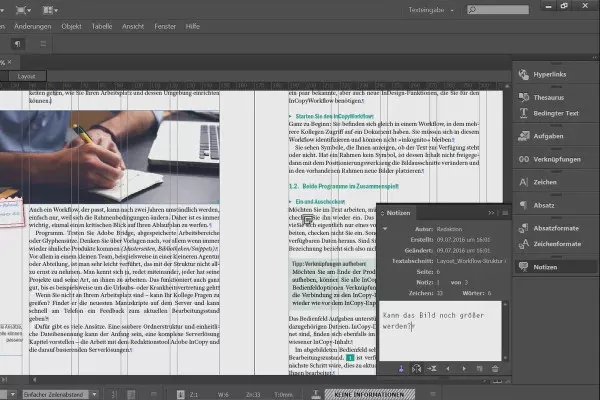
Whether you’re crafting articles, scripts, or marketing copy, InCopy 2025 ensures your content flows perfectly into the final design.
🎯 Why Use Adobe InCopy 2025?
- ✅ Seamless InDesign Integration: Edit text directly linked to InDesign layouts
- ✅ Parallel Workflow: Writers work on content while designers work on layout
- ✅ Professional Editing Tools: Spell-check, track changes, comments, and styles
- ✅ Version Control & History: Access previous versions and track edits
- ✅ Real-time Collaboration: Multiple users can contribute simultaneously
- ✅ Consistent Typography: Access and apply InDesign character and paragraph styles
Perfect for publishers, marketing teams, content creators, and anyone collaborating on text-rich InDesign projects.
✨ Key Features of Version 20.5
📝 1. Tight InDesign Link
- Link directly to InDesign stories and text frames
- See your text in context as it appears in the layout
- Edit text without affecting the designer’s layout work
- Sync changes seamlessly between InCopy and InDesign
✂️ 2. Robust Editing Environment
- Track Changes: View, accept, or reject edits made by others
- Comments & Notes: Communicate directly on the text
- Spell & Grammar Check: Built-in tools for accuracy
- Find & Replace: Advanced search and replace options
🎨 3. Typography & Formatting
- Apply InDesign styles: Use the same character and paragraph styles
- Style management: Create and manage text styles
- Character and paragraph controls: Fine-tune formatting
- Tables & Graphics: Insert and manage basic elements
🔄 4. Collaborative Workflow
- Version history: Access and compare previous versions
- User permissions: Control access and editing rights
- Real-time updates: See changes from other collaborators
- Export & Import: Share documents in various formats (Word, PDF, INX)
⚙️ 5. Enhanced Productivity
- Keyboard shortcuts: Efficient, customizable controls
- Contextual tools: Relevant options based on selected text
- Customizable workspace: Tailor the interface to your needs
🛠️ Ideal For:
- Editors: Reviewing and refining content linked to InDesign files
- Writers: Crafting copy that integrates directly into layouts
- Publishers: Managing multi-author, text-heavy projects
- Creative Teams: Facilitating smooth collaboration between writers and designers
- Anyone: Working on projects requiring precise text-to-layout integration
💡 Tip: Use Track Changes to maintain a clear record of edits and facilitate review processes with your team.
https://www.youtube.com/watch?v=zq5YpOIA13E
🆚 InCopy vs. Other Writing Tools
InCopy excels in integrated design workflows, where text and layout are closely linked.
💡 Final Thoughts: Write, Edit, and Integrate Flawlessly
Adobe InCopy 2025 20.5 is the essential tool for professionals who need to create and refine text content that is intrinsically linked to visual design. By providing a dedicated writing environment that integrates directly with InDesign, it streamlines the creative process and enhances team collaboration.
✍️ Write. Edit. Integrate. Collaborate.
🌐 Official website: https://www.adobe.com/products/incopy.html (Note: Verify exact product page for InCopy 2025)
💻 Part of Adobe Creative Cloud subscription. Compatible with Windows and macOS.
✔ Tested: This software was tested on Windows 10 & Windows 11 and works smoothly without issues.
Frequently Asked Questions
- Is this software free?
Yes, it can be downloaded and used for free. - Does it support Windows 11?
Yes, it works perfectly on Windows 10 and 11. - Is it safe to use?
Yes, the software was scanned and tested before publishing.
Last updated: January 2026