What Is Adobe Creative Cloud Cleaner Tool?
Adobe Creative Cloud Cleaner 4.3.0.834 is an official utility developed by Adobe to repair installation problems, remove corrupted files, and completely clean up remnants of previous installations. When Creative Cloud or any Adobe application fails to install, update, or uninstall properly, this tool provides a quick and safe solution. It ensures a clean environment for reinstalling Adobe products, allowing users to fix persistent system errors and restore smooth functionality.
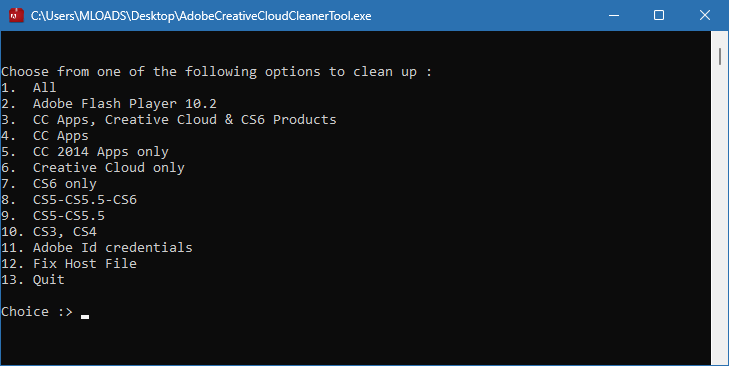
This tool is designed for users who experience repeated installation failures, damaged files, or software conflicts after updates. Unlike traditional uninstallers, Creative Cloud Cleaner goes deeper into your system to delete leftover registry entries, temporary files, and hidden configuration data.
Why You Need Adobe Creative Cloud Cleaner 4.3.0.834
Many users face errors such as “Installation failed,” “App not responding,” or “Creative Cloud not opening.” These problems are often caused by incomplete uninstallations or conflicts between different Adobe versions. Using the Creative Cloud Cleaner Tool eliminates these issues by wiping all Adobe-related traces from your computer.
Here are common situations where this tool becomes essential:
- You cannot install or update Adobe Creative Cloud.
- The Creative Cloud desktop app crashes frequently.
- Old trial versions or beta releases cause license conflicts.
- You migrated to a new device and want to start clean.
- Your Adobe apps no longer open due to corrupted files.
By cleaning your system properly, the tool prepares your computer for a fresh, successful installation.
How to Use Adobe Creative Cloud Cleaner
Using the tool is simple, but it’s important to follow the correct steps for best results:
- Back up your files: Save important projects before running the cleaner.
- Download from Adobe’s official website: Never use third-party copies to avoid malware.
- Close all Adobe programs: Ensure no Adobe apps are running in the background.
- Run the tool as Administrator: This gives it full permission to remove files.
- Choose the software to clean: Select Creative Cloud or any specific Adobe app.
- Restart your computer: After cleaning, reboot to finalize the process.
- Reinstall Adobe products: Download the latest versions directly from Adobe’s website.
This ensures that every trace of previous installations is removed safely and efficiently.
Benefits of Using the Cleaner Tool
- Fix installation errors instantly without manual troubleshooting.
- Save time by avoiding long support procedures.
- Improve system performance by removing unnecessary Adobe services.
- Ensure a clean reinstall for Creative Cloud and all Adobe apps.
- Resolve licensing problems that block access to your tools.
The tool works for all Creative Cloud applications, including Photoshop, Illustrator, Premiere Pro, and Acrobat, helping restore them to optimal condition.
Best Practices for Maintenance
After cleaning your system with the Adobe Creative Cloud Cleaner Tool:
- Keep your Adobe software updated regularly.
- Use only genuine Adobe apps to avoid activation issues.
- Avoid installing multiple versions of the same software.
- Regularly check your system for leftover temporary files.
Following these practices ensures long-term stability and a smooth Adobe experience.
Final Thoughts
Adobe Creative Cloud Cleaner 4.3.0.834 is a must-have tool for anyone facing Adobe installation problems. It provides a safe and thorough cleanup process that removes corrupted data, resets services, and allows for a fresh, error-free installation. Whether you’re a designer, video editor, or developer, using this official utility guarantees your Adobe applications run faster, cleaner, and without interruptions.
✔ Tested: This software was tested on Windows 10 & Windows 11 and works smoothly without issues.
Frequently Asked Questions
- Is this software free?
Yes, it can be downloaded and used for free. - Does it support Windows 11?
Yes, it works perfectly on Windows 10 and 11. - Is it safe to use?
Yes, the software was scanned and tested before publishing.
Last updated: January 2026