What Is SQL Backup Master 8.0.984?
SQL Backup Master 8.0.984 is a robust backup solution designed for Microsoft SQL Server databases. It provides an easy, automated way to back up databases locally or to various cloud storage services such as Google Drive, OneDrive, Dropbox, Amazon S3, and more.
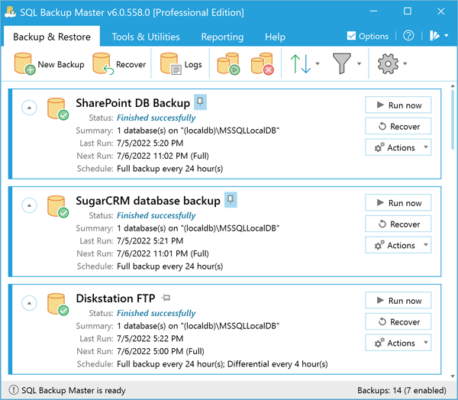
This software is ideal for developers, database administrators, and businesses that need reliable and regular backup automation without complex configurations.
Key Features of SQL Backup Master 8.0.984
🔄 Automatic Backup Scheduling
You can schedule automatic backups at regular intervals, ensuring your databases are always protected. The software supports flexible scheduling with advanced automation settings.
☁️ Cloud and Remote Storage Support
SQL Backup Master allows backups to be stored in multiple destinations — including local folders, FTP servers, and major cloud platforms like Google Drive, Dropbox, and Amazon S3.
🔐 Compression & Encryption
To keep your backups secure and efficient, the tool supports AES encryption and ZIP compression. This helps protect sensitive database data while reducing storage space.
📧 Email Notifications
Receive instant notifications about the status of each backup task, whether it’s successful, failed, or incomplete. This ensures you’re always aware of your database safety.
🧠 Simple and User-Friendly Interface
The program’s interface is intuitive and easy to use, making it suitable for both professionals and beginners in database management.
Why Choose SQL Backup Master?
1. Reliable Backup Automation
SQL Backup Master eliminates the need for manual backup scripts by providing an automated system that works in the background.
2. Flexible Storage Options
You can back up to multiple locations simultaneously, ensuring redundancy and maximum data protection.
3. Advanced Monitoring and Reporting
The software offers detailed logs and reports, giving you full control over your SQL Server backup activities.
4. Cost-Effective Solution
Compared to enterprise-level tools, SQL Backup Master offers excellent value with professional-grade features at an affordable price.
How to Use SQL Backup Master
Install SQL Backup Master on your Windows system.
Connect to your SQL Server instance.
Choose backup destinations (local, FTP, or cloud).
Set up a backup schedule and encryption preferences.
Run or automate the backup process with one click.
It’s that simple — your SQL databases will be safely stored and recoverable whenever needed.
System Requirements
OS: Windows 7, 8, 10, 11, or Windows Server editions
Processor: 1GHz or faster CPU
RAM: Minimum 1GB (2GB recommended)
SQL Server: All editions from 2005 and later
Conclusion
SQL Backup Master 8.0.984 is a comprehensive solution for database administrators who want to automate SQL Server backups securely and efficiently.
It supports multiple destinations, provides encryption and compression, and offers real-time notifications — making it a must-have tool for any SQL environment.
✔ Tested: This software was tested on Windows 10 & Windows 11 and works smoothly without issues.
Frequently Asked Questions
- Is this software free?
Yes, it can be downloaded and used for free. - Does it support Windows 11?
Yes, it works perfectly on Windows 10 and 11. - Is it safe to use?
Yes, the software was scanned and tested before publishing.
Last updated: January 2026