Any to Icon 3.59: Effortlessly Convert Your Images Into Professional Icons 🖥️✨
Need to create custom icons for your applications, websites, or desktop shortcuts from existing images or graphics? Any to Icon 3.59 is a dedicated, user-friendly Windows utility that converts common image formats (like JPG, PNG, BMP, GIF) into standard Windows ICO files and other icon formats.
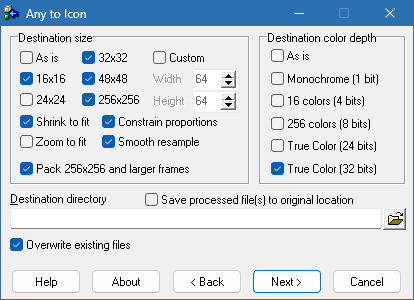
Whether you’re a developer, designer, or just someone wanting to personalize their desktop, Any to Icon provides a straightforward way to generate high-quality, multi-resolution icons.
🎯 Why Use Any to Icon?
- ✅ Simple Conversion: Drag and drop or browse to convert images
- ✅ Multiple Input Formats: Supports JPG, PNG, BMP, GIF, TIFF, and more
- ✅ Multi-Resolution ICO Output: Creates icons with multiple sizes (16×16, 32×32, 48×48, 256×256, etc.)
- ✅ Batch Processing: Convert multiple images at once
- ✅ Adjustable Settings: Modify size, color depth, and transparency
- ✅ Lightweight & Portable: Often runs without installation
Perfect for developers, designers, and anyone needing to create custom icons.
✨ Key Features of Version 3.59
🖼️ 1. Wide Image Format Support
- Input: Convert from JPG, PNG, BMP, GIF, TIFF, PCX, TGA, and other formats
- Output: Generate standard ICO files (compatible with Windows)
- Preserves Transparency: Maintains alpha channels where possible
🧩 2. Multi-Size Icon Creation
- Creates ICO files containing multiple resolutions (e.g., 16×16, 32×32, 48×48, 256×256)
- Ensures compatibility with different Windows contexts (folders, shortcuts, applications)
- Optimizes icon quality at various sizes
⚙️ 3. Flexible Conversion Options
- Resize images to specific dimensions or percentages
- Adjust color depth (e.g., 256 colors, 16-bit, 32-bit)
- Apply dithering to improve color transitions
- Add padding or borders to the icon
🔄 4. Batch Processing
- Convert multiple images into icons in one operation
- Apply the same settings to a whole folder of images
- Saves time for large icon sets
🛠️ Ideal For:
- Software Developers: Creating application icons
- Web Designers: Making favicons or web icons
- UI/UX Designers: Designing custom interface elements
- Power Users: Personalizing desktop shortcuts or folders
- Anyone: Needing to convert an image into a standard Windows icon
💡 Tip: Use a high-resolution source image (e.g., 256×256 or larger) to ensure the best quality for the smaller icon sizes within the ICO file.
🆚 Any to Icon vs. Other Image/Icon Tools
Any to Icon provides a focused, efficient solution for creating ICO files.
💡 Final Thoughts: Create Custom Icons Easily
Any to Icon 3.59 is the go-to tool for anyone needing to convert images into standard Windows icons. Its simplicity, batch processing capability, and support for multi-resolution ICO files make it a valuable utility for developers and designers alike.
🖼️ Select. Convert. Customize. Use.
🔗 (Note: Availability and the official developer for “Any to Icon” can vary. Ensure downloading from a reputable source.)
💻 Compatible with Windows.
✔ Tested: This software was tested on Windows 10 & Windows 11 and works smoothly without issues.
Frequently Asked Questions
- Is this software free?
Yes, it can be downloaded and used for free. - Does it support Windows 11?
Yes, it works perfectly on Windows 10 and 11. - Is it safe to use?
Yes, the software was scanned and tested before publishing.
Last updated: January 2026