💾 R-Studio 9.5: Advanced Data Recovery for Professionals & IT Experts
When data loss strikes—whether from accidental deletion, disk corruption, virus attacks, or hardware failure—you need a solution that’s both powerful and precise. R-Studio 9.5, developed by R-Tools Technology, is a leading professional-grade data recovery software trusted by IT specialists, forensic investigators, and system administrators worldwide.
Unlike basic recovery tools, R-Studio 9.5 handles complex scenarios with ease: encrypted volumes, RAID arrays, damaged partitions, and even drives with bad sectors.
🔍 Why Choose R-Studio 9.5?
R-Studio stands out for its deep scanning algorithms, support for over 200 file types, and compatibility with Windows, macOS, and Linux. Version 9.5 enhances performance, adds new file system support, and improves recovery accuracy—especially for modern SSDs and NVMe drives.
✅ Key Features at a Glance:
- Raw file recovery using file signatures (even without file system)
- RAID reconstruction (supports custom and standard RAID levels)
- Network data recovery – scan and recover from remote computers
- Disk imaging to preserve evidence or prevent further damage
- Support for encrypted files (BitLocker, FileVault, APFS encryption)
🛠️ Who Is It For?
While user-friendly enough for tech-savvy individuals, R-Studio 9.5 truly shines in professional environments:
- IT departments managing enterprise storage
- Digital forensics labs requiring chain-of-custody integrity
- Data recovery services handling client drives daily
- System admins restoring servers after crashes
💡 Tip: Use the “Create Disk Image” feature first to avoid writing to a failing drive—this preserves data integrity during recovery.
🧩 Supported File Systems & Devices
R-Studio 9.5 supports a wide range of file systems, including:
- Windows: NTFS, FAT/exFAT, ReFS
- macOS: HFS+, APFS
- Linux: Ext2/3/4, XFS, UFS
- Virtual disks: VMDK, VHD, VHDX
It also recovers data from:
- Internal/external HDDs & SSDs
- USB flash drives
- Memory cards (SD, microSD)
- Virtual machines
🔒 Safe & Non-Intrusive Recovery
R-Studio operates in read-only mode by default—meaning it never modifies the original drive during scanning. This makes it ideal for forensic use and critical recovery operations where data integrity is non-negotiable.
📊 User Interface: Powerful Yet Organized
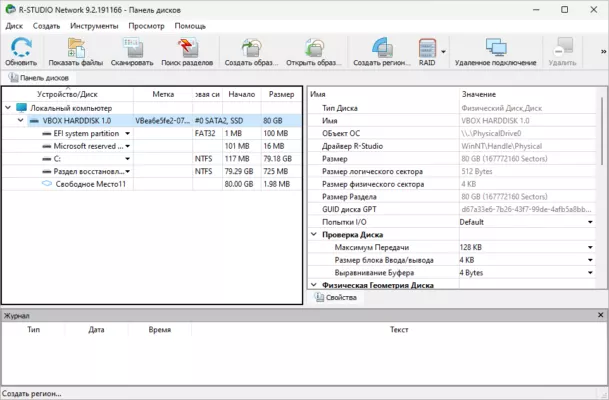
The interface may look technical at first glance, but it’s logically structured:
- Drive tree on the left for quick navigation
- Preview pane to verify file content before recovery
- Recovery wizard for guided workflows
- Advanced hex viewer for manual analysis
Version 9.5 introduces a cleaner dashboard and faster preview rendering—especially for photos and documents.
🌐 Network & Remote Recovery
One of R-Studio’s standout capabilities is remote data recovery. Install the lightweight R-Studio Agent on a target machine, and control recovery operations from your workstation over LAN or internet—perfect for servers or inaccessible systems.
📥 Official Download & Licensing
R-Studio 9.5 is available in Free, Technician, and Enterprise editions, with scalable licensing for teams. The free version allows scanning and previewing files (ideal for testing), while paid versions unlock full recovery features.
🔗 Official Website: https://www.r-studio.com
🔚 Final Thoughts
In a world where data is irreplaceable, R-Studio 9.5 offers unmatched depth, reliability, and flexibility. Whether you’re recovering family photos or reconstructing a failed RAID 6 array, it delivers professional results with enterprise-grade precision.
Don’t wait until it’s too late—add R-Studio to your digital toolkit today.
✔ Tested: This software was tested on Windows 10 & Windows 11 and works smoothly without issues.
Frequently Asked Questions
- Is this software free?
Yes, it can be downloaded and used for free. - Does it support Windows 11?
Yes, it works perfectly on Windows 10 and 11. - Is it safe to use?
Yes, the software was scanned and tested before publishing.
Last updated: January 2026