
ViewCompanion Premium 16.20.0.0110: The Professional CAD Drawing Solution for Viewers & Printers 🖥️🔧
Working with CAD drawings in formats like DWF, DWG, DXF, or PDF? Need to view, print, or convert these files without the full, expensive CAD software? ViewCompanion Premium 16.20.0.0110 is a professional-grade application designed specifically for engineers, architects, contractors, and anyone who regularly handles technical drawings.
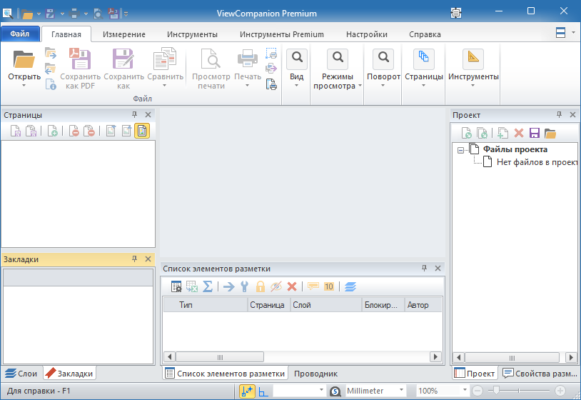
With support for a wide range of formats and powerful output options, ViewCompanion Premium bridges the gap between complex CAD files and simple, accessible viewing or printing.
🎯 Why Use ViewCompanion Premium?
- ✅ View multiple CAD formats (DWF, DWG, DXF, RVT, PDF, etc.)
- ✅ High-fidelity rendering of complex drawings
- ✅ Print to scale with precise output controls
- ✅ Convert drawings to PDF, TIFF, PNG, and other formats
- ✅ No CAD software required – lightweight and standalone
- ✅ Batch processing for handling multiple files efficiently
Perfect for reviewing blueprints, printing technical documents, sharing drawings, or converting legacy formats.
✨ Key Features of Version 16.20.0.0110
📄 1. Comprehensive Format Support
- DWF (Design Web Format) – native support
- DWG & DXF (AutoCAD formats)
- PDF (including PDF/A)
- Image formats (TIFF, PNG, JPG, BMP)
- Revit (RVT) – for architectural drawings
🖨️ 2. Precision Printing & Plotting
- Print to scale – essential for construction and engineering
- Tile large drawings across multiple sheets
- Custom paper sizes and orientation
- Print multiple sheets in one job
🔄 3. Advanced Conversion Tools
- Batch convert multiple drawings to a new format
- Set output resolution (DPI) for images
- Maintain layers and object properties (where supported)
- Compress output files for easy sharing
🔍 4. Powerful Viewing Tools
- Zoom, pan, and rotate drawings with ease
- Measure distances and areas directly on the drawing
- Search for text within the drawing
- View layer contents and toggle visibility
🛠️ 5. Professional Output Options
- Export to PDF with bookmarks and hyperlinks
- Create high-resolution images for presentations
- Generate print-ready files (PostScript, HPGL)
- Email drawings directly from the application
🛠️ Ideal For:
- Architects & Engineers: Review project drawings without CAD software
- Contractors: Print scaled plans for construction sites
- Project Managers: Share drawings with clients or teams
- Draftspersons: Convert legacy formats for compatibility
- Anyone: Needing reliable CAD file viewing and printing
💡 Tip: Use the batch conversion feature to quickly convert entire sets of drawings to PDF for sharing.
🆚 ViewCompanion vs. Full CAD Software
ViewCompanion Premium is the ideal solution for viewing, printing, and converting, without the complexity or cost of editing tools.
💡 Final Thoughts: View, Print, Share – Effortlessly
ViewCompanion Premium 16.20.0.0110 simplifies the handling of technical drawings, making them accessible, printable, and shareable without needing expensive CAD software. It’s a must-have tool for anyone who regularly works with engineering or architectural documents.
📐 View. Print. Convert. Collaborate.
🌐 Official website: https://www.softwareunplugged.com (Note: Verify exact product page for ViewCompanion Premium)
💻 Compatible with Windows (32-bit & 64-bit)
✔ Tested: This software was tested on Windows 10 & Windows 11 and works smoothly without issues.
Frequently Asked Questions
- Is this software free?
Yes, it can be downloaded and used for free. - Does it support Windows 11?
Yes, it works perfectly on Windows 10 and 11. - Is it safe to use?
Yes, the software was scanned and tested before publishing.
Last updated: January 2026