
OpenGL Extensions Viewer 7.4.0: The Ultimate Tool to Analyze Your Graphics Hardware 🖥️📊
Whether you’re a developer, gamer, or tech enthusiast, knowing your GPU’s true capabilities is essential. OpenGL Extensions Viewer 7.4.0 by Realtech VR is a lightweight, powerful utility that reveals detailed information about your graphics card, OpenGL version, supported extensions, and driver status—all in a clean, user-friendly interface.
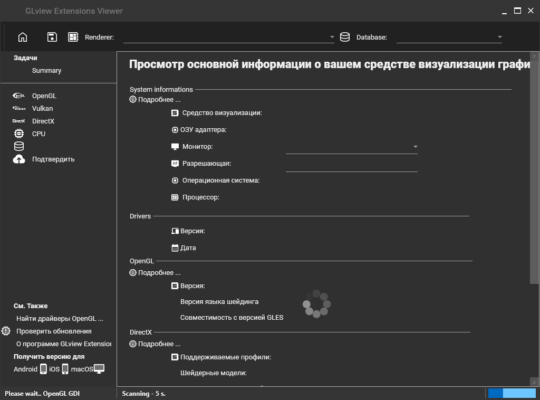
No more guesswork. Just clear, accurate insights to optimize performance, troubleshoot issues, or verify compatibility.
🔍 What Is OpenGL Extensions Viewer?
OpenGL Extensions Viewer is a free system diagnostic tool that scans your PC and displays:
- Installed GPU model (NVIDIA, AMD, Intel, etc.)
- Current OpenGL version supported
- Full list of OpenGL extensions (like GL_ARB, GL_EXT, etc.)
- Driver version and release date
- Render capabilities, texture limits, and memory info
It’s widely used by developers to test cross-platform graphics compatibility and by gamers to confirm if their system meets a game’s OpenGL requirements.
✨ Key Features of Version 7.4.0
🖼️ 1. Real-Time GPU & Driver Detection
Instantly identifies your graphics hardware and checks for outdated or missing drivers—critical for stable OpenGL performance.
📋 2. Comprehensive Extension List
View hundreds of supported OpenGL extensions with descriptions. Filter by vendor (e.g., NVIDIA-specific vs. Khronos-standard) for precise debugging.
📊 3. Detailed Render & Performance Metrics
See:
- Max texture size
- Number of texture units
- Vertex/fragment shader support
- Framebuffer object (FBO) capabilities
Perfect for OpenGL developers building shaders or 3D engines.
🌐 4. Benchmark & Render Test
Run built-in OpenGL render tests to verify stability and performance. Includes visual demos that stress-test your GPU using real-time effects.
💾 5. Export & Report Generation
Save your system report as HTML, XML, or text—ideal for sharing with support teams or documenting development environments.
🛠️ Who Should Use OpenGL Extensions Viewer?
- Game Developers: Verify OpenGL compatibility across devices
- 3D Artists & Engineers: Ensure software (Blender, CAD tools) runs smoothly
- Gamers: Check if your GPU supports a game’s required OpenGL version
- IT & Support Teams: Diagnose graphics-related crashes or rendering bugs
💡 Did You Know? Many older games (e.g., Minecraft with shaders, Doom 3) require specific OpenGL extensions. This tool tells you instantly if your system qualifies.
🆚 Why Choose Version 7.4.0?
The latest update (7.4.0) includes:
- Improved support for modern GPUs (RTX 40-series, RX 7000, Intel Arc)
- Enhanced detection of Vulkan and DirectX info (side-by-side comparison)
- Cleaner UI with dark mode support
- Faster scan times and better Windows 11 compatibility
Unlike generic system info tools (like CPU-Z), OpenGL Extensions Viewer focuses exclusively on graphics rendering capabilities—making it the gold standard for OpenGL diagnostics.
💡 Final Thoughts: Know Your GPU Inside Out
OpenGL Extensions Viewer 7.4.0 is more than a diagnostic tool—it’s a window into your graphics pipeline. Whether you’re debugging a rendering issue, optimizing a game, or just curious about your hardware, it delivers accurate, actionable insights in seconds.
✅ Free
✅ Lightweight (under 10 MB)
✅ No installation required (portable version available)
🔍 Download it today—and unlock the full potential of your GPU.
ℹ️ Always get the latest version from the official Realtech VR website to ensure security and feature completeness.
✔ Tested: This software was tested on Windows 10 & Windows 11 and works smoothly without issues.
Frequently Asked Questions
- Is this software free?
Yes, it can be downloaded and used for free. - Does it support Windows 11?
Yes, it works perfectly on Windows 10 and 11. - Is it safe to use?
Yes, the software was scanned and tested before publishing.
Last updated: January 2026