Freemake Video Converter 5.0.0.18: Convert, Extract & Create with Ease 🖥️✨
Looking for a free, user-friendly video converter that handles virtually every format without the complexity? Freemake Video Converter 5.0.0.18 is a popular Windows application that allows you to convert videos, extract audio, burn DVDs, and even create photo slideshows—all in one integrated tool.
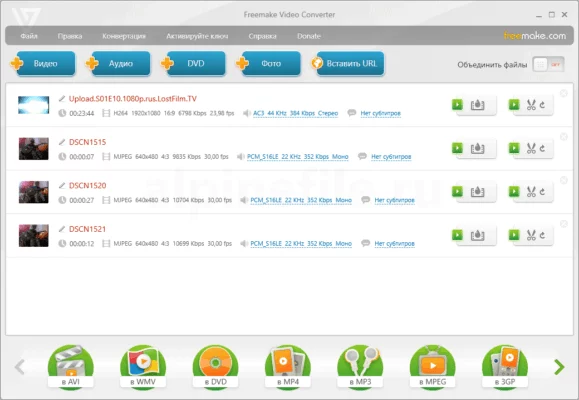
Whether you’re preparing files for your smartphone, extracting music from videos, or converting old clips for modern devices, Freemake delivers broad compatibility and straightforward operation.
🎯 Why Use Freemake Video Converter?
- ✅ Free to use – no watermarks or hidden fees
- ✅ Supports 500+ formats – almost any file you encounter
- ✅ Simple drag-and-drop interface – no technical skills needed
- ✅ Built-in editing tools – trim, crop, add effects
- ✅ Direct upload to YouTube – share converted videos easily
- ✅ DVD burning capability – create physical discs
Perfect for home users, students, and anyone needing a versatile, free converter.
✨ Key Features of Version 5.0.0.18
🎞️ 1. Extensive Format Support
- Convert to/from MP4, AVI, MKV, WMV, FLV, 3GP, MPG, and more
- HD and 4K video support
- Mobile-optimized presets (iPhone, Android, PSP, etc.)
🎵 2. Audio Extraction
- Extract audio from video files (MP3, AAC, etc.)
- Preserve original quality or choose custom bitrate
- Batch processing for multiple files
📽️ 3. DVD Creation & Burning
- Burn videos to DVD with custom menus
- Create backup discs from video files
- Support for DVD-R, DVD+R, and dual-layer discs
🖼️ 4. Photo Slideshow Maker
- Create slideshows from image collections
- Add music, transitions, and effects
- Export as video files or burn to DVD
✂️ 5. Basic Video Editing
- Trim and cut video clips
- Crop and rotate footage
- Apply effects (grayscale, sepia, etc.)
- Adjust brightness, contrast, saturation
📤 6. Easy Sharing
- Upload directly to YouTube from the app
- Copy to devices (iPhone, Android, PSP)
- Email converted files (if small enough)
🛠️ Ideal For:
- Home Users: Convert videos for TV or mobile devices
- Students: Extract audio for study materials
- Content Creators: Prepare files for editing software
- Anyone: Needing a reliable, free video conversion tool
💡 Tip: Use the device presets to quickly convert videos optimized for your specific smartphone or tablet.
🆚 Freemake vs. Other Free Converters
Freemake offers the broadest range of features in a user-friendly package.
⚠️ Important Notes
- Freemake may include optional bundled software during installation – choose “Custom” to avoid it
- The free version may prompt for premium upgrades
- Compatible with Windows 10 & 11 (32-bit & 64-bit)
💡 Final Thoughts: Convert Virtually Anything
Freemake Video Converter 5.0.0.18 stands out as a versatile, free solution for common video conversion tasks. While it may not offer the advanced features of professional software, it excels at making video conversion accessible and straightforward for everyday users.
🎥 Convert. Extract. Share. Easily.
🌐 Official website: https://www.freemake.com (Note: Verify exact product page for Video Converter)
💻 Compatible with Windows 10 & 11 (32-bit & 64-bit)
✔ Tested: This software was tested on Windows 10 & Windows 11 and works smoothly without issues.
Frequently Asked Questions
- Is this software free?
Yes, it can be downloaded and used for free. - Does it support Windows 11?
Yes, it works perfectly on Windows 10 and 11. - Is it safe to use?
Yes, the software was scanned and tested before publishing.
Last updated: January 2026