SuperRam 7.10.21: Enhance Your PC’s Memory Performance Instantly 💻🚀
Is your computer running low on memory? Are applications slowing down or crashing due to insufficient RAM? SuperRam 7.10.21 is a powerful Windows application designed to optimize your system’s memory usage, free up RAM, and boost overall performance—making your computer run smoother and faster.
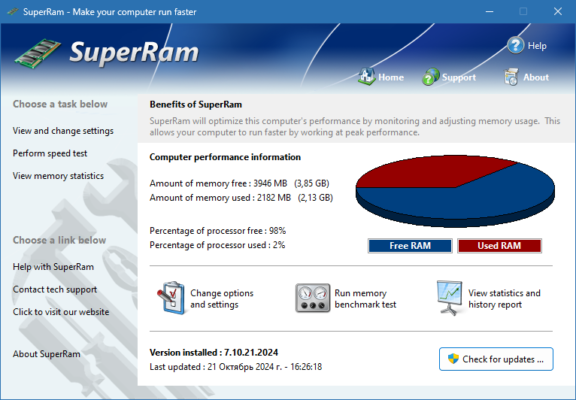
Developed by PGWARE, SuperRam focuses on efficiently managing your PC’s memory to ensure smooth operation, especially when running memory-intensive applications.
🎯 Why Use SuperRam?
- ✅ Automatic Memory Optimization: Frees up RAM by moving data to the page file
- ✅ Real-time Monitoring: Keeps an eye on memory usage and adjusts accordingly
- ✅ Lightweight & Fast: Minimal system resource usage
- ✅ Easy to Use: Simple interface for all skill levels
- ✅ Free & Reliable: No hidden costs or bloatware
Perfect for home users, gamers, and professionals who want to maximize their PC’s memory efficiency.
✨ Key Features of Version 7.10.21
🧠 1. Automatic Memory Management
- Frees up RAM by moving unused memory pages to the page file
- Prevents memory leaks from misbehaving applications
- Keeps frequently used programs in RAM for faster access
📊 2. Real-Time Memory Monitoring
- Displays current RAM usage in real time
- Alerts you when memory usage reaches critical levels
- Shows memory usage by process for detailed insights
⚙️ 3. Customizable Settings
- Schedule automatic optimization (e.g., every 10 minutes)
- Set memory thresholds to trigger optimization
- Configure boost intensity for different usage scenarios
🚫 4. System Stability
- Safe operation – no harmful modifications to system files
- Preserves running applications while optimizing memory
- Minimizes performance impact during boosting
🎨 5. User-Friendly Interface
- Clean, intuitive design
- One-click optimization for instant results
- Detailed statistics and logs for advanced users
🛠️ How to Boost Your RAM in 3 Steps
- 📥 Launch: Open SuperRam and let it monitor your system.
- ⚙️ Configure: Set your preferred optimization schedule and thresholds.
- ⚡ Boost: Let the tool automatically free up RAM and enhance performance.
💡 Tip: Enable automatic optimization to keep your RAM clean throughout the day.
🆚 SuperRam vs. Manual Memory Management
SuperRam provides the best balance of automation and efficiency for memory optimization.
⚠️ Important Notes
- RAM boosters don’t increase physical RAM—they optimize its usage
- Modern Windows systems manage memory well; use only if you experience genuine slowdowns
- Download only from official PGWARE sources to avoid malware
💡 Final Thoughts: Optimize Your Memory, Enhance Your Experience
SuperRam 7.10.21 helps you maximize the efficiency of your existing RAM, ensuring your system runs smoother and faster. While it won’t replace the need for more RAM, it can significantly improve performance on systems with limited memory.
🧠 Boost your RAM. Enhance your PC. Enjoy seamless performance.
🌐 Official website: https://www.pgware.com (Note: Verify exact product page for SuperRam 7.10.21)
💻 Compatible with Windows 10 & 11 (64-bit)
✔ Tested: This software was tested on Windows 10 & Windows 11 and works smoothly without issues.
Frequently Asked Questions
- Is this software free?
Yes, it can be downloaded and used for free. - Does it support Windows 11?
Yes, it works perfectly on Windows 10 and 11. - Is it safe to use?
Yes, the software was scanned and tested before publishing.
Last updated: January 2026