⚙️ Overview of HiBit Startup Manager 2.6.60
HiBit Startup Manager 2.6.60 is a lightweight yet powerful utility that gives you full control over your Windows startup programs and services. It helps you improve system boot time by allowing you to manage, delay, or disable applications that automatically start with Windows.
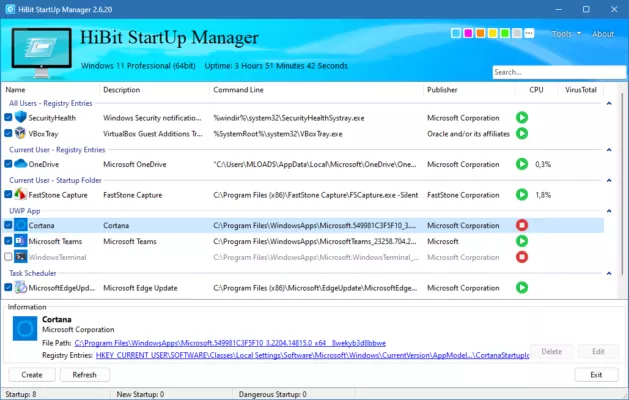
Over time, as more software installs startup entries, your computer can slow down noticeably. HiBit Startup Manager solves this problem with a clean interface and smart optimization tools designed for both beginners and advanced users.
🚀 Key Features of HiBit Startup Manager
⚡ Startup Program Management
View all applications that launch at system startup, including hidden ones. You can enable, disable, or permanently remove entries to make Windows boot faster.
🕐 Startup Delay Function
Instead of disabling important apps, you can delay their launch to reduce system load during boot. This ensures faster startup while keeping your preferred apps available afterward.
🧩 Full Control Over Scheduled Tasks and Services
HiBit Startup Manager provides access to Windows scheduled tasks, context menu entries, and services, letting you manage every background process from one dashboard.
🧠 System Performance Insights
The built-in performance monitor displays CPU and memory usage, allowing you to identify resource-hungry apps and optimize them for better system stability.
🔒 Safe and Portable
HiBit Startup Manager is safe, free of bloatware, and portable—no installation required. It works smoothly on both old and modern Windows versions without affecting system files.
🧰 What’s New in Version 2.6.60
The latest release introduces several enhancements focused on speed, compatibility, and accuracy:
Improved scanning engine for startup entries.
Better detection of hidden autostart services.
Enhanced user interface with modern design.
Fixed bugs related to Windows 11 compatibility.
Optimized memory usage during background operations.
These updates ensure HiBit Startup Manager 2.6.60 remains one of the fastest and most reliable startup management tools available.
💡 Why Use HiBit Startup Manager
🖥️ Optimize Boot Time Effortlessly
Unlike manual startup tweaks, HiBit automates the process, showing you exactly what affects your PC boot time and allowing you to fix it instantly.
🧹 Cleaner, Faster, and More Stable System
By disabling unnecessary background apps, your computer gains more RAM and CPU power for tasks that really matter — gaming, video editing, or browsing.
🧩 Ideal for All Users
From home users to IT professionals, HiBit Startup Manager’s detailed insights make it a trusted tool for optimizing Windows performance without risk.
🔧 System Requirements
Operating System: Windows 7 / 8 / 10 / 11 (32-bit & 64-bit)
Processor: 1 GHz or faster
RAM: 512 MB minimum (1 GB recommended)
Storage: 50 MB free space
🏁 Conclusion
HiBit Startup Manager 2.6.60 is the perfect solution for users who want to take back control of their Windows startup and speed up boot times. With its clean interface, advanced management options, and minimal resource usage, it’s an essential optimization tool for every PC.
Whether you’re a casual user or a system admin, HiBit Startup Manager helps keep your computer fast, efficient, and clutter-free.
✔ Tested: This software was tested on Windows 10 & Windows 11 and works smoothly without issues.
Frequently Asked Questions
- Is this software free?
Yes, it can be downloaded and used for free. - Does it support Windows 11?
Yes, it works perfectly on Windows 10 and 11. - Is it safe to use?
Yes, the software was scanned and tested before publishing.
Last updated: January 2026