
Running out of storage space is a common problem for both casual users and IT professionals. Identifying what takes up your disk can be challenging without the right tools. SpaceSniffer 2.0.3.1.12 provides a powerful yet lightweight solution by visually displaying disk usage in a treemap layout. This makes it easier than ever to locate large files, manage your storage, and keep your system running smoothly.
What is SpaceSniffer?
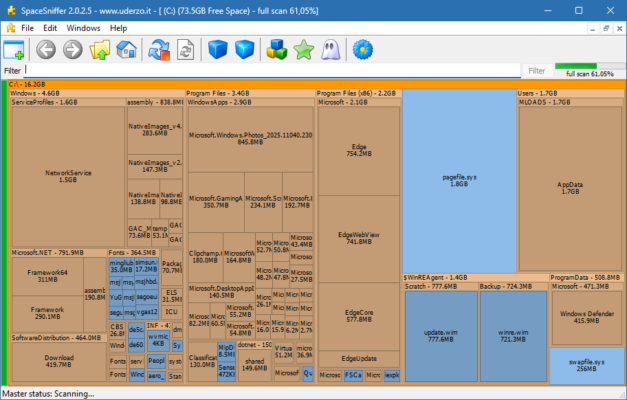
SpaceSniffer is a free disk space analyzer for Windows that uses a treemap visualization technique to represent files and folders. Each rectangle on the screen corresponds to a file or folder, and its size reflects how much disk space it consumes.
This approach makes it simple to see exactly which files are taking up the most space, helping you make informed decisions about what to delete or move.
Key Features of SpaceSniffer 2.0.3.1.12
1. Treemap Visualization
SpaceSniffer uses an intuitive graphical representation of files and folders, making it easy to spot space hogs at a glance.
2. Real-Time File System Updates
The program updates in real time, so if you delete, move, or copy files, the changes are immediately reflected in the visualization.
3. Filter and Search Options
Quickly locate files by using powerful filtering options. You can search by file type, size, date, or custom rules.
4. Portable and Lightweight
SpaceSniffer is portable and does not require installation, making it a convenient tool for IT administrators and regular users alike.
5. User-Friendly Interface
The drag-and-zoom functionality lets you easily explore your storage and drill down into folders without complicated navigation.
6. Compatibility
Supports all modern versions of Windows, from Windows 7 to Windows 11, with minimal system requirements.
What’s New in Version 2.0.3.1.12?
The latest release brings improvements for better stability and usability:
Enhanced support for Windows 10 and 11.
Optimized treemap rendering for faster analysis.
Improved filtering and search performance.
Minor bug fixes and UI enhancements.
System Requirements
Minimum:
OS: Windows 7/8/10/11
CPU: 1 GHz or faster
RAM: 1 GB
Disk Space: 10 MB free space
Recommended:
OS: Windows 10/11
CPU: Dual-core or better
RAM: 2 GB+ for large disks
Disk Space: 20 MB free space
Why Choose SpaceSniffer?
While there are several disk analysis tools available, SpaceSniffer stands out due to its:
Free and portable design (no installation required).
Intuitive treemap visualization.
Real-time updates and fast performance.
Easy filtering and file discovery features.
This makes it especially useful for system administrators, IT technicians, and advanced users who manage large storage systems.
Conclusion
SpaceSniffer 2.0.3.1.12 is one of the most effective tools for understanding and managing disk space on Windows systems. Its visual treemap interface, lightweight design, and advanced filtering capabilities make it an indispensable utility for anyone looking to clean up their hard drive and free valuable space.
If you’re looking for a free, portable, and easy-to-use disk space analyzer, SpaceSniffer is one of the best tools available today.
✔ Tested: This software was tested on Windows 10 & Windows 11 and works smoothly without issues.
Frequently Asked Questions
- Is this software free?
Yes, it can be downloaded and used for free. - Does it support Windows 11?
Yes, it works perfectly on Windows 10 and 11. - Is it safe to use?
Yes, the software was scanned and tested before publishing.
Last updated: January 2026