Every Windows user relies heavily on the right-click context menu for quick access to essential actions. However, the default options are often limited, cluttered, or not aligned with personal workflow needs.
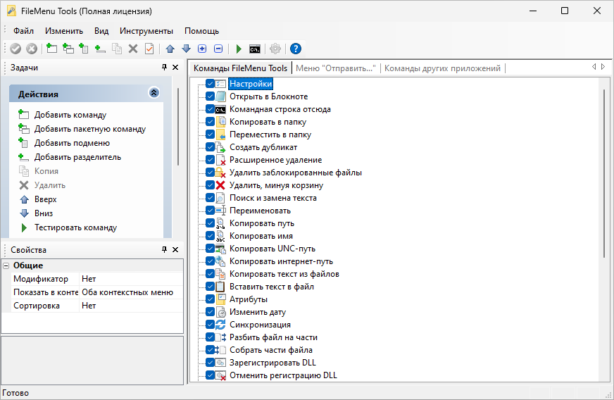
FileMenu Tools 8.5.0 is a powerful utility that allows you to fully customize and manage the Windows context menu. Whether you want to add new commands, remove unnecessary ones, or organize options for better efficiency, this tool provides complete control.
What is FileMenu Tools?
FileMenu Tools is a lightweight Windows utility designed to enhance the right-click context menu experience. It allows users to:
Add new commands to the menu.
Create submenus for better organization.
Integrate third-party applications.
Remove clutter and unused options.
This makes it ideal for power users, IT professionals, and anyone who wants a cleaner, faster, and more productive workflow on Windows.
Key Features of FileMenu Tools 8.5.0
1. Context Menu Customization
Add commands for copy, move, delete, or open with.
Create custom actions to launch apps, scripts, or batch files.
2. File and Folder Utilities
Advanced file renaming tools.
Synchronize folders and split/join large files.
Secure delete for sensitive data.
3. Submenu Organization
Group similar commands under folders.
Keep the right-click menu clean and easy to navigate.
4. Compatibility and Integration
Works seamlessly with Windows Explorer and File Explorer.
Supports Windows 10 and Windows 11.
5. Lightweight and Portable
Low memory consumption.
Option to use as a portable version without installation.
What’s New in Version 8.5.0?
Improved Performance – Faster loading of context menus.
Bug Fixes – Enhanced stability and smoother integration with Windows Explorer.
Updated Interface – More intuitive layout for managing commands.
Expanded Compatibility – Better support for the latest Windows 11 updates.
Benefits of Using FileMenu Tools 8.5.0
For Professionals
Customize context menus for specific workflows.
Save time with quick access to scripts, apps, and tools.
For Developers & IT Admins
Add debugging tools directly into the right-click menu.
Run maintenance scripts with a single click.
For Everyday Users
Clean up cluttered context menus.
Simplify daily tasks like renaming, compressing, or copying files.
How to Use FileMenu Tools 8.5.0
Step 1: Installation
Download and install the program or use the portable version.
Step 2: Open the Interface
Launch FileMenu Tools and view all current context menu options.
Step 3: Customize Commands
Add new commands or remove unnecessary ones.
Organize options into submenus for better clarity.
Step 4: Save and Apply
Apply changes, and your customized right-click menu will be instantly available in Windows Explorer.
Why Choose FileMenu Tools Over Default Context Menu?
The standard Windows context menu is functional but limited. With FileMenu Tools 8.5.0, you get:
Full customization to match your workflow.
Cleaner interface with organized submenus.
Advanced utilities like secure delete and file splitting.
Portability, making it easy to use across multiple PCs.
This makes it one of the most versatile right-click customization tools available.
Conclusion
FileMenu Tools 8.5.0 transforms the way you use the Windows context menu. By allowing full customization, advanced file utilities, and submenu organization, it ensures a cleaner and more efficient workflow.
Whether you are a professional, IT expert, or casual user, FileMenu Tools provides the flexibility and control needed to optimize your Windows experience.
If you want to boost productivity and declutter your right-click menu, downloading FileMenu Tools 8.5.0 is a smart choice.
✔ Tested: This software was tested on Windows 10 & Windows 11 and works smoothly without issues.
Frequently Asked Questions
- Is this software free?
Yes, it can be downloaded and used for free. - Does it support Windows 11?
Yes, it works perfectly on Windows 10 and 11. - Is it safe to use?
Yes, the software was scanned and tested before publishing.
Last updated: January 2026