
In today’s digital world, Windows computers are frequent targets for cyber threats, malware, and ransomware. While antivirus programs provide essential protection, they are often not enough on their own. Hardentools 2.6 is a lightweight, open-source security utility that disables unnecessary Windows features often exploited by hackers. With one click, users can harden their system and reduce their exposure to attacks.
🚀 Why Use Hardentools 2.6?
1. Disable Risky Features
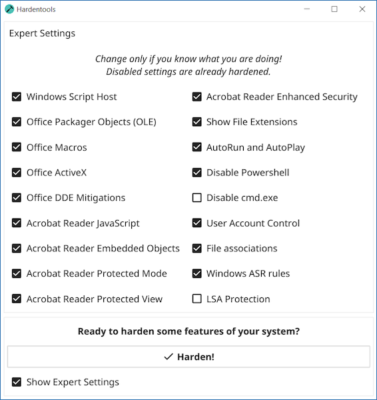
Hardentools automatically disables scripting engines, macros, and other Windows functionalities that malware frequently abuses.
2. Enhanced Privacy Protection
The software reduces data leaks by shutting down telemetry and services that compromise privacy.
3. Lightweight & Easy to Use
With a simple interface and one-click hardening, it doesn’t require advanced technical skills.
4. Open-Source & Safe
Being open-source, Hardentools is transparent, trusted, and free from hidden risks.
🔑 Key Features of Hardentools 2.6
🛡 System Hardening – disables risky Windows features such as Windows Script Host, PowerShell, and Office macros.
🔒 Privacy Improvements – prevents background data collection and telemetry services.
🚫 Malware Defense – blocks common infection vectors exploited by ransomware and viruses.
⚡ Lightweight Performance – runs without consuming system resources.
🔧 One-Click Enable/Disable – easily apply or reverse changes when needed.
📂 No Installation Needed – portable software, just run and secure your PC.
📌 What’s New in Version 2.6?
Updated security rules for better protection.
Improved compatibility with Windows 10 and Windows 11.
Enhanced system stability after applying hardening.
Minor bug fixes and optimizations.
💻 Software Information
Name: Hardentools
Version: 2.6
Size: ~4 MB
Developer: Security Without Borders
System: Windows 7/8/10/11
License: Free / Open-Source
🛠 How to Use Hardentools 2.6
Download and run the program (no installation required).
Click “Harden” to disable risky Windows features.
Restart your computer to apply changes.
If needed, click “Restore” to revert settings.
👨💻 Who Should Use Hardentools?
Casual Users 🖥️ – to reduce risks without technical complexity.
Business Professionals 💼 – to protect sensitive company data.
IT Administrators 🔧 – for securing multiple systems efficiently.
Privacy Enthusiasts 🔐 – who want stronger control over Windows.
✅ Final Verdict
Hardentools 2.6 is not a replacement for antivirus but an essential layer of defense that reduces your system’s attack surface. By disabling features that are rarely needed but frequently exploited, it gives you greater protection and privacy without slowing down your PC. For anyone serious about securing Windows, this tool is a must-have addition.
✔ Tested: This software was tested on Windows 10 & Windows 11 and works smoothly without issues.
Frequently Asked Questions
- Is this software free?
Yes, it can be downloaded and used for free. - Does it support Windows 11?
Yes, it works perfectly on Windows 10 and 11. - Is it safe to use?
Yes, the software was scanned and tested before publishing.
Last updated: January 2026